Notes: Bash

My notes about life, work and other fascinating things around me.

Shown: 0 · Page

Finding Long Queries with Python
18 Jule 2021 ·

I’ve published a Python script for finding long-running queries in the 1C technological log. I wrote it in a fit of despair: I couldn’t understand why my trusty Bash script reported an average execution time higher than the maximum for one query.

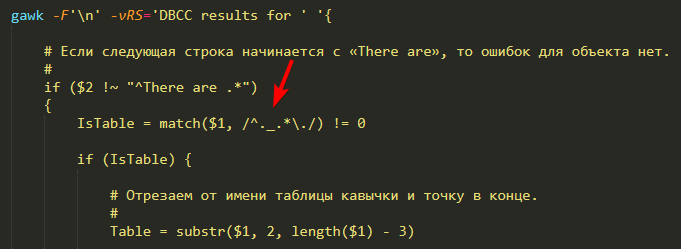
The problem turned out to be gawk. With some log events, it couldn’t work out the duration: it tried to convert a string to a number, failed, and… Oh, no! Of course it didn’t throw an exception! It simply treated those strings as zero and calmly carried on.

The fix was even sillier than the problem: I simply added an explicit string-to-number conversion, and everything worked. How the hell is an explicit conversion different from an implicit one in gawk-land? And, more importantly, why?

Well, that was a circus. At least I got a new script out of it, and it goes easier on memory and CPU too. In the Bash version, I used three collections to calculate execution count, total execution time, and maximum execution time, each keyed by query text and context. All three had to be updated and kept in memory.

That works until you get into hundreds of thousands of entries. Then the collections start eating gigabytes of RAM, and searching them burns through CPU time. The new script is more straightforward: one collection stores all the data for each query.

Why Not Bash?
3 Jule 2021 ·

In my previous note, I discussed tasks where Bash is the perfect tool: minimal constraints and simple requirements. I also mentioned that sometimes it can’t cope at all.

Here’s one I actually ran into. Suppose we have around seventy gigabytes of 1C technological logs and need to rank exception descriptions from most to least frequent.

Easy, right? Extract EXCP, get Descr, count repetitions. I’d even written the necessary script before. I run it and patiently wait…

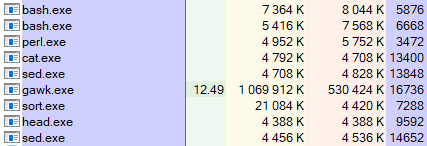
Know how long it took? Neither do I: after a day, I stopped it and investigated. Something was getting stuck inside gawk: it was hammering the CPU, with cat occasionally chipping in to read more data.

Processes

Well, crap. I thought about it and rewrote the script in Python. The new version finished in fifteen minutes and gave me:

  1. A ranking of exception descriptions;
  2. A script I can read six months later without Google;
  3. Confidence that I can add two or three conditions without accidentally summoning Satan through a combination of operators and flags.

Of course, I could have optimized the Bash version. The array lookups are probably what’s slow: the more descriptions you’ve collected, the longer each search takes, growing linearly with the array size. I could change the collection approach, using gawk only to extract descriptions and passing the results to sort and uniq.

But that starts to resemble the meme about a loaf of bread: you can build a trolleybus out of it, sure, but why? Come on, I just need to solve the problem. Python already did that with flying colors, saving me a lot of time and nerves.

That’s my point. We know Bash has its quirks, and often we can live with them. We know what it’s good at too. But sometimes the question becomes: is getting a solution specifically in Bash worth spending two hours wrestling with utilities, parameters, manuals, and Stack Overflow posts?

Tweet

That’s why not Bash.

UPDATE: A good post by Ivan Grishaev on the same subject.

Why Bash?
23 June 2021 ·

I occasionally see colleagues asking: is 1C still messing around with Bash? Why not Python? Or PowerShell, at least? Weirdos!

Yes, Bash isn’t native to Windows, which is native territory for 1C, and getting it onto Windows is a job in itself. Yes, as a task grows more complicated, script readability drops exponentially. Yes, Bash simply can’t handle some tasks.

But its main advantage is that, for many 1C technological log analysis tasks, it is the simplest and fastest solution. Like an old screwdriver your grandfather used: always at hand, scratched, nicked, and a little awkward, but still working perfectly.

An example? Suppose we need to extract exceptions from the log. Let’s keep it simple and say we only need the first line of each event. We get something like this in Python.

You’ll say it can easily be cut in half, or even to a third. After all, it’s just a one-off job. Why fuss about readability and predictability?

Agreed! But let’s first solve the same task in Bash:

grep -r --include "*.log" ',EXCP,' > result.txt

That’s why Bash.

An Updated Script for Finding Long Queries
26 April 2021 ·

I’ve updated the script for finding long queries in the platform’s technological log. The old version had a pretty big bug: it happily grouped DBMSSQL events by Sql and Content, but ignored cases where Sql was missing. That isn’t exactly normal for DBMSSQL, but it happens.

While I was at it, I tidied the code: added formatting and comments, and moved some gawk logic out of the main body into functions. Yes, the script now looks longer than it actually is, but it’s much easier to read.

Honestly, I don’t understand why Bash veterans cram all their logic into two or three lines. The language isn’t exactly a shining example of readability to begin with; Nikita Prokopov’s Telegram channel has an excellent piece about that. A page of pipelines without a single line break makes me want to quietly climb out of the window.

A Bunch of Scripts
24 April 2021 ·

I’ve put a few more scripts on GitHub that I wrote recently to dig through the platform’s technological log:

  • Frequent Events. Groups events by name, counts occurrences, and lists them in descending order, from most to least frequent. Not sure this one is much use in practice; I just wanted to note down which cluster process writes which events.
  • Exception Descriptions. Groups EXCP events by the Name field; for each name, it lists the Description values found in exceptions with that name. This script gives you a rough picture of which exceptions are real problems and which are just background noise you can ignore and, for example, filter out in Kibana.
  • Locks by Connection ID and Region. Useful for finding the culprit behind a managed lock timeout: it extracts all TLOCK events for a particular region and connection from the technological log, then puts them in chronological order.
Searching Files Recursively
14 January 2021 ·

Some time ago, I tried finding code vulnerabilities with Bash scripts. Sounds intimidating, but it’s just recursive text searching with regular expressions. I wrote the scripts, but as I realized today, I did it in a rather… ass-backwards way, ahem. All you need is egrep! Out of find, xargs, and egrep, we can throw away two of the three.

For example, today our configuration stopped building in the latest EDT release. We suspected broken GUIDs: references to metadata objects removed from the configuration. The platform doesn’t always clean these up after deleting the objects themselves. I’ve written about this a couple of times, for example here and here.

We decided to search the configuration export for GUIDs and check whether they all belonged where they were. All it takes is one command:

egrep -rn '.{8}-.{4}-.{4}-.{4}-.{12}' dump

The r flag enables recursive search; n adds not only the filename but also the line number to each match. The final parameter, dump, is the directory to search.

You could make the regex more precise, but this is plenty. False positives, GUIDs that aren’t broken references, are easy to filter through a pipe. For example, the following script excludes GUID-containing lines that include “uuid”:

egrep -rn '.{8}-.{4}-.{4}-.{4}-.{12}' dump | grep -v 'uuid'
Time for a Walk
2 November 2020 ·

How do you know when to take a break from work? Put it this way: if your script suddenly starts winking at you, it’s definitely time for some fresh air.

Hello!

Counting Exceptions in the Technological Log
24 October 2020 ·

Another script. It counts exceptions per minute and ranks the results, so you can quickly see when the applications were having a particularly bad time.

Along the way, two odd little problems threw me off. First, for some reason I was convinced that uniq -c groups lines regardless of where they occur in the data stream. Take this:

банан
банан
груша
банан

I thought that feeding this data to uniq -c would group identical lines, count repetitions, and produce something like this:

3 банан
1 груша

But what I actually got was:

2 банан
1 груша
1 банан

Turns out uniq expects repeated lines to sit next to each other. If a line differs from the previous one, it starts a new count for that line. To get the result I expected, you have to sort the data first, then pass it to uniq.

The second problem involved sed. I was trying to use it to remove everything from the data stream except hours and minutes; the attempt is on line 12 of the script. But some events stubbornly failed to match the regular expression despite looking exactly the same. I wasted a lot of time and got thoroughly annoyed before remembering BOM. Once I removed the markers, everything went smoothly.

Every technological log file uses a BOM, which you can confirm with this script, for example. Each log begins with special characters invisible to the naked eye, and these can prevent the first line from being processed because they don’t match the regular expression.

My takeaway is to strip BOMs out by default, rather than wonder every time whether they’ll cause trouble. Sometimes this will be unnecessary; a BOM doesn’t interfere with solving the task above using grep, for instance. But I don’t like surprises. Besides, a few processor cycles spent on a simple replacement are a much better deal than the equivalent in fried nerves and wasted time.

Queries and Lock Waits
19 October 2020 ·

I’ve put together two more technological log analysis scripts: the first ranks heavy MS SQL queries, and the second ranks long lock waits.

I pick out heavy queries by how long their DBMSSQL events lasted. The longer a query takes, the more likely it is to have eaten a lot of resources. That usually holds up, though you’d need a trace to diagnose it properly.

Lock waits are also measured by duration. The script also checks that the TLOCK event has something in WaitConnections. That tells us the platform really was waiting to get a lock, rather than just taking a while to set one.

An Updated Top Exceptions Script
17 October 2020 ·

I rewrote the Bash script that ranks exceptions in a collected technological log: I wanted a simpler way to do it.

Out went all the fiddling with replacing event beginnings with a gawk record separator: you can just give gawk a regex for that. I also moved more of the logic into gawk itself. It’s easier to follow, especially if I want to add to it later.

It’s clearly better than before, or at least the logic is easier to understand. Originally, though, I wanted to make the script smaller and get something like this:

grep -hoP ",EXCP,.*\KDescr=.*" */*.log | uniq -c | sort -rn

Filter only lines with EXCP events, cut everything before the error description, and group with uniq. Very elegant, I think.

Except EXCP descriptions can run over several lines. So sometimes we’d lose information we need to figure out what happened: everything after the first line break. I haven’t yet worked out how to solve that without tripling the script’s size :-)

Vulnerabilities in 1C Configurations
13 October 2020 ·

Last month, I attended an Infostart meetup about security in 1C-based solutions. I learned a lot! Among other things, Oleg Tymko talked about things we do in code that can leave a product vulnerable: hard-coded IP addresses, links, email addresses, passwords, that sort of thing.

Yesterday, I put together a simple Bash script that searches a configuration export for such issues. Essentially, it just runs regular expressions over the configuration. I didn’t put too much thought into it, just tried a couple of approaches for the fun of it.

My takeaway? If you’re going to keep developing this seriously, start with something like SonarQube. Brute-force approaches produce too many false positives; you need filters, exceptions, history, and supporting infrastructure.

For a quick look, though, this does the job: no infrastructure, no fussing with configuration or hardware. Export the configuration, kick Bash into action, and that’s it: results in a few seconds.

Top Exceptions in the Technological Log
16 February 2020 ·

I’ve published a Bash script on GitHub that identifies the most frequent exceptions in a collected 1C technological log.

It analyzes EXCP events. These are the main source of error information, though certainly not the only one: EXCPCNTX, for example, describes an event that had started but hadn’t finished when an error occurred. Also, if an exception occurs during a server call, the CALL event’s RetExcp field contains the error text returned to the client.

Most of the time, though, EXCP and the occasional EXCPCNTX will do. People often collect them by default: it doesn’t put any real load on the system and lets you run the logs through an analysis tool, such as the script above, to keep a finger on the pulse.

Finding Methods with a Parameter
18 November 2019 ·

The task: find methods in a configuration’s common modules that have a specific parameter, DecimalPlacesFor in this example.

A normal search through the configuration code produces many false positives, such as every reference to a parameter with that name inside method bodies. The platform doesn’t support regular expression searches yet, so the easy way is to export the configuration to files and run a Bash script on the common modules directory.

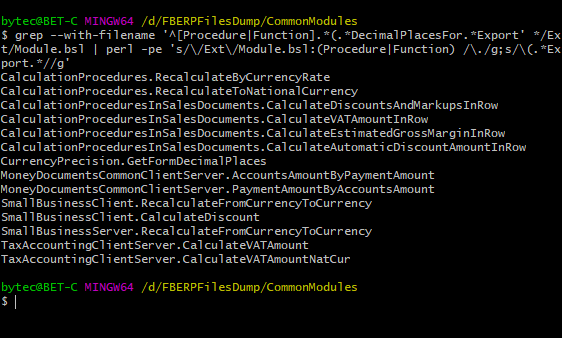
The bit before the pipe does the searching. The rest trims the output down to module names and the methods found in them. For example:

Console screenshot

Profit? Profit!