Notes: Obsidian

My notes about life, work and other fascinating things around me.

Shown: 0 · Page

Obsidian Property Organizer
9 August 2026 ·

One thing AI has genuinely made better for developers: tiny side projects actually get finished now.

I'm talking about all those little tools, MVPs, and random ideas that used to go straight into the "maybe someday" pile. You want to build them, sure, but spending three evenings on yet another tiny utility is a pretty hard sell.

Last week, for example, I vibe-coded an Obsidian plugin for keeping note properties tidy. The idea is simple: for each folder, you can define which properties notes are supposed to have and what order they should appear in. The plugin adds missing ones, removes unwanted ones, and puts everything back where it belongs — instead of preserving whatever mess I hastily threw together months ago and never bothered to fix.

There's a more detailed explanation in the GitHub repo if you're curious.

It's a tiny thing, obviously. Mostly just me feeding my inner perfectionist. But I do like things neat, and apparently I'm not alone: seventy people downloaded the plugin in its first three days.

Greetings, fellow people who derive unreasonable satisfaction from tidy metadata :)

Auto-Refresh for Timesheet
26 Jule 2026 ·

I spontaneously returned to my old Obsidian plugin, which takes the daily note for a given day and generates a list of tasks along with the time spent on each one.

The plugin had an original sin of a bug: whenever the note text changed, the plugin block would not refresh on its own. So you would add a task, change the time spent, or fix a description, while the report kept showing the old data. You had to either reopen the note itself or start editing the block and then cancel, just to trigger a manual render. It was annoying — and smelled suspiciously like reinventing the wheel.

Now the plugin block automatically re-renders after changes — just the block, not the entire note. There is also a short delay after typing and an additional check: if the report has not actually changed, no render happens at all.

I also wanted to update the dependencies while I was at it — it has been a year, after all — but... You know, NPM remains its usual shining example of order and discipline. Every tiny library for adding two numbers inevitably depends on ten others, every package is somehow a second cousin twice removed of the fence next door, and you cannot replace a single one without consequences: npm audit complains whenever someone sneezes. So, at first glance, I could not figure out how to update the dependencies reliably without breaking the plugin itself.

Oh well. That is a problem for tomorrow me.

Food Diary In Obsidian Bases
23 November 2025 ·

I've rebuilt last year’s plugin with Obsidian Bases — it now tracks calories, protein, fat, and carbs in your food.

The result is way more flexible and customizable than the plugin version: if you suddenly decide you want to count fiber as well or just shuffle some columns in the report, you don't have to rewrite, rebuild, or release anything. You just tweak it to your heart's content.

And it doesn't look half bad either:

UI

All the necessary settings and scripts live in the GitHub repo.

Day Switcher for Obsidian
17 August 2024 ·

When you're actively working in daily notes in Obsidian, you often want to quickly peek into the note from yesterday or, conversely, for tomorrow. For example, when sorting today's tasks and wanting to postpone some of them for tomorrow.

I'm too lazy to type the exact date every time, so I wrote a script for this. It takes the note's date from its title (expects it to be in ISO 8601 format) and generates a tooltip with links to yesterday's and tomorrow's notes. The day of the week is displayed in the header for additional convenience:

Example

The script is written for the Dataview plugin since I'm already using it for other tasks. In general, it can easily be adapted for Templater, CustomJS, or even turned into a standalone plugin (again, I'm too lazy to bother with that).

If you plan to use it:

  1. In the noteLink() function, specify the path to your daily notes folder (currently, the path contains a 'Days' folder for example; I mean the path is indicated in the Daily notes/Template file location setting);
  2. Include the script in your daily note template (Daily notes/Template file location setting).
Timesheet for Obsidian
12 May 2024 ·

I made another Obsidian plugin, this time for daily notes. Draws a nice report: what tasks I worked on, what I did, and how much time I spent. I tried to describe how it works in the repository; will be glad if it is useful to someone else!

Funny thing: for the examples in the README, I used issue numbers FBI-1, FBI-2, and so on. This isn't a reference to the X-Files or Twin Peaks — it's just the first thing that came to mind. The fact is that our internal project for the development of FirstBit ERP is called First Bit Internal, abbreviated as FBI. The main pool of tasks we work on lives in it.

We’re already used to it, but our colleagues outside the company always find our screenshots from JIRA or SonarQube amusing. Did you imagine that you were Agent Cooper? Well, I almost don’t even need to :)

Foodiary for Obsidian
14 April 2024 ·

Following my first plugin for Obsidian, I released the second one a couple of weeks ago. Counts calories, proteins, fats, and carbohydrates in food. It helps not to overeat out of nowhere — it’s rather difficult to judge by eye how much you’ve eaten today and whether you can afford that donut.

In short, a useful thing if you:

  1. Fatty (like me)
  2. Want to stop being fatty (like me)
  3. You take notes in Obsidian (like me) 🙂

In fact, there is a lot of software for this task. I tried some of them but was dissatisfied: it either has terrible design, is bugged, or is constantly trying to sell me a monthly subscription. In short, it's more annoying than helpful. I wanted something native, built into the usual routine; so, if routine settles in Obsidian, then the solution seems to suggest itself.

You can install the plugin directly from the program — the developers have already approved it. Otherwise, everything is simple: you write in a daily note what you ate and how much it weighed, and you receive a simple table sorted by calories with numbers by proteins, fats, and carbohydrates.

There are examples in the repository at the link above.

Fastimer's Look
9 Marth 2024 ·

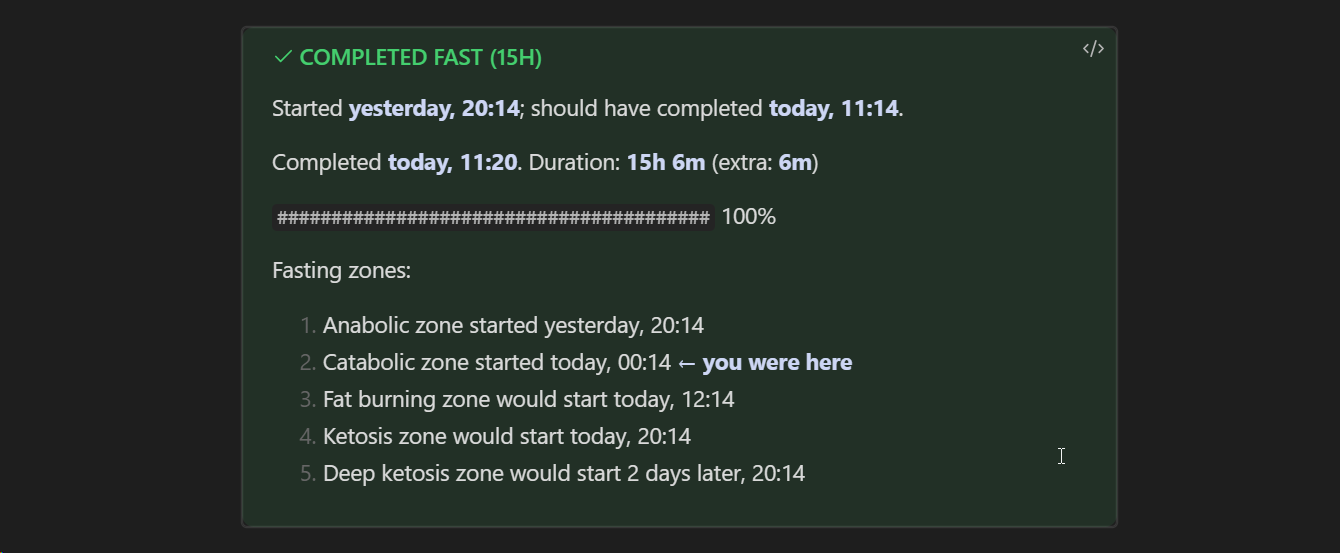
I just implemented Fastimer's rendering through callouts: this is an Obsidian mechanic that allows you to turn an ordinary quote into a designed block of text that attracts the reader's attention. You've probably seen blocks like “advice” and “pay attention” — these are callouts.

You can read more in Obsidian Help.

As a result, the timer now takes on a different color depending on the state: blue for an active fast, green for completed, and red for a failed one.

In addition, I made the text more compact and worked on styling:

Example

It turned out to be way nicer than the block of preformatted text as it was before.

Fastimer for Obsidian
13 February 2024 ·

The Obsidian developers recently approved one of my TypeScript pet plugins — Fastimer. It is an intermittent fasting tracker that adds a new code block to your vault: you enter the start date of the fasting interval and get the date of its finish, the time until this moment, and a list of the zones to be passed.

The block shows an up-to-date picture every time Obsidian renders it, which means you can monitor your progress in real time. When a fasting window ends, you can enter the end date, and the code block will show the result: whether you managed to achieve the goal, how much time you fasted beyond the plan, and so on.

I'm thinking of improving the visual part a bit (currently, everything is displayed as plain text without any design). In addition, I want to add functions for calculating statistics so that you can draw cute graphs like Charts and show achievements. I already made the same in implementing the same application in Python, but I’m unlikely to return to it — it’s easier to solve the task in the Obsidian vault than to roll out an additional utility.

In short, check out the plugin! :) You can find it by name (Fastimer) in the Obsidian library, or install it manually from the repository.