Notes: Optimization

My notes about life, work and other fascinating things around me.

Shown: 0 · Page

Desire Paths
29 November 2025 ·

Alright, Jean Fresco's riddle. You've got a table — say, ~50k rows. How do you end up reading half a billion?

Easy-peasy: Nested Loops + Clustered Index Seek:
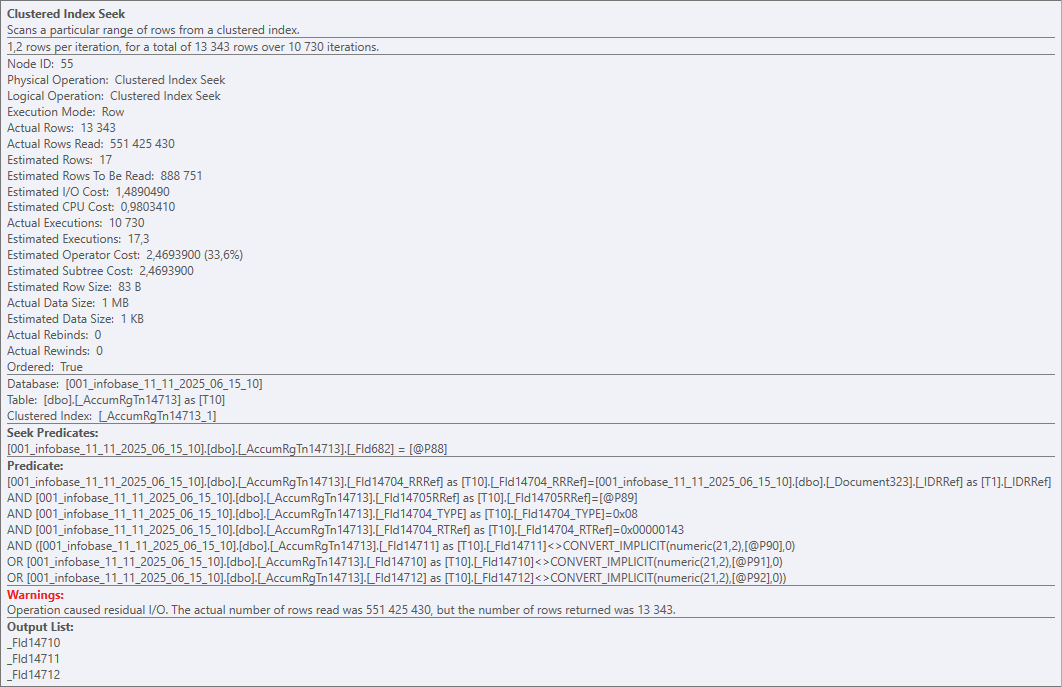
Half a billion

Clustered Index Seek is a bit of a marketing name here, of course. In reality, on every execution the operator walks the entire table (the whole clustered index) and checks every row against the predicates. And it does that 10 730 times for 51 391 rows. Result: 551 425 430 rows read, 13 343 returned.

Ouch

So yeah — a perfect textbook example of a horrible query plan in a vacuum. Put it in a museum. Nested Loops, if you've forgotten, works roughly like this:

For Each Table1Row In Table1 Do
    For Each Table2Row In Table2 Do
        ...

That's fine for small tables, but the DB can also pick it for bigger ones — for example, if it runs out of time to build a proper plan.

That's exactly what happened here. Zooming out to the platform level: we've got a dynamic list that queries a documents table, and the devs bolted on like a dozen virtual tables from accumulation registers.

Some of those registers were huge on their own, and the virtual tables poured gasoline on the fire (each one turns into 2+ nested queries). The DB honestly tried to come up with an efficient strategy, but at some point it basically decided: "a garbage plan is still better than no plan at all".

And the user? They tried to search a document by number — and the client app just straight-up froze.

So, about virtual tables in dynamic lists. There's a nice English phrase: "desire path" — the trail people naturally carve because it's the easiest way. Slapping a virtual table onto the main one really is often the simplest, fastest, most familiar way to solve the task. But it's not efficient.

There's an alternative, for example the OnGetDataAtServer() handler. It takes longer to implement, but it lets you properly tune the virtual table and avoid the scenario above. Scrolling the list will produce more queries, sure — but they'll be smaller, faster, and way more efficient than one single giant monster query.
One Query More, One Query Less
5 May 2024 ·

One query more, one query less — it doesn’t matter, people often say. Like, the main thing is that the query must be cheap: it doesn’t read too much, uses index, and so on.

This point of view makes sense, but mindlessly machine-gunning queries is a dangerous idea. Even if everything looks good at the moment, the system may change slightly in the future. And then a seemingly harmless patch will burn your production server to the ground right on Friday.

Let me tell you about one example from recent practice. There is an ERP that contains a table with payment stages for customer orders. One of these stages is prepayment; until it is received, you cannot create an order for the supplier.

Technically, the purchase order simply stores the customer's order ID; if the field is filled (that is, if the purchase order is created by the customer's order), ERP needs to read the payment stages of the customer's order and understand whether the purchase can be made.

It sounds elementary, but monitoring shows that the operation is slow as hell and eats up memory as if it were the last time.

Welp, let's go find out. We saw something like this:

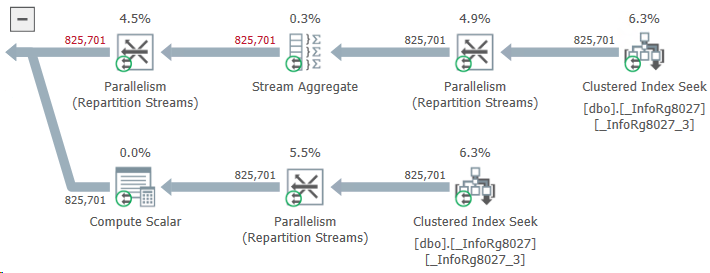
825701 records

What do we have here? Instead of taking two or three stages of payment for an order, ERP reads almost a million! How this could be possible?

It turned out that the problem was with those purchase orders that were not related to customer orders at all. The developer considered that the logic for them could not be changed: the customer’s order ID is empty and the query will not find payment stages for this ID. This means that the same result will be obtained as if there were no query at all. And an extra query — well... One query more, one query less... Not a big deal.

The deal turned out to be big. The table of payment stages contained data not only for customer orders, but also for other types of documents. Their customer order ID field was empty. As a result, ERP, when trying to find payment stages using an empty customer order ID, unexpectedly found them.

The query read about a gigabyte of data and wrote it to a temporary table. A gigabyte was read, then a gigabyte was written... History hit the disk, the DBMS buffer cache, and other components of the system (even the network, which had to drive this gigabyte back and forth without any benefit).

Do you know what I think? If the result of a query is known, there is probably no need to do it after all.