Notes: Optimization

My notes about life, work and other fascinating things around me.

Shown: 0 · Page

UUID In 1C's DB
17 October 2026 ·

I was patching up our 1cFresh setup again (more trouble with data history — I'll tell that story sometime) when I ran into the platform's little UUID storage trick once more. Figured I'd write about it.

Long story short, UUIDs for metadata objects, just like those for regular object references, are stored in a 1C database as sixteen bytes. Except when you look at those bytes, they don't look anything like the UUIDs you're used to: for example, 8e1f9db8-4be2-11ed-a101-2c4d5450919d shows up in the database as 0xA1012C4D5450919D11ED4BE28E1F9DB8. The first time I saw this, I thought: some kind of hash, or a bit of little-endian wizardry.

What the platform actually does is rearrange the UUID groups while keeping the byte order within each group intact:

UUID:   aaaaaaaa-bbbb-cccc-dddd-eeeeeeeeeeee
SQL:    dddd eeeeeeeeeeee cccc bbbb aaaaaaaa

Why? My guess is that it's an attempt to make database indexes work more efficiently. The thing is, the platform uses UUID v1 when automatically generating references for documents, catalog items, and similar objects. These UUIDs are time-based, with the timestamp split into three parts. The low part comes first, followed by the middle and high parts:

8e1f9db8-4be2-11ed-a101-2c4d5450919d
│        │    │    │    │
│        │    │    │    └─ Node ID (48 bits)
│        │    │    └────── Clock sequence + variant (16 bits)
│        │    └─────────── Time high + version (16 bits)
│        └──────────────── Time mid (16 bits)
└───────────────────────── Time low (32 bits)

In a 1C database, the same UUID looks like this:

0xA1012C4D5450919D11ED4BE28E1F9DB8
  │   │           │   │   │
  │   │           │   │   └─ Time low (32 bits)
  │   │           │   └───── Time mid (16 bits)
  │   │           └───────── Time high + version (16 bits)
  │   └───────────────────── Node ID (48 bits)
  └───────────────────────── Clock sequence + variant (16 bits)

So the rearrangement puts the timestamp parts in order from most to least significant. With the same clock sequence and Node ID, a later timestamp gives you a larger binary UUID value.

References form part of index keys. When keys arrive in a random order, new entries land all over the B-tree. If the target index page is already full, it has to be split: allocate a new page, move some entries over, and update the links in the tree. That's called a page split, and it can increase index fragmentation and hurt performance — both immediately and down the road.

With mostly increasing keys, though, new entries usually go at the end of the index. Pages fill up more sequentially, and inserts are often cheaper.

(of course, lots of concurrent inserts bring another problem: everyone wants to write to that same last page and starts elbowing each other out of the way, but that's a story for another day)

(love stuff like this: you're just staring at some weird little bunch of bytes in a database, and then you start to see what looks like a perfectly reasonable architectural decision made by some unknown developer years ago)

Desire Paths
29 November 2025 ·

Alright, Jean Fresco's riddle. You've got a table — say, ~50k rows. How do you end up reading half a billion?

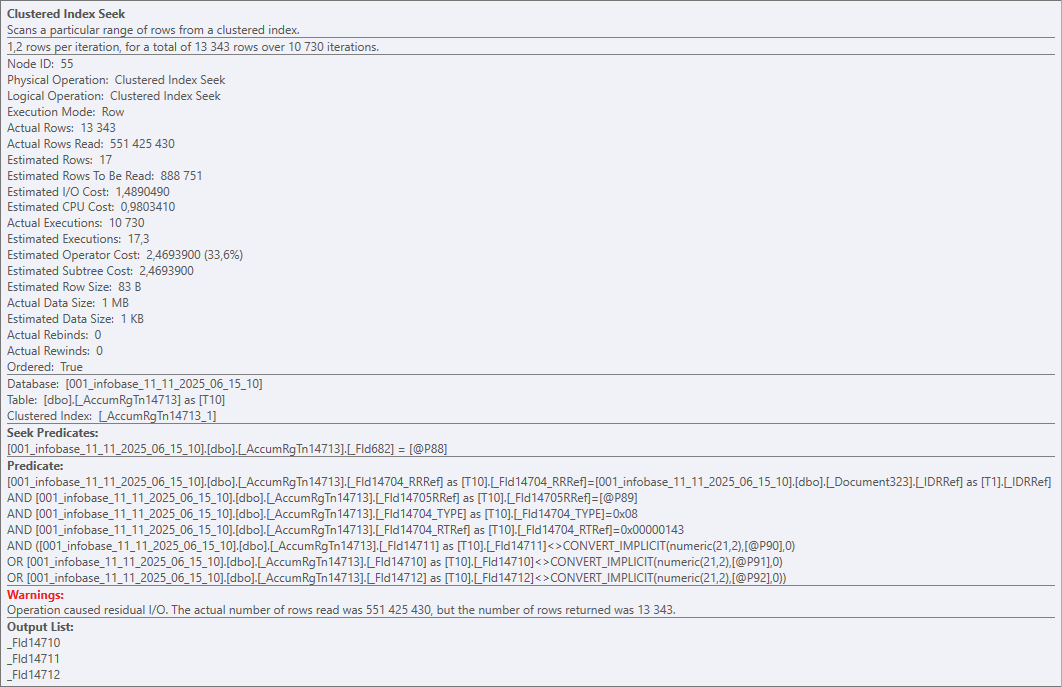
Easy-peasy: Nested Loops + Clustered Index Seek:

Half a billion

Clustered Index Seek is a bit of a marketing name here, of course. In reality, on every execution the operator walks the entire table (the whole clustered index) and checks every row against the predicates. And it does that 10 730 times for 51 391 rows. Result: 551 425 430 rows read, 13 343 returned.

Ouch

So yeah — a perfect textbook example of a horrible query plan in a vacuum. Put it in a museum. Nested Loops, if you've forgotten, works roughly like this:

For Each Table1Row In Table1 Do
    For Each Table2Row In Table2 Do
        ...

That's fine for small tables, but the DB can also pick it for bigger ones — for example, if it runs out of time to build a proper plan.

That's exactly what happened here. Zooming out to the platform level: we've got a dynamic list that queries a documents table, and the devs bolted on like a dozen virtual tables from accumulation registers.

Some of those registers were huge on their own, and the virtual tables poured gasoline on the fire (each one turns into 2+ nested queries). The DB honestly tried to come up with an efficient strategy, but at some point it basically decided: "a garbage plan is still better than no plan at all".

And the user? They tried to search a document by number — and the client app just straight-up froze.

So, about virtual tables in dynamic lists. There's a nice English phrase: "desire path" — the trail people naturally carve because it's the easiest way. Slapping a virtual table onto the main one really is often the simplest, fastest, most familiar way to solve the task. But it's not efficient.

There's an alternative, for example the OnGetDataAtServer() handler. It takes longer to implement, but it lets you properly tune the virtual table and avoid the scenario above. Scrolling the list will produce more queries, sure — but they'll be smaller, faster, and way more efficient than one single giant monster query.

One Query More, One Query Less
5 May 2024 ·

One query more, one query less — it doesn’t matter, people often say. Like, the main thing is that the query must be cheap: it doesn’t read too much, uses index, and so on.

This point of view makes sense, but mindlessly machine-gunning queries is a dangerous idea. Even if everything looks good at the moment, the system may change slightly in the future. And then a seemingly harmless patch will burn your production server to the ground right on Friday.

Let me tell you about one example from recent practice. There is an ERP that contains a table with payment stages for customer orders. One of these stages is prepayment; until it is received, you cannot create an order for the supplier.

Technically, the purchase order simply stores the customer's order ID; if the field is filled (that is, if the purchase order is created by the customer's order), ERP needs to read the payment stages of the customer's order and understand whether the purchase can be made.

It sounds elementary, but monitoring shows that the operation is slow as hell and eats up memory as if it were the last time.

Welp, let's go find out. We saw something like this:

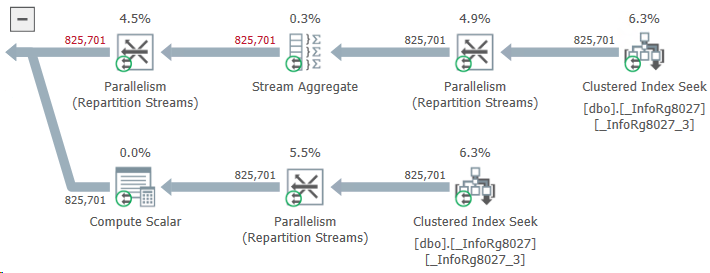
825701 records

What do we have here? Instead of taking two or three stages of payment for an order, ERP reads almost a million! How this could be possible?

It turned out that the problem was with those purchase orders that were not related to customer orders at all. The developer considered that the logic for them could not be changed: the customer’s order ID is empty and the query will not find payment stages for this ID. This means that the same result will be obtained as if there were no query at all. And an extra query — well... One query more, one query less... Not a big deal.

The deal turned out to be big. The table of payment stages contained data not only for customer orders, but also for other types of documents. Their customer order ID field was empty. As a result, ERP, when trying to find payment stages using an empty customer order ID, unexpectedly found them.

The query read about a gigabyte of data and wrote it to a temporary table. A gigabyte was read, then a gigabyte was written... History hit the disk, the DBMS buffer cache, and other components of the system (even the network, which had to drive this gigabyte back and forth without any benefit).

Do you know what I think? If the result of a query is known, there is probably no need to do it after all.

A Slow Notification
18 August 2021 ·

Tweet

This tweet reminded me of a job I once worked on. A client gets in touch: 1C is slow, do something. We ask a few questions. Okay, not all of 1C, just one operation.

They’re running a heavily rewritten Trade Management configuration, and the slow bit is custom code. Inside, it’s queries nested all over the place, a lot of messing about with value tables, some dubious calculations, and a bunch of server procedures seven hundred lines long each. We can’t copy the infobase, the technological log is unavailable, and DBMS and performance counter access are blocked. Debugging on the 1C server is off, and enabling it isn’t an option.

A mess. How can we find where it bogs down? Well, we can change the configuration; that’s something. I time the operation: yes, it thinks about something for a couple of minutes. Excellent! Rubbing my hands, I narrow the search by adding a whole pile of measurements to the most suspicious sections.

And here’s the funny part: nothing’s slow! The code doesn’t exactly fly, but we’re nowhere near minutes. For something this complicated, the timings look fine. Could it be serialization between client and server? I go through the server procedure carefully. Nope, nothing’s being passed back. Everything on the server stays there.

I move to the client code. What could possibly be slow here? Simplified, it looked something like this:

I stared at that code like an idiot for about ten minutes. Eventually, I asked a colleague, who told me something surprising: Notify() doesn’t just send notifications to every open form, it waits for their notification handlers to finish.

That blew my mind. I went digging and eventually found a form that caught the operation-completed event and immediately refreshed its dynamic lists. A query in one of those lists caused the delay: a subquery inside a subquery inside a subquery, plus a pile of joins “through a dot.” Nothing interesting after that.

Well, there you have it :-) Notify with care!

One Query to Rule Them All
25 Jule 2020 ·

For posterity, I’ve uploaded one of the inefficient queries I worked on a few months ago to GitHub Gist. It powered a dynamic list on a catalog item form, and whenever the user opened that tab, the platform went off to meditate, even with a relatively small database.

At first glance, it looks straightforward: a bunch of queries against document tables, joined with UNION ALL. Each table is filtered by roughly the same conditions: reference type, date, and whether the reference appears in a subquery’s result.

But there are several potential problems. First, at least 14 tables are involved, one per combined query. That alone raises the risk that the optimizer won’t have time to choose even a reasonably decent plan. Most likely, it will just take a wild guess and hope for the best.

Second, much of that work is probably wasted. Each query has something like this:

WHERE VALUETYPE(AdditionalExpenses.Ref) IN (&DocumentsListSelectedTypes)

The dynamic list receives a list of document types to display. But that filter kicks in after the data has been read: even if the user only wants invoices, the DBMS still reads all 14 tables, then discards 13 of them.

Still, none of that is especially critical. If that were the full list of problems, we might never have investigated. The main issue is the second condition in the WHERE clauses: each query checks whether the document reference appears in a subquery’s result.

Using subqueries in conditions is almost taboo unless temporary tables are involved: the DBMS often can’t work out how much data it’ll get back, or how best to handle it. And the data source makes things even worse here. A filter criterion isn’t a database table you can read, even by scanning; it’s a collection of tables. DocumentsByProject contains thirty!

That sounds bad enough, but there’s more: each of the fourteen combined queries selects documents of a particular type from those thirty tables.

OMG

And… scene :-)

Fifty Times Faster
5 December 2019 ·

Here’s the brief: a client’s month-end closing document takes just under an hour to post. The database isn’t especially big, but an hour is still way too long. Sure, you don’t close the month very often, and you could do it at night. Still.

I dig into the code, profile it, and see that the platform spends almost all that time in a single procedure, executing a query batch. I look at the first query and think: classic, accessing data through a dot on a composite type. The DBMS must be attaching a wagonload of joins to huge document tables, and the optimizer can’t come up with a decent plan in time.

I test the theory. But SalesDocument includes only eight document types. That should be manageable: the usual rule of thumb is that the optimizer can find a decent plan with up to eight joins.

I check the document tables: they aren’t particularly big. I run the query separately from the batch. It isn’t instantaneous, reading around 350,000 records and selecting about 200,000, but it certainly doesn’t take an hour.

All right, the batch’s first query is heavy, but it’s not the problem. I look at the second and realize that we’ve just read the entire Inventory register and selected most of its records, and now we’re reading it again and joining both result sets on a pile of conditions. The register’s record table has no suitable index: only the standard recorder index, which naturally doesn’t help.

I check: this is exactly where the platform spends most of its time waiting for the DBMS.

I couldn’t find a way around reading the whole register table twice. Every alternative I tried meant changing how the data was stored, and that wasn’t an option. So I went with a compromise: in the second query, I replaced the join to the actual register record table with a join to a temporary table created in advance and indexed on the join fields.

This was a case where 1C’s general recommendation worked perfectly: posting time fell from 50 minutes to three, and after further code optimization, to one minute. Fifty times faster than where I started.

A minute for month-end closing is usually fine, so I called it a day.