Notes: PostgreSQL

My notes about life, work and other fascinating things around me.

Shown: 0 · Page

The Year In The Date Literal Exceeds 3999
28 Marth 2026 ·

I already wrote about the error mentioned in this post’s title earlier, but here's the refresher: the platform chokes on dates later than the year 3999 (things start blowing up at 3999-12-01, I guess). In theory, dates like that should never make it into the database in the first place. In practice... Well, thanks to bugs in application code — and in the platform itself — they sometimes do.

The usual symptoms are pretty random and annoying: some reports stop working, some documents refuse to post, totals recalculation crashes, and so on. Basically, any code that touches records with those broken dates is now having a bad day.

The fix I outlined in the post linked above does work, but it's relatively slow: you need to configure the tech log, collect the output, and then parse it. The problem is that the platform crashes the moment it touches the first bad date, and there may be lots of them scattered across different tables. So you often end up doing this in multiple passes: run a check, hit an error, fix it, run again, hit the next one, repeat.

Thank You, Mario!

A few years ago, because I wanted a faster way to deal with this, I wrote a PostgreSQL query for it. The idea is simple:

  1. Find all date fields in the database.
  2. Build one giant query against those fields to look for dates beyond 1C's limit.

So yes, this query generates another query. Very normal behavior. Run the generated query, and you get the full picture: a list of tables containing invalid dates. After that, it's just engineering work — inspect the tables and decide what to do. In our case, bad dates sometimes show up in totals and turnovers, so we can just delete those rows and recalculate totals using the standard tools.

Why do this at the DBMS level? Because 1C itself can't really help here — as a reminder, the platform crashes as soon as it touches the bad records. That includes reads, not just writes. Also, in this case, going directly against the database is simply faster and more convenient.

The other day I rewrote the same query for MS SQL. It turned out longer — because, well, MS SQL likes to make you earn it — but the idea is exactly the same.

If you want to use it, keep this in mind:

  • The _Fld626 field in the query text is the Fresh separator. In your database it may have a different name, or it may not exist at all.
  • The query is written for a database that uses a 2000-year offset. If your database does not use that offset, you'll need to adjust the condition accordingly — see DATEADD().
  • I added the XML output trick (FOR XML) to stop SSMS from truncating the generated mega-query. That seemed faster than messing around with type casts. The side effect is that before running the generated query, you need to replace > with >.
Harmless Harm
16 November 2025 ·

The other day my colleague and I were debugging an issue, nothing fancy, just another "why is this query behaving weird?" moment.

Simplified, the idea was: we read a table from the database and dump the result into a temp table. If a certain condition is met, we still want the temp table to be created, but it must be empty (regardless of whether the source table has rows or not).

The query looked roughly like this:

SELECT
    Table.Field1 AS Field1
FROM
    Table AS Table
WHERE 
    &Parameter

If we needed to copy rows from the source table into the temp table, we passed TRUE into the parameter; if we wanted the temp table to be empty, we passed FALSE.

Looks simple at first glance, but this trick is a silent performance foot-gun if the table being read is large.

The reason is how DB engines work with parameterized queries. Both MS SQL and PostgreSQL build the execution plan based on the query text, and in this example the parameter value does not affect the decision of whether the table should be read or not.

As a result, when this query runs, both engines will pedantically scan the whole table (or its index), even if the parameter is FALSE. In that case each row is just discarded, so the logic is technically correct, but we're wasting resources on a pointless scan and polluting the buffer cache, slowing down the system overall and diligently contributing to global warming :)

The fix is simple: inline TRUE/FALSE in the query body as a constant instead of using a parameter. Or use TOP so the query text is even simpler:

SELECT TOP 0
    Table.Field1 AS Field1
FROM
    Table AS Table

At the SQL level this turns into something like "SELECT TOP 0 ... FROM Table" for MS SQL and "SELECT ... FROM Table LIMIT 0" for PostgreSQL. The final plan will still contain a read operator, but the executor won't actually request any rows, so there's no real data scan (yay).

P.S. If you don't care about having proper column types in the temp table, you can even do this:

SELECT TOP 0
    UNDEFINED AS Field1

The performance gain, however, is so tiny that it's probably not worth over-optimizing for this. There are better hills to die on.

Rapture
31 August 2024 ·

I remember how amazed I was when I worked with window functions in PostgreSQL for the first time. You can adjust the calculation window for each row individually! And even segment it in advance. And all this is done natively, within a regular query, no extra add-ons needed. The standard aggregation with grouping and subqueries that I was used to in 1C suddenly turned into a pumpkin, just like Cinderella's carriage at midnight.

Recently, I’ve been learning Blender, and I suddenly felt the same excitement for the same reason. The fact that you can freely move objects around the 3D Viewport with the Move command was clear from the start, fine. However, when it hit me that each object is a set of polygons, and that each polygon can also be moved freely, leading to a natural reshaping of the object's geometry — that’s when it really got me.

Technology is amazing. Learning is awesome. Moments like these make me want to keep doing it over and over again :)

Non-Unique Metadata
8 June 2024 ·

Once again, I came across a nasty bug when the platform broke the data history metadata table.

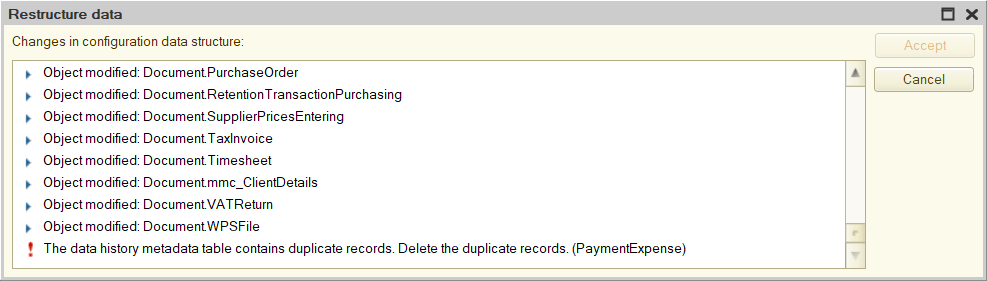
Outwardly, it looks like this: you update the database configuration, and when you try to restructure, the error “The data history metadata table contains duplicate records. Delete the duplicate records” pops up. The platform does not offer any clear way to find such records.

The data history metadata table contains duplicate records. Delete the duplicate records

The problem can be solved at the database level. The table referenced by the error is _DataHistoryMetadata. It contains metadata versions of each object for which data history is being maintained. This allows the platform to understand what attributes the object had at any point in time if the data history is maintained for the object.

How does it work? Well, when the list of an object’s attributes changes (for example, an attribute was added to the catalog), the platform writes its metadata: specifically, it adds a new entry to _DataHistoryMetadata and stores in it the current list of object attributes, as well as the version number of this list (for example, when history is enabled for an object, the first version of metadata is saved, when adding some attribute, the second version is saved, and so on).

The platform also puts a mark in the created record that this particular version of the object is the most actual, and then removes this mark from the version that was marked as actual before.

So, the problem is that the platform sometimes forgets to take the last step, and two versions appear in the table at once, marked as current. The Designer understands this but cannot do anything.

The solution follows from the algorithm above: you need to find conflicting versions and revoke the mark of actuality from the one that is older. It is better to use queries: data history is often enabled for a bunch of objects, and the list of their attributes is constantly changing — in general, there will be so many versions in the table that the devil will break his leg.

If you also encountered this problem and are therefore reading this text, you can use the queries that I wrote:

  1. get-issues.sql checks that there is an issue: it looks for metadata versions that are also marked as actual.
  2. fix-issues.sql removes the actuality mark from those versions that are actually outdated.

Both queries are written for Microsoft SQL Server. If you use PostgreSQL, then here they are for this DBMS.

The queries will require a slight adaptation to a specific database: they use the _fld626 field, which is the data separator. In your _DataHistoryMetadata table, this field may be called differently, so you need to update its name to the current one. It will be difficult to make a mistake — the table has only one field with the _fld prefix.

P.S. Please bear in mind that the license agreement prohibits access to the database, bypassing the platform’s tools, so you can only go for such experiments if there are no other options left.

The Main Issue of UUID
2 June 2024 ·

I came across a good text about the main problem that UUID brings with itself. It is also relevant for 1C: all platform reference objects (catalog items, documents, and so on) have their own UUID. They are stored in a database, actively used in searches, and, of course, extensively indexed (with all the ensuing consequences).

1C tries to suppress the issue by creating consistent UUIDs. It may not be perfect, but overall, this thing works, and the indexes turn out to be more or less compact. In general, the community has been talking about this for a long time: for example, the old thread on Mista (though the conversation here quickly turned into a chicken coop, and out of six dozen comments, at most one and a half are on point).

P.S. The remark about the probability of creating two identical UUIDs in one database made me laugh:

As an aside, for those worried about collisions: you should take up the lottery, since winning the jackpot twice in a row is a much more likely outcome than your system ever generating two identical random 128 bit numbers.

Infostart Event 2021
16 November 2021 ·

Last week I visited Moscow for Infostart Event 2021:

  • Listen to numbers of interesting reports — check;
  • Meet a few cool people in real life — check;
  • Chat with friends — check!

As a result, I suddenly felt rested despite the flights, stress, and fuss. I think it's because I'm working remotely, so it was really cool to look at so many colleagues in real life (not as a stream of electrons, I mean).

In order not to get up to fly twice, I passed the first test for PostgreSQL administration in the PostgresPro office. There are three more tests ahead, and the final one does not exist at all yet — but the walking one will master the road, I guess.