Notes: Powershell

My notes about life, work and other fascinating things around me.

Shown: 0 · Page

Summary to Slack
10 November 2024 ·

I found a script that I wrote a couple of years ago for our work GitLab. In short, we run our development repository through a barrage of tests on Vanessa daily, resulting in a nice report showing how many tests passed, which ones failed, the reasons for failures, and so on.

The report needs to be analyzed regularly, at least at a glance. Of course, we haven’t seen fully "green" tests in a long time, and that’s expected: for example, in the case of interdependent development, commits can break the checked functionality, and the tests still need adjustments. However, keeping a pulse on it is still essential.

To simplify this routine, I expanded the pipeline code a bit: after generating the report, GitLab first creates a brief summary (client type, database type, test statistics) and sends it to Slack.
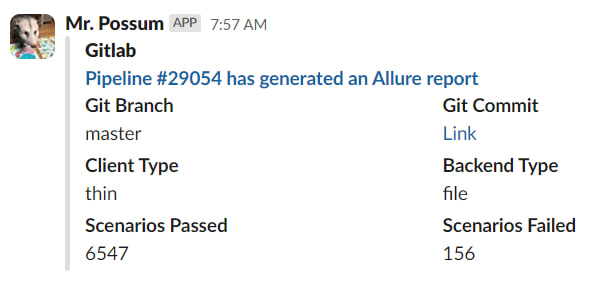
Report

As a bonus, it’s now easier to answer the philosophical question, "who broke everything". Most often, it’s the author of the first commit on which the Scenarios Failed metric in the screenshot above hit the ceiling :)

Service Launcher Update
22 Jule 2020 ·

I’ve improved Service Launcher. If you run the script without parameters, specifying neither -start nor -stop, it now decides for itself whether to start or stop the services.

It checks the status of the first service in the list. If it’s running, the script stops everything on the list. If it’s stopped, the script tries to start them all.

Why? If, like me, you run the script from a programmable keyboard, you now need only one key. Previously, you needed two: one to start the services and another to stop them.

Service Launcher
13 Jule 2020 ·

Some time ago, I wrote about PowerShell cmdlets for starting and stopping services. I’ve now turned those sketches into a proper script: it reads the list of services to start or stop from a separate file, and checks whether it has admin rights, asking for them if it doesn’t.

You can see the result on GitHub. No big deal: I wanted to practice the language and simplify my daily routine. My system has about fifteen resource-hungry services needed for work but useless at other times. Stopping and starting that whole zoo by hand is a pain. Doing it with one command? Much better!

Managing Services with PowerShell
28 April 2020 ·

The other day, I sketched out a few PowerShell scripts for starting and stopping services on my work PC. I didn’t end up needing them, so I’ll leave a couple of examples here before I lose them:

get-service -Name 1C:Enterprise* | Where-Object {$_.status -eq 'running'} | stop-service -pass
get-service -Name *SQL* | Where-Object {$_.status -eq 'running'} | stop-service -pass

Both lines above do the same thing: find services with a particular name, check their status, and stop them if they’re running. Patterns come in handy for the service names. Microsoft SQL Server, for example, has a whole brood of services with different purposes, and it’s handy to kill them with one line. Or take the 1C:Enterprise server service: there’s only one, but its name is so long that I can’t be bothered to type it in full :-)

You can do pretty much the same thing with regular processes. This line looks for obs64 and stops it if it’s there.

get-process -Name obs64 | stop-process -pass

If you want the details, there’s plenty of documentation, packed with examples and discussions along the lines of “how to start a service while meditating on one leg in artificial zero gravity.”