Notes: 1С

My notes about life, work and other fascinating things around me.

Shown: 0 · Page

A Turnover Register without Turnovers
15 October 2019 ·

If you disable “Use in totals” for every dimension of a turnover register, its turnovers will no longer be calculated. In fact, the turnover table disappears from the database altogether. Try to query it in 1C, and you’ll get an error.

That can come in handy when all we do is collect data, then filter it by recorder or other fields. We only need the register’s record table. There’s no point spending server resources calculating and storing a turnover table.

An information register naturally comes to mind for this task. But its efficiency depends on how many dimensions you plan to create: every index on an information register includes all its dimensions, plus the period for periodic registers. The platform creates a base dimension index, an index for each dimension marked “Master,” and an index for each dimension, resource, or attribute you choose to index separately. And we haven’t even reached the slice tables, which use the same approach!

So if your information register isn’t thought through all that well and has quite a few dimensions, say more than two or three, keeping all those indexes up to date can get expensive. A “flat” turnover register without turnovers starts to look pretty good.

A Large Table on the Client
19 May 2019 ·

I’ve already written a couple of times about the quirks of working with huge tables on the client (one, two), but late last week my colleagues suggested another interesting way to optimize relatively large data collections on the client. The short version: the standard recommends working with large collections only on the server. However, if you iterate through the entire collection on the client at the start, for example in the form’s opening handler, it gets cached. After that, you can loop through it, search for rows, and do other work without extra server calls. Overall, you spend less time shuffling data around.

I’ve just run some simple tests, and yes, it seems to work. The method feels a bit like a workaround, and I haven’t tested it under serious load yet, but it’s probably worth keeping in mind.

PageLatch Waits
22 April 2019 ·

PageIOLatch waits, which I wrote about today, are easy to encounter in any system, even small ones. PageLatch waits are the opposite: they’re hard to notice until you have several thousand users.

They occur when a page is already in RAM and several users try to modify it. Until one user finishes, the others must wait. The wait is usually tiny, but with many users competing for the page, it becomes noticeable.

Two things can cause this.

An Index Hotspot

This happens when we try to write heavily to the last page of an index, primarily one with a monotonically increasing key. Examples include indexes on reference-type fields: since late 8.2 versions, the platform has generated sequential GUIDs, reducing disk fragmentation and making the index key monotonically increasing.

What is an index with a monotonically increasing key? In 1C, register indexes on the period are one example. They don’t grow perfectly monotonically, but the important point is that we generally write data at the end. Document number and catalog code indexes also belong here: a new number is assigned and written to the end of the index.

Fixing a hotspot means changing the design: you need writes to land in different parts of the index, not all at the end.

tempdb System Pages

Creating or dropping a table updates a number of internal pages: IAM (Index Allocation Map), PFS (Page Free Space), GAM (Global Allocation Map), SGAM (Shared Global Allocation Map), and others.

Why does this matter for tempdb? The 1C platform regularly creates an enormous number of tables there. Those internal pages get updated so often that you start seeing PageLatch waits.

MS SQL Server can optimize system page updates for tempdb so they happen less often, but sometimes even that isn’t enough, especially when tables are created with indexes, a very common case in 1C applications.

There are a few ways to tackle it. First, for DBMS versions before 2016, disable mixed extents using trace flag 1118. That removes the need for two internal page types, GAM and SGAM, so you no longer have to wait for their updates. An extent is eight data pages, or 64 kilobytes. If it contains pages from one table, it is uniform; if from several, mixed.

Second, split tempdb into multiple files. Since 2016, the DBMS splits it into eight files by default. Each file has its own internal pages, so spreading the work across files cuts the waits.

Third, reduce the number of temporary tables to lower the load on tempdb. Rewrite the most frequent queries so they run acceptably fast without temporary tables.

Object Locks
22 April 2019 ·

First, to avoid confusion: the platform’s object locks have nothing to do with managed locks, let alone DBMS locks. Second, there are two types: pessimistic and optimistic object locks.

Both are well documented on ITS; here’s the short version.

Pessimistic Locks

A form extension applies one when the user starts editing an object, for example by changing a field. If someone else tries to edit the same object in a form, that form tries to get a pessimistic lock too. It can’t, so the user gets “Failed to lock record.”

The platform is being pessimistic here: the first user has started editing, so they’ll probably save. Better not let the second user change it in the meantime.

You can also apply a pessimistic lock using the object’s Lock() method and release it with Unlock(). Other options are the global context’s LockDataForEdit() and a managed form’s LockFormDataForEdit().

Optimistic Locks

First, some theory: the platform stores versions for reference-type objects, such as catalogs and documents. Basically, a version tells you when the object last changed. When a form extension or code reads an object, its version is read with it.

When writing the object, the platform compares the version obtained when reading it with the version currently stored in the database. If they differ, it reports: “The operation cannot be performed because the versions do not match or the database record is missing.”

That’s an optimistic lock. It’s called that because the platform leaves the check until the last possible moment, when someone actually tries to save.

You cannot apply an optimistic object lock through code: the version is stored in the object table’s _Version field, populated by the DBMS. The platform provides no way to change it directly, though writing the object will change its version.

Bloated Roles
18 April 2019 ·

A very interesting post about the trouble the “Clear All Rights” command can cause in a role. It does what it says, sure: the rights are gone. But the role object can end up eating several times more memory than it needs, out of nowhere.

I read it, thought about it, and went to check our configuration. And what do you know? I found a couple of dozen roles stuffed to the brim with “unchecked boxes.” The rights export weighed in at around three hundred megabytes. After a cleanup, it was almost three times smaller.

It’s curious that this had gone unnoticed for so long. Most likely, it’s down to the object count: our configuration is relatively small. Those roles just weren’t eating enough resources for us to notice.

A Simple Checkbox
30 Marth 2019 ·

A couple of weeks ago, we added an “Inactive” parameter to FirstBIT ERP’s product catalog. The task was simple: if a user no longer needs a product, they check the box and it disappears from everywhere, including selection forms and warehouse balance selection forms.

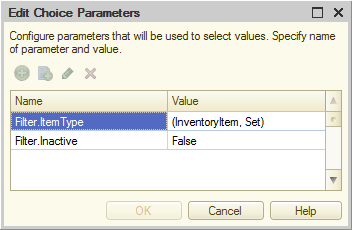
Sounds straightforward, right? The code was simple too: we went through every object where users select products and added an extra choice parameter.

Choice parameters

But users started complaining that the setting didn’t work. We investigated and realized we’d forgotten input history. Turns out it just ignores choice parameters. Users selected a product in an invoice, marked it inactive, returned to the invoice, and… Saw the supposedly disabled product in the history again.

We looked for a way out. The problem is that input history lives in system storage, and there’s no way to change it from code. You can wipe it altogether, but it only actually clears when the client restarts, and even then it’s hit and miss. Disable history completely? That feels like curing a cold by cutting off the patient’s head.

At some point, we learned that input history is stored not just per field, but also per combination of choice parameters. Each combination of parameters and values has its own history. So, if we add another choice parameter to every product selection field, changing its value will “clear” the history. In reality, it creates a new one, but what difference does that make to the user?

So that’s what we did. It lives in shared storage and is passed to forms when they open through a common module that adds the choice parameter programmatically. When a user sets or clears Inactive for any product, the parameter changes, and already open forms receive it through notifications.

Wait a minute!

It all started so innocently, didn’t it?

It works pretty well, but the downsides are obvious. First, system storage gradually grows as new combinations of real choice parameters and our artificial one appear. Second, saving products is now a potential bottleneck: two users can’t save products with changed Inactive flags at the same time, because writing our hidden choice parameter’s new value to shared storage causes a lock.

The first problem can be solved by clearing storage on some trigger; the second, by storing our choice parameter per user, for example in an information register. Still, we’re really hoping 1C gives us access to input history before we have to pile more workarounds on top of the ones we’ve already built :-)

A Duplicate Key
1 Marth 2019 ·

Infostart published an interesting article about the DBMS error “cannot insert duplicate key.” One possible cause is using an object’s unique identifier to match it during exchanges with other infobases, without a dedicated register mapping local objects to identifiers in the external database.

I haven’t yet encountered anything as wild as unique identifiers colliding across different infobases for the same table. But I abandoned the “single identifier” approach for good after building an exchange between FirstBIT ERP and GROTEM / Agent.

The first version worked like this: data from FirstBIT ERP was first exported to an intermediary 1C infobase written by GROTEM’s developers, and then to the mobile application server’s main database.

Matching was very simple: object identifiers. The same document in both databases had the same identifier, for example. But some mappings were more complicated: a FirstBIT ERP counterparty became three objects on GROTEM’s side: a counterparty, a retail outlet, and a settlement document.

WAIT WHAT

Yes, a settlement document. All three objects had the same identifier, that of the FirstBIT ERP counterparty. It wasn’t particularly elegant, but the platform handles this arrangement perfectly well, and we decided there shouldn’t be any problems.

The exchange refused to work, though.

A quick look showed that the data made it to the intermediate infobase just fine and passed every integrity and completeness check. Only the last step was failing: sending it to the mobile application server’s database.

Eventually, it turned out that:

  1. This database has a table storing all the objects we care about: documents, catalog items, and so forth.
  2. That table has a unique index on the object GUID.

Well, mystery solved. Of course, the very first exported counterparty created three entities with the same GUID. They lived happily in their separate tables on the 1C side, but couldn’t be written into one shared table in the application database.

I will not use GUIDs to map objects!

An Unsuccessful Hunt
21 February 2019 ·

After upgrading the platform to 8.13.12.1790, we encountered an intermittent bug when switching a control’s current page on the server. It works on the server itself, but as soon as control returns to the client, the current page reverts to the previous one. The current-page-change event also fires, as though the user had changed it manually.

Unpleasant, but nothing terrible: we worked around the bug, documented it, and reported it to 1C. They’re still thinking about it. But weirdly, I’m a little disappointed. When you dig into these things, there’s always a bit of mystery. It feels like you’re about to uncover something interesting, some new quirk of the platform, maybe.

Then you finally look at the problem from the right angle, and it’s just an ordinary bug. Maybe striped or spotted, but a perfectly ordinary bug, sitting there twitching its antennae. And you think: damn, is that all I caught? :-)

Large Value Tables
17 February 2019 ·

While writing about searching for rows on the client, I remembered another detail about data on managed forms, also involving transfers between client and server.

Say we need to work with fairly large value tables, thousands of rows each. These might hold data that generally doesn’t need to be shown to the user: pricing parameters, sales and purchase information, or something else. Creating these tables as form attributes seems logical, if only because the designer is convenient.

But things get awkward when the platform sends one of those tables to the server. Instead of a nice compact ValueTable, it sends a much bulkier FormDataCollection. The difference is enormous: on one of our projects, this data exchange accounted for around 40% of a key operation’s total runtime.

The fix is pretty obvious: don’t use form attributes for the tables. Instead, create value tables in code, for example in the OnCreateAtServer handler, put them in temporary storage, and keep only their storage addresses in form attributes. When you need to work with a table, only the address string is sent to the server, so you spend next to nothing on serialization and data transfer. On the server, retrieve the table, read its data, change it if necessary, and save it back to temporary storage at the same address.

Finding Rows on the Client
12 February 2019 ·

I learned quite a while ago that FindRows() on form data collections can quietly generate server calls, when I ran into a form that took forever to load. The method was being called right in the opening handler, inside a loop, no less. You shouldn’t do that, of course, as the help gently suggests: calling the method executes a server call.

Today, though, while writing code for a similar task, I noticed there were no actual server calls. Surprised, I checked ITS. Here’s the explanation: when you call FindRows() on the client, the search does happen there, but the platform doesn’t keep all the data of large collections on the client. It transfers data from the server, and requesting that data is the server call mentioned in the help.

The platform developers are vague about the collection size below which the client doesn’t need the server; ITS says it’s about twenty rows. So I’d still do the same thing: make an explicit server call and don’t worry about the platform adding its own. Still, it’s always nice to understand a little better what’s going on under the hood :-)

An Unexpected Drummer
9 February 2019 ·

I’ve been writing for the 1C platform for quite a while and have seen some shit, but honestly, this is a first.

Well, would you look at that!

At first, I didn’t even know where to begin. I looked up a translation of the character: Wikipedia just told me it was a type of cup, while Google Translate gave up entirely.

A colleague said it looked a bit like a warehouse worker moving stuff between boxes. I’m not so sure. To me, it looks more like a drummer at work. But what the hell does it mean? Is 1C trying to tell me something? Something about music?

Maybe I should have become a bass player instead of doing all this.

Deleting Temporary Tables
7 February 2019 ·

A curious detail: closing a temporary tables manager doesn’t remove its tables from tempdb. It doesn’t matter whether you call Close() yourself or let the manager object disappear when the method that created it finishes. In both cases, only TRUNCATE runs, deleting the table’s data. The table sticks around in case the user runs another query with the same fields. That’s cheaper than making it all over again.

The same thing, deleting data rather than the table itself, happens when you explicitly use DESTROY in query text. That command doesn’t come in handy very often anyway. Maybe if the manager hangs around for a while and you’ve got a huge temporary table you’d like to empty sooner rather than later.

The table is only deleted when the connection to the application server closes.

String Concatenation
27 January 2019 ·

Like many companies, we give applicants a test assignment. It’s intentionally straightforward, mainly to see how well the candidate understands the platform and how carefully they work with configuration objects and code.

One little thing we look at is how they put together a long message with lots of parameters in it. A developer can use StrTemplate() or StrConcat(), or simply concatenate strings. We mark that last option down a little: the user sees the same result, but the code makes it much harder to picture roughly what the message will look like.

But there’s something else to it. In the first half of last year, Rarus published a report about its work for Beeline. There’s lots of interesting stuff in there, but one bit floored me: dropping string concatenation cut CPU load by 40%! They didn’t even need those two extra servers anymore.

The problem was that worker processes spent too much time allocating memory to concatenate strings. Joining two strings once isn’t going to hurt, but building a large query in a loop and doing it repeatedly can make the load snowball. Don’t use concatenation in those cases. The right tools are the same StrTemplate() or StrConcat(). On older platform versions without those methods, you can use a text document object: add lines to it, then retrieve the text.

Uncompiled Code
27 January 2019 ·

Here’s something you might not expect: an external data processor runs noticeably slower than the exact same processor built into a configuration or extension. Its code has to be compiled again for every user, every time they run it. Built-in processors get compiled once for everyone. According to an article in 1C’s knowledge base, this was outright catastrophic in platform 8.3.10. But a fifty-percent increase in CPU load in 8.3.13 isn’t exactly good news either.

Storing code inside the infobase does the same thing, for example if you keep it in utility catalog attributes. Every time you run it, the platform fetches it from the database and compiles it. In our configuration, for example, scheduled jobs can be created without changing metadata: add an item to a special catalog, load the code into it, and set its schedule.

That’s more or less fine: scheduled jobs don’t usually run all that often, so compiling them probably won’t make a noticeable dent in the CPU. But the same catalog can also be used to run code automatically after pretty much any event, say saving a certain kind of document. If lots of users will be running that code all the time, move the logic into a common module method in an extension and leave only a call to that logic in the stored code.

Or you could ditch stored code altogether and put the whole thing in an extension. It might be less flexible, but that’s still better than staring at a low APDEX later.

The Ampersand in 1C
27 December 2018 ·

For ampersands in labels, the platform does the usual Windows thing: the ampersand itself disappears, and the following character becomes a keyboard shortcut for the action associated with the label, such as a command handler or a control event.

The example below shows up as “Project Costing.” The “P” is underlined and becomes the shortcut key; if this is a command title, for example, you can run it with Alt + P.

ТекстНадписи = "&Project Costing";

The only catch is when you want an actual ampersand in the label. Then you need to double it: the example below will appear as “Project P&L.” No shortcut keys will be created.

ТекстНадписи = "Project P&&L";
A New Object’s Reference
29 November 2018 ·

A unique identifier is a convenient way to match objects across configurations, for example when transferring invoices from one infobase to another. How can the receiving infobase tell whether an invoice has already been loaded? The first idea is simply to find the object by UUID:

ИнвойсЗагружен = Документы.Инвойс.ПолучитьСсылку(UUID).Пустая();

Sometimes, though, unique identifiers are used to link objects within the same configuration. Maybe the task won’t let us add a regular reference attribute, so document A can’t point straight to document B. Or perhaps we create a catalog item based on a document and want a direct link between them, assigning the item a reference obtained from the document’s unique identifier. The platform guarantees identifier uniqueness within a table, so such tricks are perfectly safe.

My point is: use SetNewObjectRef() carefully! Check whether a reference has already been assigned before your code runs:

СсылкаЗадана = ПолучитьСсылкуНового().Пустая();

If there’s already a reference, deal with it: leave it alone if that works for your task, or throw an exception. Otherwise, you can break the links between your data, and good luck tracking that down. Or even noticing it.

This works both ways, of course: some other code, such as an object event handler or subscription, might overwrite the reference you assigned. Testing is the only reliable way to catch that.

DCS and View Rights
28 August 2018 ·

The Data Composition System goes by the rule “if the user can’t view it, it might as well not exist.” Sometimes that leads to some pretty weird behavior. For a nice simple textbook report, it works fine: if the user lacks view rights for a catalog, for example, that catalog won’t appear in the report. Real examples can be more complicated, though.

A couple of weeks ago, I was debugging a report that produced a seemingly clear error when generated:

Your settings are wrong, comrade!

The report is enormous: a query of a good thousand lines, complex settings, a huge template, and tangled composition code. We first suspected a settings error, but the investigation quickly led from a currency reference in the dataset to a constant holding that currency at the report’s lowest level. The user had no view rights for that constant.

I couldn’t tell you exactly what threw the platform off and made the error so unhelpful. Maybe it was what we did with the temporary table holding the constant. Maybe it was reading it inside a CASE expression. Or maybe it was that we had all the rights we needed for the currency catalog itself. I didn’t dig around to find the exact trigger. I think it’s simply an implementation detail of the DCS engine that may change between versions. Just keep view rights in mind, and you can avoid the problem.

If you encounter the error, try generating the problematic report with full rights. If that works, list the tables from which it reads data and check that both read and view rights are granted for all of them.

Tedious, but it can save a lot of time.

Message to User
30 April 2018 ·

1C:Enterprise has a convenient and accustomed method of showing information for a user — it's a UserMessage object. It outputs messages at the bottom of a form and suddenly it's a potential problem. The thing is, most users don't look at it. It's like: well, I see no critical errors for now so there is nothing to worry about.

Therefore, in case an error happens or you just have an essential message, you should show it through a dialogue window — by the ShowQueryBox() method or a ShowMessageBox() method, for example. Otherwise, a user may not notice a problem and continue to work in spite of some action might not be executed or might be executed in a wrong way. The issue will come out later and you will be rightfully blamed for it.

In addition, using of a UserMessage object should be prohibited in case of small service forms. Yes, in fact, it's hard to overlook a text if a window is small, but that's a different matter: the messages below literally devour form's workspace and it becomes hard to work with.

Why So Serious?
17 February 2018 ·

Sometimes when you developing some complex mechanic you don't have enough time time for the adequate naming of variables. As a result, there is a lot of mysterious WhatTheHeck, ApplyMagic and bunch of other LivingFailures.

It's what you should avoid despite it looks funny. You'll rewrite code you've written month or two later and it will be hard to shame its author because it is you.

Exporting Bus Schedules
17 November 2017 ·

Ever since my colleagues and I redid the automation at KPAT, it has been running on Bus Terminal Management. It’s a 1C:Enterprise configuration, so hooking it up to pretty much anything is fairly quick.

First up, we wanted to send the bus schedules to E-Traffic and Yandex Schedules.

What Are These Services?

The first, E-Traffic, is Russia’s largest aggregator of bus terminal data. It collects information about scheduled departures and acts as an electronic ticket agent. Passengers don’t have to fight their way through individual bus terminal websites: E-Traffic lets them buy a ticket from anywhere to anywhere.

As for Yandex Schedules, it’s one of the Russian search engine’s side projects. Like E-Traffic, it’s mainly for passengers, and it can quickly put together fairly complicated routes with transfers. It doesn’t sell tickets, though.

How Did We Build the Export?

At first, we built a fairly elaborate setup to send schedules to both systems. We worked our asses off, until a conversation revealed that E-Traffic already knew how to pass schedules on to Yandex. Just like that, half the job disappeared.

On the technical side, we made a web service for Bus Terminal Management. E-Traffic sent a SOAP request, the service gathered the bus schedule data from the 1C:Enterprise infobase, and back came some XML.

We didn’t even have to write code to fetch schedules from every terminal in the KPAT network: all schedules are created and stored in one place, the main node of the distributed infobase, and that’s where we deployed the web service. In the end, coordination took longer than programming.

Where Can You See It?

The inner workings aren’t visible from outside, and there’s nothing unusual there anyway: robots talking to robots, big deal :-) The result of their chatter is much more interesting! For example, here’s today’s schedule from Kemerovo to Novokuznetsk.