Notes

My notes about life, work and other fascinating things around me.

Shown: 0 · Page

A Blog in Vue.js
21 Jule 2020 ·

In the middle of last year, I got excited about rewriting this website with something more modern than PHP, chose Vue.js as the framework, and got to work. I barely knew JavaScript at the time, so I stumbled over plenty of things like “the date formatting method crashes in Safari.” Eventually, though, I had a working app.

Well, sort of. On one hand, I achieved my main goal: a client-side web application that only asks the server for data and builds the entire interface itself. On the other, I had to bolt an army of workarounds hooks onto the framework even for basic things, like highlighting menu items or returning the correct HTTP codes. Some things I couldn’t get working at all on the first go, such as serving HTML versions of pages to Yandex, whose crawlers in 2020 can’t index JavaScript websites.

I learned a lot, but the end result was such a mixed bag that I eventually gave up on the idea and published the resulting Frankenstein on GitHub. Perhaps it will save someone time on tasks like “display arbitrary HTML through Vue.js” or “make VueI18n work with Russian.”

There’s no documentation, though. I initially wanted to explain how everything worked, but quickly realized it would take a lot of time for little obvious benefit. I’ll probably return to the subject when the mood strikes. For now, let’s call it an MVP :-)

A Broken Bicycle
20 Jule 2020 ·

1C:Drive

I suspect whoever drew this image for 1Ci was about as far removed from developing the configuration, and from programming in general, as possible. Because a programmer sees exactly two messages about the product here:

  1. It reinvents the wheel.
  2. The wheel is broken.
Service Launcher
13 Jule 2020 ·

Some time ago, I wrote about PowerShell cmdlets for starting and stopping services. I’ve now turned those sketches into a proper script: it reads the list of services to start or stop from a separate file, and checks whether it has admin rights, asking for them if it doesn’t.

You can see the result on GitHub. No big deal: I wanted to practice the language and simplify my daily routine. My system has about fifteen resource-hungry services needed for work but useless at other times. Stopping and starting that whole zoo by hand is a pain. Doing it with one command? Much better!

The Size of Data in a 1C Database
11 Jule 2020 ·

Last week, while browsing the 8.3.15 release notes, I came across GetDatabaseDataSize(). I got curious about how it works and how its numbers compare with what you get from, say, Management Studio.

I ended up writing a sort of console to pass various metadata objects to the method, and started watching the platform’s database queries.

Basically, the platform works out the data size with something like this:

CAST(
    SUM(
        CAST(
            DATALENGTH(T1._Fld40) AS NUMERIC(12, 0)
        )
    ) AS NUMERIC(18, 0)
)

It does this for every field in the object, including standard attributes. If there are tabular sections, it counts those too, then sums the results.

Conclusions?

First, now I understand the method’s awkward name. It doesn’t calculate table size, as I initially thought, but data size specifically. The estimate excludes schema overhead, index overhead, and extent allocation. It counts only the size of the data stored directly in the object.

So a product catalog, say, will actually take up more space than this method reports. Possibly a lot more. You wouldn’t use it for precise analysis, but it’s fine for a quick look at where the data is piling up.

Second, the method doesn’t count the data history overhead for the objects being analyzed, which the docs are quite clear about. In theory, you could calculate it manually starting from _DataHistoryMetadata, but let’s wait a release or two: perhaps the developers will add it.

Third, the DBMS reads all the data in the tables it needs, then works out how big that data is. That probably means a whole bunch of scans, which can flush the buffer cache pretty quickly. In 1cFresh, the queries respect data separators, but that’s cold comfort to me.

Use it with care on a live production system.

Exporting Standard Data Processors
5 Jule 2020 ·

We recently swapped out SSLi’s creaky old homegrown versioning for the platform’s built-in data history in our configuration. I’m now finishing data history backup and restore. Surprisingly, neither the Standard Subsystems Library, the Standard Technologies Library, nor SSLi can do this yet, though I didn’t expect it from the last one.

I’ll write more when it’s finished. For now, here’s a neat trick that came in handy: the platform’s built-in data processors available through “All Functions” can be exported as ordinary epf files! Colleagues on Infostart explained the trick in detail here and here. In brief, the magic looks like this:

КопироватьФайл(
    "v8res://mngbase/StandardDataChangeHistory.epf",
    "Q:/StandardDataChangeHistory.epf"
);

The links above have the full list of forms and processors you can pull out, how to get that list, and plenty of people arguing about it all.

Why might this help you? Honestly, I don’t know. In our case, we were building interfaces for data history and were curious about how 1C had written its own. Spoiler: it’s pretty messy.

The Subtle Art of Landing
31 May 2020 ·

With all the news lately, I ended up watching a three-year-old SpaceX compilation of failed landings on a floating platform. To me, it’s a great example of how to treat your mistakes: with humor!

Well, technically, it did land… Just not in one piece.

:D

The comments are in fine form too:

Space X : Launches astronauts for the first time.

Youtube: Let's recommend this video!

Fred
24 May 2020 ·

Igor Sakharov covered Korol i Shut’s “Fred” in English:

Rock! Ro-o-ock! :-)

Seriously, I’ve written about this before, but I’m happy to repeat myself: things like this are one of the simplest and most enjoyable ways to memorize lots of words and expressions.

Sure, there are plenty of sharp-minded people who don’t need this trick. It’s more for ordinary folks like me. Otherwise, all those “what a good match you and I” and “spellbound by your beauty pure and true” phrases sometimes evaporate from our heads in, well… Ten seconds?

This way, you watch the video, catch yourself singing along, and the words stick before you know it.

On Perfect Balance
20 May 2020 ·

I want to share a couple of great pieces about modern software. Neither is exactly new, especially the first, but I’m sure some of you haven’t seen them:

What brought this to mind? Last week, I took part in a hackathon for developers at our company. I learned a lot of cool things and even shared first place with two other people who came up with very similar solutions.

(If you also work at First BIT, the results are on the portal, along with a review by another winner, Dima Leshchenko.)

Along the way, we had to deploy and configure a mountain of software: EDT, RabbitMQ, Docker, GitLab, JIRA, SonarQube, and a wagonload of smaller, simpler tools. All right, no complaints about RabbitMQ: it’s light and fast. But the rest… I already knew EDT had an appetite, but GitLab and JIRA’s hunger really surprised me.

Yes, everything ran in Docker; yes, the configuration wasn’t optimal, with several PostgreSQL servers instead of one, for example; yes, it was Docker for Windows, which every sysadmin I know loves to make jokes about. But twelve gigabytes of RAM straight out of the gate?! I won’t even mention the CPU: the load looked as if the computer were simulating a nuclear explosion in real time.

It’s hard to find a better illustration of Nikita’s points: this software devoured a sea of resources and calmly asked for more before it had even started doing anything useful. But Evgeny has a point too: with one single command, I got several operating systems up and running, complete with some pretty complicated servers. And it took a tiny fraction of the time it would have a few years ago.

I don’t have an answer. I don’t think anyone does. We’ve been having this argument forever. Pick either side, and you still end up trying to find a balance. You need to write good, fast code, while also avoiding premature optimization. Getting the code right feels great: you remember that, damn it, you’re pretty good! The second simply keeps you from losing your mind in search of the perfect bubble sort algorithm :-)

Viewing a Value Table
16 May 2020 ·

I’ve uploaded a short function to GitHub that converts any value table into a spreadsheet document.

Why? So you can see what’s in it. You can’t pass the value table itself to the client, but you can pass a spreadsheet document based on it. A spreadsheet document also has a client-side Show() method that displays it in a separate window.

That way, you can poke around in utility tables right in Enterprise mode, without building an interface for each one. Feed a table to the function above, get a spreadsheet document back, send it to the client, and show it.

Self-Documenting Code
3 May 2020 ·

Hello, everyone! Johnny Catswill is back with another episode of Self-Documenting Code!

Today, we’ll iterate over value table rows from Н to Й:

:|

It seems like a tiny thing, but by the fifth time you run into this kind of variable naming in the same module, your eye starts twitching :-)

It isn’t even that this section is harder to understand; it says a lot about the module’s overall quality. The programmer who wrote it was probably exhausted, and somewhere nearby you’ll likely find something like someone cheerfully dumping the entire product catalog into a value table, reading a bunch of objects “through a dot,” and more of the same slapdash stuff.

Managing Services with PowerShell
28 April 2020 ·

The other day, I sketched out a few PowerShell scripts for starting and stopping services on my work PC. I didn’t end up needing them, so I’ll leave a couple of examples here before I lose them:

get-service -Name 1C:Enterprise* | Where-Object {$_.status -eq 'running'} | stop-service -pass
get-service -Name *SQL* | Where-Object {$_.status -eq 'running'} | stop-service -pass

Both lines above do the same thing: find services with a particular name, check their status, and stop them if they’re running. Patterns come in handy for the service names. Microsoft SQL Server, for example, has a whole brood of services with different purposes, and it’s handy to kill them with one line. Or take the 1C:Enterprise server service: there’s only one, but its name is so long that I can’t be bothered to type it in full :-)

You can do pretty much the same thing with regular processes. This line looks for obs64 and stops it if it’s there.

get-process -Name obs64 | stop-process -pass

If you want the details, there’s plenty of documentation, packed with examples and discussions along the lines of “how to start a service while meditating on one leg in artificial zero gravity.”

Black Mesa
13 April 2020 ·

They’ve given the legendary, but now pretty creaky, Half-Life a careful makeover and thrown in a bunch of new ideas. It turned out great; you can really see the fans put their hearts into it :-) Xen benefited especially, although I think the factory could have been shorter. Still, the reworked Nihilanth fight more than makes up for all the suffering.

There are minor issues with music, optimization, and translation, but nothing particularly serious. Given how long it was in development, it’s amazing they got it out at all. Long projects tend to wear people out and burn them out, and that’s before you even get to the enormous job of bringing a twenty-year-old game up to date! Quite a nasty piece of work you managed over there, guys. I am impressed.

Swamp Crystal Cave Burning Sky Flytrap

IsEmpty() or ValueIsFilled()?
11 April 2020 ·

A few days ago, a colleague and I discussed the best way to check whether a reference is filled. I remembered an instructor telling us, very confidently, to be careful with ValueIsFilled(). Supposedly, it compares the variable with every possible empty value in the configuration, and the whole thing is a huge, slow mess. As an alternative, the instructor recommended the reference’s IsEmpty() method and checking composite attributes roughly like this:

СсылкаЗаполнена = Ссылка <> Неопределено И Не Ссылка.Пустая();

My colleague argued that ValueIsFilled() is faster because it’s a built-in function and doesn’t spend time looking up a method on an object, a relatively slow operation in scripting languages.

I can’t recall either method ever being a bottleneck, but I got curious and wrote a test that checks a reference variable for an empty value both ways and measures the time taken.

The average result looks roughly like this. There are four steps: the first two assume the reference is defined, while the third and fourth add a check for that. The table’s last column shows the execution context, client or server.

The result is pretty clear: ValueIsFilled() doesn’t slow things down at all. It’s actually faster than IsEmpty(), especially once we start checking the variable for Undefined. The difference isn’t enormous, of course, but it could save a couple of seconds in some lengthy scheduled operations.

Besides, one check that works for everything is easier than trying to guess every value the variable might have.

Recording Video with ShareX
8 April 2020 ·

Before switching to OBS Studio for video recording, which I wrote about in my previous note, I tried ShareX. It worked well at first, but one nasty bug made me give up on it. Sometimes I’d stop recording and end up with a broken video.

I googled around but never figured out why. That isn’t surprising: ShareX uses ffmpeg to record video, and this child of open source calmly dumps a whole scroll of logs instead of useful diagnostics. Trying to make sense of that without knowing your way around it is a job for an incurable optimist.

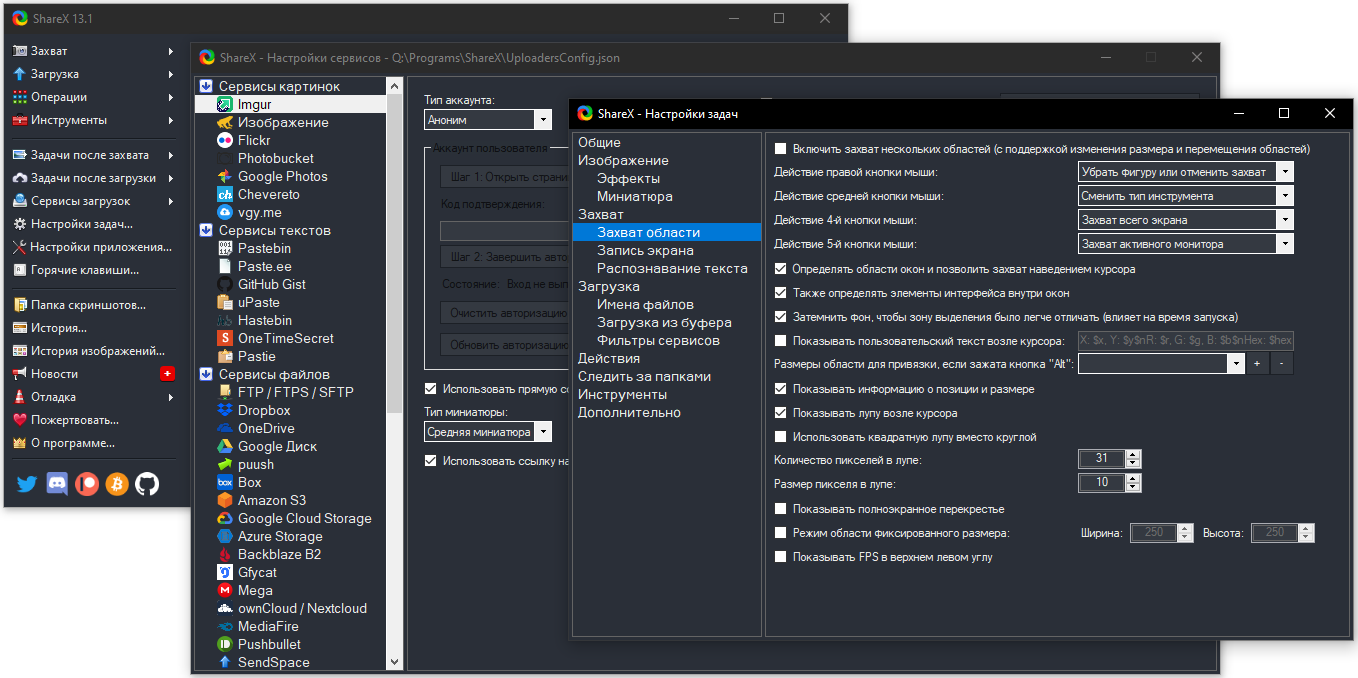
As a screenshot tool, though, ShareX is almost flawless. All those options remind me a bit of an exhausted person having a sudden burst of hyperactivity :-)

Configuring screenshots

“I’ll test it myself! I’ll test everything myself! And mop the floors!”

Efficiency Doesn’t Work. Ilya Yakyamtsev

Recording Video
3 April 2020 ·

I work remotely, so I talk to colleagues over Zoom and Slack. Mostly in chats, but many subjects are still easier to discuss by voice. That’s where it gets awkward: forget message indexing and search, and, most importantly, there’s no conversation archive. Sometimes you really need to remember: who said it? What exactly? When?

Zoom and Slack don’t solve this on their own. Zoom only records meetings you organize or have permission to record, which is far from all of them, while Slack doesn’t record video at all.

Solving the Problem

I solved it some time ago by installing OBS Studio, screen recording software popular with streamers. It handles conference recording beautifully. Setup is minimal: record the entire screen, microphone audio, and all playback audio. After a few test recordings, you can add mixer filters such as gain and noise suppression.
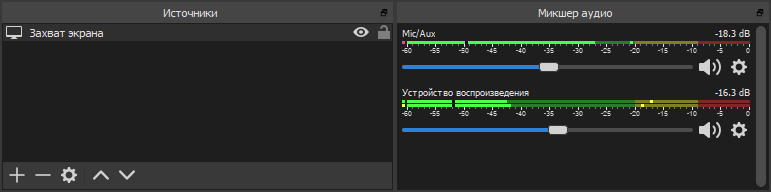
Configuring OBS Studio

Choose where to save the recordings under Output → Recording → Recording Path. We’re recording calls, so there’ll be lots of files. Might as well sort them into folders by day from the start. Go to Advanced settings and set Filename Formatting to something like %CCYY-%MM-%DD/%hh-%mm-%ss.

Quick Recording Controls

Opening OBS for every call is inconvenient, but it supports plenty of hotkeys. You can press some elaborate combination at the start and end of a conversation. That didn’t work for me, though: for some reason, the shortcuts kept slipping my mind. Even sticky notes didn’t help.

At first I got quite annoyed, then realized: if I can’t remember a shortcut, I should get rid of it. Start recording with one button, stop with another.

The hardware was easy: I have an ergonomic Microsoft keyboard with a wagonload of programmable buttons. Software was harder: OBS Studio understands some launch parameters, but there’s not much to choose from. There isn’t even a stop-recording option. I wanted more.

I eventually solved it with an OBS Studio plugin that lets you control a running instance. It was designed for remote recording control, from a smartphone for example, but it works just as well on the same machine.

Here’s what I ended up with:

  1. Install OBS Studio and the obs-websocket plugin. Clear “Enable System Tray Alerts” under Tools → WebSockets Server Settings, or it will report every little thing.
  2. Put this utility somewhere convenient to control the plugin from the command line.
  3. Assign OBSCommand.exe /startrecording to one button and OBSCommand.exe /stoprecording to another.
  4. Done. Look at you go!

A console window pops up for a moment when you press the button: OBSCommand launches, contacts obs-websocket, and waits for a reply. I initially wanted to hide the window, but changed my mind. If OBS Studio isn’t running or something goes wrong, the console will stay open, and at least I’ll know recording hasn’t started.


Unresolved References
10 Marth 2020 ·

Unresolved references to metadata objects usually appear when objects are deleted, and sometimes when configurations are merged. ITS has an article with a good explanation of the details.

Broken references don’t always affect the application’s behavior. A field without a data binding is easy to notice, of course. But suppose you delete a functional option: what does it matter if a reference remains somewhere in a form command? It simply sits there like a cut wire, inert and harmless. Nothing passes through it.

Still, these things gradually clutter the configuration and should be removed. The ITS advice isn’t all that helpful: go through every place a broken reference might be hiding. Imagine a complicated document form with lots of controls. How long would that search take? And success isn’t guaranteed.

There’s a rougher way that works: delete groups of controls from the form, one after another. Start with large groups, such as pages. After each removal, check the configuration and see whether the broken reference has disappeared. Before starting, it’s best to delete all form code so the platform doesn’t complain about references to nonexistent controls.

The problem might also be in the form itself rather than its controls, but that’s much easier to locate: settings storage, conditional appearance, commands. There aren’t many candidates.

You can also export the configuration to files and dig through the XML. That’s also worth doing because what you see in Designer can be misleading. If a form command references a missing functional option, for example, you might see nothing wrong in the command’s properties. But the XML will contain a suspicious GUID instead of an option name: practically a signed confession :-)

Filtering Standard Attributes
9 Marth 2020 ·

A short code fragment from the data history settings processor I just wrote about. It checks whether Attribute is MetadataObject’s standard attribute named StandardAttributeName. When is that useful? Suppose you’re iterating over an object’s standard attributes and want to skip one for some reason.

At first glance, the solution looks absurdly convoluted. Why not simply compare the attribute being checked with the one we want to exclude?

If Attribute = MetadataObject.StandardAttributes.Order Then

Because that code doesn’t work: comparing two standard attributes of a metadata object in the 1C platform always returns False.

All right, you might say, why complicate things? How about this?

If Attribute.Name = "Order" Then

That won’t work either if your code runs in a Russian configuration: the standard attribute we’re looking for is then named “Порядок.”

But you can look up the standard attribute in the collection by either its Russian or English name. Then you get its actual name and compare that with the name of the attribute you’re checking.

Of course, we could simply compare the name with both “Order” and “Порядок.” But first, that’s ugly; second, our coding standards don’t allow Russian in the code. I wanted a more general solution.

The Try/Catch is there in case the configuration has no standard attribute with that name at all. Trying to look it up would throw an error.

Data History Settings
9 Marth 2020 ·

I’ve put a data processor on GitHub for setting up the data history feature that arrived in the platform not long ago. Here’s what it does:

  1. Builds a tree of objects that support data history;
  2. Shows which objects currently have data history enabled;
  3. Lets you enable or disable data history for objects and their attributes.

It supports batch operations: for example, you can enable history for several documents and all catalogs at once. Or wipe all your changes and go back to the defaults the configuration developer set.

I think it turned out well. I mostly wrote it for myself, to give my brain a workout in the evenings, but we might even include it in our configuration! Right now, SSLi handles our data versioning, and it’s not exactly efficient: it’s slow and makes the database balloon. Hopefully, the platform will do better when we test it.

You can find similar tools on Infostart and ITS, but they’re either buggy, work only with Russian configurations (no English interface and dependencies on the Russian Standard Subsystems Library), or are just out of date, with no support for constants, for example.

The Ninth Wave
9 Marth 2020 ·

Yesterday morning, I was buying gifts for my women. While a florist was makings bouquets for me, we had a small talk and I suddenly caught her eye. She was looking at the growing crowd of customers with calmness and a clearly readable shadow of doom. This is probably how sailors looking at a surging wave which is about to bury their boat :-)

People outside the flower industry grin sometimes — they say, eight of March is such a magical holiday for all the florists who make a fortune in ten hours. Well, income is really good these days, but literally anybody who has ever worked in this sphere more often associates the holiday (and a couple of days before it, by the way) with a monstrous strain on health and nerves.

I can say that I got off cheaply: was just deploying and servicing some IT of a local net of flower shops, nothing more (by the way, I want to proudly recommend my former colleagues!). Nonetheless, the smell of flowers caused me Vietnam syndrome for a long time :-)

Top Exceptions in the Technological Log
16 February 2020 ·

I’ve published a Bash script on GitHub that identifies the most frequent exceptions in a collected 1C technological log.

It analyzes EXCP events. These are the main source of error information, though certainly not the only one: EXCPCNTX, for example, describes an event that had started but hadn’t finished when an error occurred. Also, if an exception occurs during a server call, the CALL event’s RetExcp field contains the error text returned to the client.

Most of the time, though, EXCP and the occasional EXCPCNTX will do. People often collect them by default: it doesn’t put any real load on the system and lets you run the logs through an analysis tool, such as the script above, to keep a finger on the pulse.