Notes: 1С

My notes about life, work and other fascinating things around me.

Shown: 0 · Page

The Year In The Date Literal Exceeds 3999
28 Marth 2026 ·

I already wrote about the error mentioned in this post’s title earlier, but here's the refresher: the platform chokes on dates later than the year 3999 (things start blowing up at 3999-12-01, I guess). In theory, dates like that should never make it into the database in the first place. In practice... Well, thanks to bugs in application code — and in the platform itself — they sometimes do.

The usual symptoms are pretty random and annoying: some reports stop working, some documents refuse to post, totals recalculation crashes, and so on. Basically, any code that touches records with those broken dates is now having a bad day.

The fix I outlined in the post linked above does work, but it's relatively slow: you need to configure the tech log, collect the output, and then parse it. The problem is that the platform crashes the moment it touches the first bad date, and there may be lots of them scattered across different tables. So you often end up doing this in multiple passes: run a check, hit an error, fix it, run again, hit the next one, repeat.

Thank You, Mario!

A few years ago, because I wanted a faster way to deal with this, I wrote a PostgreSQL query for it. The idea is simple:

  1. Find all date fields in the database.
  2. Build one giant query against those fields to look for dates beyond 1C's limit.

So yes, this query generates another query. Very normal behavior. Run the generated query, and you get the full picture: a list of tables containing invalid dates. After that, it's just engineering work — inspect the tables and decide what to do. In our case, bad dates sometimes show up in totals and turnovers, so we can just delete those rows and recalculate totals using the standard tools.

Why do this at the DBMS level? Because 1C itself can't really help here — as a reminder, the platform crashes as soon as it touches the bad records. That includes reads, not just writes. Also, in this case, going directly against the database is simply faster and more convenient.

The other day I rewrote the same query for MS SQL. It turned out longer — because, well, MS SQL likes to make you earn it — but the idea is exactly the same.

If you want to use it, keep this in mind:

  • The _Fld626 field in the query text is the Fresh separator. In your database it may have a different name, or it may not exist at all.
  • The query is written for a database that uses a 2000-year offset. If your database does not use that offset, you'll need to adjust the condition accordingly — see DATEADD().
  • I added the XML output trick (FOR XML) to stop SSMS from truncating the generated mega-query. That seemed faster than messing around with type casts. The side effect is that before running the generated query, you need to replace > with >.
With Side Effect
15 Marth 2026 ·

In the latest release of our ERP, we optimized several heavy dynamic lists — orders, invoices, proforma invoices, and so on. Over time they had accumulated a pretty solid pile of technical debt, mostly in the form of mountains of helper tables bolted onto the main queries: contact info, technical attributes, balances, turnovers, you name it.

At some point even in fairly small deployments the DB optimizer started producing complete nonsense instead of query plans, and the resource cost of letting that happen was getting less and less funny.

So, we patched things up using several different approaches. One of them was loading extra row data inside the OnGetDataAtServer() handler (I actually mentioned this mechanism not that long ago). We built a nice little framework around it, rolled it out, tested it, and... Well, now we're all sitting here with those deeply unimpressed engineer faces.

To be fair, performance really did get a lot better. Inside a compact handler, you can tune queries against heavy virtual tables almost perfectly. The problem is somewhere else: field values populated by this handler are not passed into the standard dynamic list mechanisms. Which means search, sorting, and grouping simply do not work for those fields.

So you type a value that is clearly visible in the column — and the row is not found. Or not all matching rows are found. Or rows show up that visibly should not match at all. From the user's point of view, this looks absolutely terrible. A bug is a bug. Those fields don't look any different in the UI, so how exactly are you supposed to explain that this is "just how the platform works™"?

And if you explicitly exclude such a field from the mechanisms that can't handle it, that's somehow even worse. For example, try to sort by it — and boom, giant error message. Explaining why sorting blows up on this "Amount" column while the one right next to it works just fine is... Not exactly a beginner-friendly support conversation.

Honestly, how do you come up with such a great handler concept and then completely fumble the platform-level implementation?

This randomly reminded me of Reddit. Some communities love threads like "invent a superpower, but with a side effect". Like, one person comments: "I can run at the speed of the wind!" and someone replies: "yeah, but you can't stop". That kind of thing. Sometimes it gets pretty funny.

Superpower

That's basically the kind of conversation we're having with the platform developers. You can massively speed up dynamic lists, but the UI will make your users furious. You can automatically send binary data to an S3 bucket, but lose it all with one careless click. You can teleport anywhere, but it takes exactly as long as walking. You can shapeshift, but only into an elderly pug. You have thick, silky, luxurious hair, but on your ass.

Backup Management
6 December 2025 ·

At the end of the year we shipped a big update to our internal tool (I briefly wrote about it before). The goal: give teammates sane, usable access to backups of customer apps. In a SaaS company, everyone needs backups all the time — dev, QA, incident investigations, you name it. Without proper tracking the whole thing turns into a petting zoo: three people, same moment, three requests for almost identical copies of the same database. Sure, it "works", but you end up chewing through 3x the resources for zero extra value.

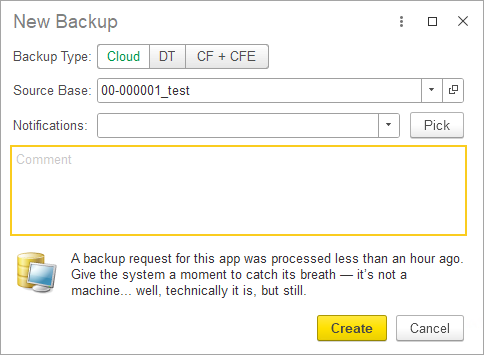
We did have a solution built on top of the Bitrix UI, but due to, uh... the unique "evolutionary path" of that product, it delivered more pain than gain. So we rethought the workflow and rewrote everything. Frontend is 1C; backend is PostgREST, PostgreSQL, PowerShell, and a bunch of other bits and bobs. The internal logic is fairly gnarly, but for the user it's a clean, friendly UI where you can request a backup in literally two clicks.

You can pick one of three backup types:

  • Cloud backup (a copy of the real app deployed in the cloud and accessible — including via the browser);
  • File backup (a regular .dt file you can download and spin up locally);
  • Configuration + extensions backup (.cf + .cfe).

Also, the new solution detects when someone tries to request a backup for an app that's already being generated right now. And it rate-limits things too: you can't back up the same app more than once per hour.

And yes — we're still sneaking jokes into the UI. Obviously.

But Still!

Coffee First!

Desire Paths
29 November 2025 ·

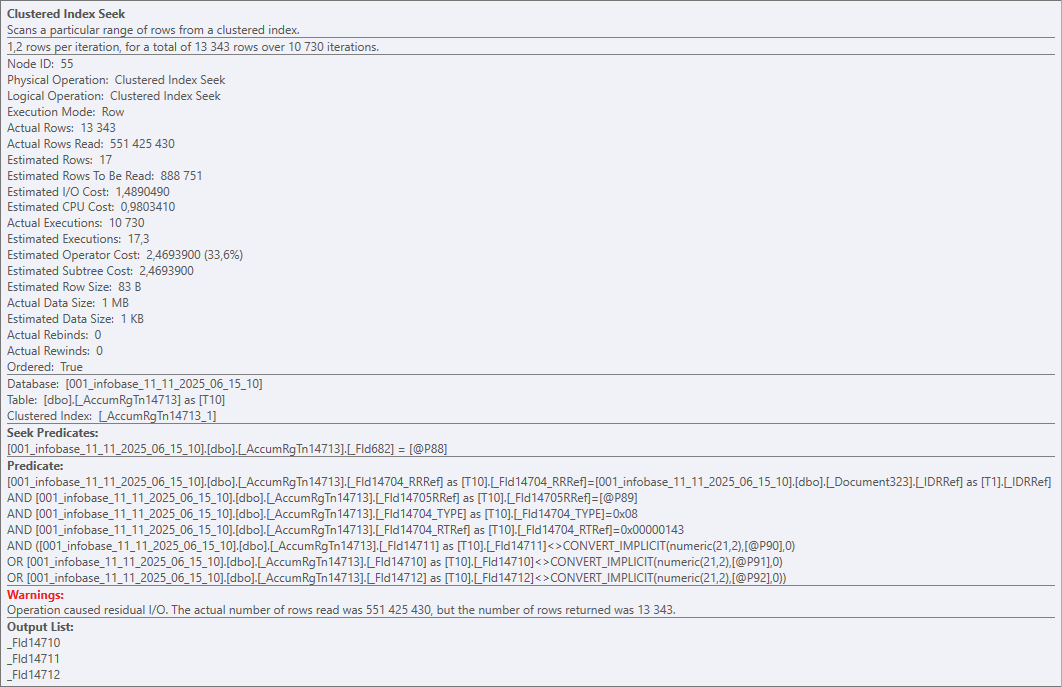
Alright, Jean Fresco's riddle. You've got a table — say, ~50k rows. How do you end up reading half a billion?

Easy-peasy: Nested Loops + Clustered Index Seek:

Half a billion

Clustered Index Seek is a bit of a marketing name here, of course. In reality, on every execution the operator walks the entire table (the whole clustered index) and checks every row against the predicates. And it does that 10 730 times for 51 391 rows. Result: 551 425 430 rows read, 13 343 returned.

Ouch

So yeah — a perfect textbook example of a horrible query plan in a vacuum. Put it in a museum. Nested Loops, if you've forgotten, works roughly like this:

For Each Table1Row In Table1 Do
    For Each Table2Row In Table2 Do
        ...

That's fine for small tables, but the DB can also pick it for bigger ones — for example, if it runs out of time to build a proper plan.

That's exactly what happened here. Zooming out to the platform level: we've got a dynamic list that queries a documents table, and the devs bolted on like a dozen virtual tables from accumulation registers.

Some of those registers were huge on their own, and the virtual tables poured gasoline on the fire (each one turns into 2+ nested queries). The DB honestly tried to come up with an efficient strategy, but at some point it basically decided: "a garbage plan is still better than no plan at all".

And the user? They tried to search a document by number — and the client app just straight-up froze.

So, about virtual tables in dynamic lists. There's a nice English phrase: "desire path" — the trail people naturally carve because it's the easiest way. Slapping a virtual table onto the main one really is often the simplest, fastest, most familiar way to solve the task. But it's not efficient.

There's an alternative, for example the OnGetDataAtServer() handler. It takes longer to implement, but it lets you properly tune the virtual table and avoid the scenario above. Scrolling the list will produce more queries, sure — but they'll be smaller, faster, and way more efficient than one single giant monster query.

Harmless Harm
16 November 2025 ·

The other day my colleague and I were debugging an issue, nothing fancy, just another "why is this query behaving weird?" moment.

Simplified, the idea was: we read a table from the database and dump the result into a temp table. If a certain condition is met, we still want the temp table to be created, but it must be empty (regardless of whether the source table has rows or not).

The query looked roughly like this:

SELECT
    Table.Field1 AS Field1
FROM
    Table AS Table
WHERE 
    &Parameter

If we needed to copy rows from the source table into the temp table, we passed TRUE into the parameter; if we wanted the temp table to be empty, we passed FALSE.

Looks simple at first glance, but this trick is a silent performance foot-gun if the table being read is large.

The reason is how DB engines work with parameterized queries. Both MS SQL and PostgreSQL build the execution plan based on the query text, and in this example the parameter value does not affect the decision of whether the table should be read or not.

As a result, when this query runs, both engines will pedantically scan the whole table (or its index), even if the parameter is FALSE. In that case each row is just discarded, so the logic is technically correct, but we're wasting resources on a pointless scan and polluting the buffer cache, slowing down the system overall and diligently contributing to global warming :)

The fix is simple: inline TRUE/FALSE in the query body as a constant instead of using a parameter. Or use TOP so the query text is even simpler:

SELECT TOP 0
    Table.Field1 AS Field1
FROM
    Table AS Table

At the SQL level this turns into something like "SELECT TOP 0 ... FROM Table" for MS SQL and "SELECT ... FROM Table LIMIT 0" for PostgreSQL. The final plan will still contain a read operator, but the executor won't actually request any rows, so there's no real data scan (yay).

P.S. If you don't care about having proper column types in the temp table, you can even do this:

SELECT TOP 0
    UNDEFINED AS Field1

The performance gain, however, is so tiny that it's probably not worth over-optimizing for this. There are better hills to die on.

Voodoo
5 October 2025 ·

Looks like we finally caught our first lab-reproducible case of platform cache corruption. Short synopsis:

  • Spin up a fresh app from the v35 template of our ERP.
  • Run it and wait for initialization to finish.
  • Swap the app configuration to the v36 release (specifically build 28537 from the dev repo) and run it again.

After this super simple sequence, about half the team sees the platform suddenly lose one of the enums. And it's annoyingly selective: hit an enum value on the client — all good; do the same on the server — boom, exception.

Same story with the manager module of one catalog: its methods exist and are exported, but after the update the platform pretends they don't and throw an exception when you call them.

Welcome To Dipshit Central

As always, when the magic blooms — look at the cache. Clear it and symptoms vanish. There are indirect hints too:

  • The enum did exist in v35, but it was renamed in v36.
  • Those manager-module methods didn't exist in v35 (they were added in v36).

So the v35 cache didn't contain either of these in their v36 identities, yet for some reason the platform insists on digging into that old cache.

We still don't have a clean root cause. We traced it to a specific commit after which the bug started showing up, but the only weird thing there its its name (and honestly, there are nearby commits that look even more suspicious from this point of view). The rest were minor changes that regenerate internal metadata IDs in the manifest. Yes, those IDs are tied to cache keys, but they get bumped on any metadata change and have never caused issues before.

If you landed here from Google because you hit the same mess — make a no-op change to the problematic object so the platform refreshes the metadata IDs in the manifest. For example, add an empty method or even just a space in the module. That fixes the configuration so the recipe at the top stops corrupting the cache.

Voodoo, sure — but hey, it works ¯\_(ツ)_/¯

Slow Removal of Fresh Areas
3 August 2025 ·

A colleague noticed that on one of our Fresh instances, deleting data areas had become painfully slow. Dug into the metrics:

DELETE FROM T1
FROM _DataHistoryMetadata T1
WHERE 
    T1._MetadataId = ?
    AND T1._IsActual = 0x00 
    AND NOT (
        T1._MetadataVersionNumber IN (
            SELECT T2._MetadataVersionNumber AS MetadataVersionNumber_
            FROM _DataHistoryVersions T2
            WHERE T2._HistoryDataId IN (
                SELECT DataHistoryLatestVersions1.DataHistoryLatestVersions._HistoryDataId AS HistoryDataId_
                FROM DataHistoryLatestVersions1.DataHistoryLatestVersions T3
                WHERE DataHistoryLatestVersions1.DataHistoryLatestVersions._MetadataId = ?
            )
        )
    )

Each of these queries was reading around 20GB. What's happening is mostly clear: the platform is trying to delete an area's data history, but the janky DB query causes a full scan over the whole history table across all areas instead of using an index. Someone on Dmitrovskaya got lazy again.

Why are you surpised?

So we were losing between 30 seconds and a half an hour per operation. Wanted it faster. Fix:

CREATE NONCLUSTERED INDEX IX_DataHistoryLatestVersions1_MetadataId
  ON dbo._DataHistoryLatestVersions1 (_MetadataId)
  INCLUDE (_HistoryDataId)
  WITH (DROP_EXISTING = OFF, ONLINE = OFF);

CREATE NONCLUSTERED INDEX IX_DataHistoryVersions_MetadataVersionNumber
  ON dbo._DataHistoryVersions (_MetadataVersionNumber)
  WITH (DROP_EXISTING = OFF, ONLINE = OFF);

Deletion cost predictably dropped ~99%.

If you're going to repeat this on your side:

  1. Technically this violates the license agreement, you've been warned and all that.
  2. There's a risk the platform will trip over the new indexes during future restructurings (especially on the "new" schema). Better to have a ready script to drop the index, and then (after restructuring) put it back.
Myth Buster
27 Jule 2025 ·

I stumbled upon a hefty Infostart article all about "debunking myths" around the platform.

Honestly, about half of it reads like a joke. It's like:

Hot off the press! Crime, intrigue, investigations! File‑based infobase is faster than client-server! DCS is slower than a plain request! Calling a server method on the server counts as a brand-new server call! UFO over Red Square!

Still, there are some genuinely interesting nuggets! For instance, I'd never heard the claim that cramming your code into one single line makes it run ten times faster. Too bad you'd get your ass handed to you by the team for trying that kind of desperate swag before you even get to celebrate the speed boost. And let's be real — most enterprise app slowdowns usually come from totally different places.

Or take their speed comparison for dumping data into a table: one test for object presentations and another for their descriptions. The presentation dump was literally tens of times slower! On paper, that sounds weird — both are just strings already pulled from the database at measurement time. My guess is it's down to typing: presentation strings can be unlimited length, unlike descriptions. So you get extra memory allocations, helper structures popping up, and bam — that's where the slowdown creeps in.

P.S. I've jotted down some of these points myself before. Off the top of my head — I remember benchmarking ValueIsFilled() and getting a nasty surprise from the built‑in FindByNumber().

No
11 June 2025 ·

No

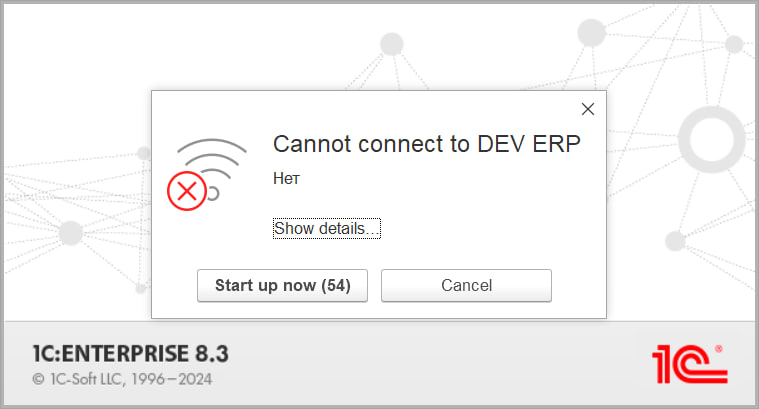
This is the message the current platform throws up when you try to connect to an offline server cluster. I do appreciate minimalism in interfaces, of course, but this is definitely over the top.

What's more, the platform is installed with only a single language pack (English) and even launched with a hard override to "Ven VLen", yet somehow the native birches still manage to sprout up. Maybe the C++ library that fires off the message (DataExchangeTcpClientImpl.cpp) is looking at the OS language (Russian) in my case — hard to say.

Anyway, I can't shake the Bugs Bunny vibes every time I see that dialog box.

No

A Little Bit Of Surgery
17 December 2024 ·

A few years ago, I stumbled upon a story about a programmer who had to debug software controlling a surgical robot — right in the middle of an operation. That blew my mind, to be frank.

Today, my colleague and I were fixing a 1C cluster with databases running on 1cFresh. After migrating it to a neighboring server, the thing suddenly started acting up. Long story short: trying to print a document would send the client app into its death throes.

While we were knee-deep in troubleshooting, I had this thought: sure, it doesn’t look as terrifying as debugging software that someone’s life literally depends on. But if you think about all the clients sitting on edge because their business is grinding to a halt... Well, who knows where the stress levels are higher?

P.S. Nerdy details for the curious. During the migration, the permissions for the server cache folder didn’t transfer properly. This led to a funny (well, not so funny) effect: the logs would happily land there, but session data wouldn’t.

So, when someone opened a print form, the configuration tried saving it to the storage, and rphost, in turn, attempted to shove it into the session cache. Here’s where things went sideways: the worker' process (probably) got slapped on the wrist by the OS. Due to (apparently) some funky file system event handling in the platform, the exception wasn’t caught, so the poor thing had no better idea than to kill the session. Naturally, this caused the client process to crash.

We fixed the permissions, rebooted the cluster, and voilà! The problem was gone.

End of Report

All other hypotheses — cluster manager acting up, lack of hardware resources, configuration bugs, client-side issues, broken security profiles, network problems between the client and server — got tossed out during the diagnostics process.

Rapture
31 August 2024 ·

I remember how amazed I was when I worked with window functions in PostgreSQL for the first time. You can adjust the calculation window for each row individually! And even segment it in advance. And all this is done natively, within a regular query, no extra add-ons needed. The standard aggregation with grouping and subqueries that I was used to in 1C suddenly turned into a pumpkin, just like Cinderella's carriage at midnight.

Recently, I’ve been learning Blender, and I suddenly felt the same excitement for the same reason. The fact that you can freely move objects around the 3D Viewport with the Move command was clear from the start, fine. However, when it hit me that each object is a set of polygons, and that each polygon can also be moved freely, leading to a natural reshaping of the object's geometry — that’s when it really got me.

Technology is amazing. Learning is awesome. Moments like these make me want to keep doing it over and over again :)

Nowhere To Run
31 August 2024 ·

Yesterday, I decided to take a break from work and go for a good run. I headed to the local park and did a few laps. Sitting there catching my breath, I grabbed my phone to switch the track, and there it was — a congratulations from my fitness tracker.

Oh hi

So much for taking a break. The platform is watching you, %username%!

P.S. But hey, now I’ve got a custom badge with the platform's logo. Gotta wear it with pride!

Yaga
29 Jule 2024 ·

I accidentally remembered that six months ago, one of my colleagues threw a link to Yaga into the work chat. It is a future (I guess) competitor of JIRA in Russia. Judging by the URL, the guys from Rostelecom are developing it. Here my curiosity was awakened — how is it there, did it take off?

Alas, but looks like nope. At least, the landing page has the “leave a request and wait for a response beep” vibe. Only a simplified version is available for smaller teams that I can't touch as well: being not in Russia and clicking on the “Start using” button leads me to a ban. Welp, next time, maybe.

The naming is clickbait, of course. But I’m not sure if it’s really a good choice. For example, “1C” may provoke forced jokes (One s! Odin's ass! Haha), but if you google this, you are more likely to find information about the platform or at least the vendor. Not a bunch of articles, fan fiction, fan art, or video games, as in the case of Yaga.

Moreover, some wrong associations come to mind. What does Baba Yaga reminds you of? A hut on chicken legs? It looks like an initially poorly designed application that was somehow remade right on production. A mortar? A crutch? Damn, if you look at it from the point of view of programmers — these are not red flags, but real scarlet banners fluttering in the wind :)

One more thing: I'm probably spoiled, but when I hear the word “Yaga”, the first thing that pops into my head is not a powerful witch from Slavic folklore, but disgusting booze from the 2000s.

Now Baba with Yaga are no longer redneck, but a patriotic programmer!

― colleague

Non-Unique Metadata
8 June 2024 ·

Once again, I came across a nasty bug when the platform broke the data history metadata table.

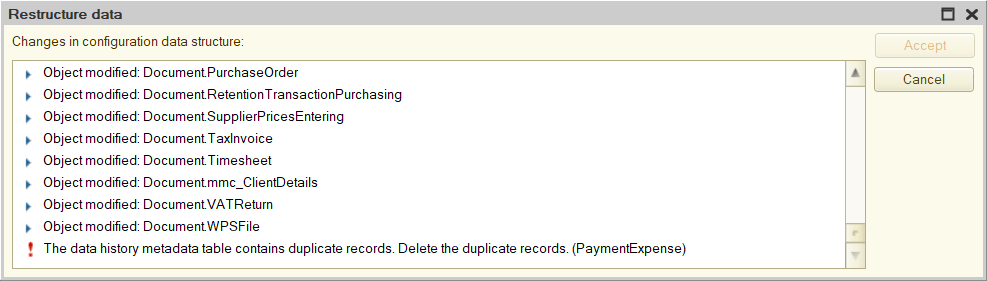
Outwardly, it looks like this: you update the database configuration, and when you try to restructure, the error “The data history metadata table contains duplicate records. Delete the duplicate records” pops up. The platform does not offer any clear way to find such records.

The data history metadata table contains duplicate records. Delete the duplicate records

The problem can be solved at the database level. The table referenced by the error is _DataHistoryMetadata. It contains metadata versions of each object for which data history is being maintained. This allows the platform to understand what attributes the object had at any point in time if the data history is maintained for the object.

How does it work? Well, when the list of an object’s attributes changes (for example, an attribute was added to the catalog), the platform writes its metadata: specifically, it adds a new entry to _DataHistoryMetadata and stores in it the current list of object attributes, as well as the version number of this list (for example, when history is enabled for an object, the first version of metadata is saved, when adding some attribute, the second version is saved, and so on).

The platform also puts a mark in the created record that this particular version of the object is the most actual, and then removes this mark from the version that was marked as actual before.

So, the problem is that the platform sometimes forgets to take the last step, and two versions appear in the table at once, marked as current. The Designer understands this but cannot do anything.

The solution follows from the algorithm above: you need to find conflicting versions and revoke the mark of actuality from the one that is older. It is better to use queries: data history is often enabled for a bunch of objects, and the list of their attributes is constantly changing — in general, there will be so many versions in the table that the devil will break his leg.

If you also encountered this problem and are therefore reading this text, you can use the queries that I wrote:

  1. get-issues.sql checks that there is an issue: it looks for metadata versions that are also marked as actual.
  2. fix-issues.sql removes the actuality mark from those versions that are actually outdated.

Both queries are written for Microsoft SQL Server. If you use PostgreSQL, then here they are for this DBMS.

The queries will require a slight adaptation to a specific database: they use the _fld626 field, which is the data separator. In your _DataHistoryMetadata table, this field may be called differently, so you need to update its name to the current one. It will be difficult to make a mistake — the table has only one field with the _fld prefix.

P.S. Please bear in mind that the license agreement prohibits access to the database, bypassing the platform’s tools, so you can only go for such experiments if there are no other options left.

The Main Issue of UUID
2 June 2024 ·

I came across a good text about the main problem that UUID brings with itself. It is also relevant for 1C: all platform reference objects (catalog items, documents, and so on) have their own UUID. They are stored in a database, actively used in searches, and, of course, extensively indexed (with all the ensuing consequences).

1C tries to suppress the issue by creating consistent UUIDs. It may not be perfect, but overall, this thing works, and the indexes turn out to be more or less compact. In general, the community has been talking about this for a long time: for example, the old thread on Mista (though the conversation here quickly turned into a chicken coop, and out of six dozen comments, at most one and a half are on point).

P.S. The remark about the probability of creating two identical UUIDs in one database made me laugh:

As an aside, for those worried about collisions: you should take up the lottery, since winning the jackpot twice in a row is a much more likely outcome than your system ever generating two identical random 128 bit numbers.

One Query More, One Query Less
5 May 2024 ·

One query more, one query less — it doesn’t matter, people often say. Like, the main thing is that the query must be cheap: it doesn’t read too much, uses index, and so on.

This point of view makes sense, but mindlessly machine-gunning queries is a dangerous idea. Even if everything looks good at the moment, the system may change slightly in the future. And then a seemingly harmless patch will burn your production server to the ground right on Friday.

Let me tell you about one example from recent practice. There is an ERP that contains a table with payment stages for customer orders. One of these stages is prepayment; until it is received, you cannot create an order for the supplier.

Technically, the purchase order simply stores the customer's order ID; if the field is filled (that is, if the purchase order is created by the customer's order), ERP needs to read the payment stages of the customer's order and understand whether the purchase can be made.

It sounds elementary, but monitoring shows that the operation is slow as hell and eats up memory as if it were the last time.

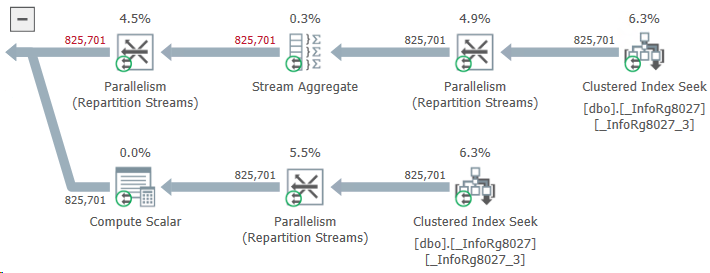
Welp, let's go find out. We saw something like this:

825701 records

What do we have here? Instead of taking two or three stages of payment for an order, ERP reads almost a million! How this could be possible?

It turned out that the problem was with those purchase orders that were not related to customer orders at all. The developer considered that the logic for them could not be changed: the customer’s order ID is empty and the query will not find payment stages for this ID. This means that the same result will be obtained as if there were no query at all. And an extra query — well... One query more, one query less... Not a big deal.

The deal turned out to be big. The table of payment stages contained data not only for customer orders, but also for other types of documents. Their customer order ID field was empty. As a result, ERP, when trying to find payment stages using an empty customer order ID, unexpectedly found them.

The query read about a gigabyte of data and wrote it to a temporary table. A gigabyte was read, then a gigabyte was written... History hit the disk, the DBMS buffer cache, and other components of the system (even the network, which had to drive this gigabyte back and forth without any benefit).

Do you know what I think? If the result of a query is known, there is probably no need to do it after all.

Not Only Everything
25 February 2024 ·

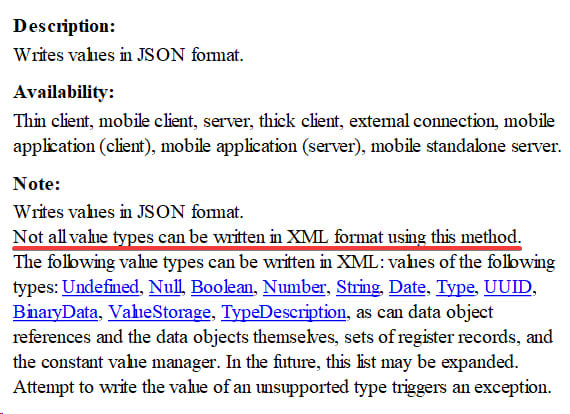
This commentary in the documentation for the WriteJSON() method of XDTOSerializer is enviably deep, I would say:

Not only everyhing

Well, yes. The method dumps data into JSON, not XML. So it’s hard to argue that not all value types can be packed into XML using it (to be precise, none). Such a pity that there is an obvious copy-paste from the help for WriteXML() further in the text! I almost decided that it was an Easter egg from the developers :)

Last Meth
17 December 2023 ·

I'm digging into the code of an external component for 1C platform, published by its developers as an example. The good thing is: well, it can be compiled and if you tweak it a little — it does the job.

As for other things, there are a lot of bruh moments. For example, the project can't be opened in modern Visual Studio (you need to specify CMake manually). The code is quite sloppy; there is no documentation, comments, or formatting. Long story short: I believe, it can be difficult for a developer without solid experience in C++ to get the hang of this.

Was a bit amused by the naming in the code below:

long CAddInNative::FindMethod(const WCHAR_T* wsMethodName)
{ 
    long plMethodNum = -1;
    wchar_t* name = 0;

    ::convFromShortWchar(&name, wsMethodName);

    plMethodNum = findName(g_MethodNames, name, eMethLast);

    if (plMethodNum == -1)
        plMethodNum = findName(g_MethodNamesRu, name, eMethLast);

    delete[] name;

    return plMethodNum;
}

I see here the inexplicable love for abbreviations. What made the author name the variable “eMethLast”, not “eMethodLast”? They already created "wsMethodName" and "plMethodNum", after all.

Perhaps this is an Easter egg with a reference to Breaking Bad. Then I like it for sure :)

Everyday Heroism
24 September 2023 ·

Some time ago, I was setting up Swagger for the internal API. While I was fiddling around, it became clear that some functionality did not need to be included in the documentation. I was looking for a way to do this without crutches and came across a funny question on GitHub.

What's funny, you ask? Well, I involuntarily remembered Mista. Among 1C developers, this is synonymous with the word “toxicity”: if you ask anything there, you get a bucket of slop by the collar instead of an answer. Here, of course, everything is not so neglected, but holy crap! These persistent guys who referring to the 14-page manual made me laugh a lot.

One thing is good: by the end of the thread, there appeared a brave rebel who just answered the question. They, like, named the required parameter for a FastAPI method's decorator, which is not supposed to be shown in the documentation. No links — could you imagine?

Not all heroes wear capes, I would say.

Do you speak English?
14 May 2023 ·

The repository login form of the current platform (8.3.22.1923, to be precise) launched with the English interface:

Login Form

You had one job, literally.

I heard some rumors that development of the Designer was stopped largely due to the monstrous amount of technical debt that slows down any new features. But here are interface glitches right on one of the first application windows! Curious how it got through the build tests.

Maybe they don't exist at all.