Notes: 1С

My notes about life, work and other fascinating things around me.

Shown: 0 · Page

Metadata Not Found
8 June 2021 ·

Metadata not found

I doubt many people have run into this one. First, you need to use the platform’s built-in data history, which isn’t especially popular. Some people are tied to the Standard Subsystems Library, which still uses familiar versioning through information registers; others don’t like how it’s implemented, and to be fair, the performance does have some rough edges.

Second, you need to disable data history for a metadata object and delete its accumulated object versions before new changes move from the buffer into the main table.

Here’s how data history works. It’s off by default. If you have the right permissions, you can turn it on for the objects you need: constants, catalogs, documents, and so on. The platform then records exactly what changes in those objects. It does this in two stages: first, a relatively fast write to an intermediate buffer, _DataHistoryQueue0; then, when UpdateHistory() is called, the data moves to the main version table, _DataHistoryVersions, and shows up in the app.

History can be updated immediately on writing, but to shorten the transaction, that step is usually moved into a scheduled job. So the data moves out of the buffer every so often, say once every five minutes. If, between an object’s data change and the history update, you disable its history and delete its versions, UpdateHistory() throws an exception: it tries to move changes from the buffer to the main table, but can’t match them up with the data already there.

Here’s some code that reproduces the problem with the Items catalog on platform 8.3.17.1989. Swap in any other object that supports data history; the result is the same.

How do you avoid the error? Obviously, call UpdateHistory() immediately before disabling history for the object. Ideally, do this when users aren’t working in the system: someone’s transaction could slip in between updating and disabling history and cause the same problem. Exclusive mode can guarantee that won’t happen.

An exclusive lock on the object’s table also comes to mind, but the documentation advises against calling UpdateHistory() inside transactions, so I’m not sure about that.

How do you fix the error? Enable data history for the affected object, update history, and disable it again. Back out, then try again properly, so to speak.

Preparing for the 1C:Expert Exam
25 May 2021 ·

In mid-May, I passed the 1C Expert exam on the technical side of large implementations. I’d spent almost two years preparing, so I’m damn glad I finally got through it.

There’s tons of material online about the exam and everything around it, from Viktor Bogachev’s course to, say, a Telegram chat on the subject. So there’s no shortage of answers to the question in the title. But there are a couple of ways this can mess with your head that people rarely talk about. It helps to know about them beforehand.

Not Enough Dopamine

This exam is hard. Preparing can take a long time, and so can passing it: there’s a good chance you’ll need several attempts. I passed on my second try, but it varies. Some people I know passed on their third, fifth, or even eighth attempt.

You can end up putting in a huge effort again and again with nothing to show for it. Eventually, your brain decides this is something to avoid: it never works out, it feels pointless, and it makes you miserable. You can guess what that does to your chances of passing.

That’s why it’s better to treat preparation as a long, risky project: break it up with small tasks you can actually finish and feel good about. Your brain doesn’t draw much distinction between big and small successes, and getting back to the main project will be easier.

For example, as a distraction I wrote home automation scripts: the static site generator for this website, an organizer based on text files, tools for my home NAS, and other things I’d never got around to. Any tasks will do, including ones that have nothing to do with IT. Unclog the bathroom drain? Excellent idea!

Not Enough Memory

Unless you deal with 1C performance problems every day, this exam eats up a lot of mental RAM. You have to keep all sorts of things in your head that you’d normally just look up: Microsoft SQL Server trace flags and dynamic view names, PostgreSQL settings and recommended values, the platform’s standard indexes, and so on and so forth. A hu-u-uge pile of information! (gestures to show how huge)

Give your brain enough data, and it starts acting suspiciously like a DBMS with an overflowing buffer cache. In other words, anything you don’t need right now will be evicted from memory. Be prepared to forget the most unexpected things: your apartment number, the neighbor’s dog’s name, your wife’s birthday, and those aren’t even the strangest consequences. While preparing, I could really relate to Johnny Mnemonic, the guy from an ancient cyberpunk film who loaded so much data into his brain that he nearly died :-)

Don’t do this

I see two ways out, both fairly obvious.

First, get some practice in. Complicated technical details are a hundred times easier to remember when they bring up a picture of the app where you tried them out.

Second, find something to associate the really tricky bits with. Take Bash! The utility name sed is easier to remember if you know it stands for Stream EDitor. The name cat comes from concatenate, not the animal, but if the animal helps you remember it, use that. Why not?

Or take the byte order mark: \xef\xbb\xbf, yes. I got it to stick with, don’t laugh, the completely unrelated phrase “Elf Friend BB Best Fight.” I have no idea why my brain needs such ass-backwards such roundabout ways of getting things in, but I’m not complaining. Whatever works!

An Updated Script for Finding Long Queries
26 April 2021 ·

I’ve updated the script for finding long queries in the platform’s technological log. The old version had a pretty big bug: it happily grouped DBMSSQL events by Sql and Content, but ignored cases where Sql was missing. That isn’t exactly normal for DBMSSQL, but it happens.

While I was at it, I tidied the code: added formatting and comments, and moved some gawk logic out of the main body into functions. Yes, the script now looks longer than it actually is, but it’s much easier to read.

Honestly, I don’t understand why Bash veterans cram all their logic into two or three lines. The language isn’t exactly a shining example of readability to begin with; Nikita Prokopov’s Telegram channel has an excellent piece about that. A page of pipelines without a single line break makes me want to quietly climb out of the window.

A Bunch of Scripts
24 April 2021 ·

I’ve put a few more scripts on GitHub that I wrote recently to dig through the platform’s technological log:

  • Frequent Events. Groups events by name, counts occurrences, and lists them in descending order, from most to least frequent. Not sure this one is much use in practice; I just wanted to note down which cluster process writes which events.
  • Exception Descriptions. Groups EXCP events by the Name field; for each name, it lists the Description values found in exceptions with that name. This script gives you a rough picture of which exceptions are real problems and which are just background noise you can ignore and, for example, filter out in Kibana.
  • Locks by Connection ID and Region. Useful for finding the culprit behind a managed lock timeout: it extracts all TLOCK events for a particular region and connection from the technological log, then puts them in chronological order.
The SKUUUID in My Own Eye
22 February 2021 ·

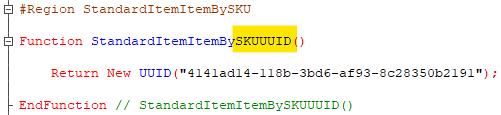
A couple of weeks ago, Alexander Kuntashov posted an amusing screenshot on his channel of an enumeration from the Electronic Documents Library. Whoever wrote it really had a thing for long abbreviations. I had a great time joking about the family resemblance between ИППДОИПУПДУКД and Moscow’s ГНУВНИВИПФИТ, then spotted this beauty in my own code:

SKUUUID

Not quite the master’s touch yet, of course, but definitely heading in the same direction. It reminded me of the parable about the speck in someone else’s eye and the great big log in your own :-)

The Date Literal Problem During Totals Recalculation
6 February 2021 ·

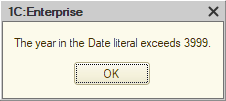
So, during a routine totals recalculation from the Configurator, we suddenly got the error: "the year in the Date literal exceeds 3999". Which means there's a date somewhere in the database — or trying to get there — that is beyond the maximum 1C can handle: 31.12.3999 23:59:59.

Exception

Alright. What do we do with that?

The main thing is to identify the exact table that contains the bad dates. Since the error showed up during totals recalculation, the obvious place to look is the registers. Open the standard totals management tool, start recalculation, and you'll get the name of the register the platform trips over.

Another approach — more proper, methodologically speaking — is to enable tech log collection (SDBL, EXCP, and EXCPCNTX) and get a log that looks roughly like this. In that log, find the EXCP event, and right before it the SDBL event. That SDBL entry contains the SQL query that caused the crash. In its text, you'll see the table name you need (AccumRgTn11530). The corresponding configuration object name can be pulled out with pretty much any utility built around GetDBStorageStructureInfo().

One way or another, you end up with the register name. Open its form, sort by period, and you'll quickly get to the bad entries. Then the job is to inspect the documents that created those records, fix the root cause, and repost the documents. If totals recalculation is still broken after that, then either this is not the only table with broken dates, or those dates have already spread somewhere beyond the records table.

For example, I once had a case where fixing the records was not enough, because records with invalid dates were still sitting in the turnover table. The platform itself could not remove them, but the database was small enough that I could get away with some restructuring tricks. I pulled the following stunt: turned off the "Use in totals" flag for all register dimensions and applied the changes; then turned it back on and recalculated totals again. As a result, the register's turnover table was physically dropped, then recreated and filled from scratch — this time without dates from the distant future.

As a last resort, you could delete the bad records with direct SQL queries (DELETE or even TRUNCATE). But first, that violates the platform vendor's license agreement, and second, it's risky: it's very easy to remove something important and not notice until later. So I would, uh, not recommend trying that at home.

Checking an Object’s Visibility
17 January 2021 ·

The platform has a few different ways to decide whether a user can see a metadata object. One is functional options. If you haven’t used them before, here’s the short version: an object can be included in an option that is either active in a particular infobase, making it visible to users, or inactive, hiding it. An object can belong to several options, in which case it appears if at least one is active, or to none, in which case users always see it.

I remember looking, about five years ago, for a way to tell from code whether a user could see an object, just as far as functional options are concerned. For some reason, I didn’t find a solution then, although it’s ridiculously simple. Here’s a function for exactly that. The logic:

  1. Iterate through the options and look for the object in each one.
  2. If the object belongs to an option, check whether that option is active. If so, the user can see the object.
  3. If the object belongs to no options, the user can see it too.

You’d want to cache the result, of course, if only because there’s a query inside a loop. Apart from that, it does the job. I still can’t understand why I didn’t write something similar back then. Man, I hope that five years from now, the things driving me nuts today will look just as easy to fix.

Searching Files Recursively
14 January 2021 ·

Some time ago, I tried finding code vulnerabilities with Bash scripts. Sounds intimidating, but it’s just recursive text searching with regular expressions. I wrote the scripts, but as I realized today, I did it in a rather… ass-backwards way, ahem. All you need is egrep! Out of find, xargs, and egrep, we can throw away two of the three.

For example, today our configuration stopped building in the latest EDT release. We suspected broken GUIDs: references to metadata objects removed from the configuration. The platform doesn’t always clean these up after deleting the objects themselves. I’ve written about this a couple of times, for example here and here.

We decided to search the configuration export for GUIDs and check whether they all belonged where they were. All it takes is one command:

egrep -rn '.{8}-.{4}-.{4}-.{4}-.{12}' dump

The r flag enables recursive search; n adds not only the filename but also the line number to each match. The final parameter, dump, is the directory to search.

You could make the regex more precise, but this is plenty. False positives, GUIDs that aren’t broken references, are easy to filter through a pipe. For example, the following script excludes GUID-containing lines that include “uuid”:

egrep -rn '.{8}-.{4}-.{4}-.{4}-.{12}' dump | grep -v 'uuid'
Good Old DATETIME
11 November 2020 ·

I did some reading online about date types in MS SQL Server, and I no longer wonder why 1C still clings to its date offset. People describe a whole bundle of DATETIME2 problems:

  1. You can’t do basic date arithmetic. Want to subtract two dates or add a day? You’ll need a workaround.
  2. Standard functions still return good old DATETIME, DATEADD for example. If you store your data as DATETIME2, you have to convert it.
  3. Fields of this type don’t index well, since each DATETIME2 value is stored backwards, time first, date second. So the DBMS gets its row count estimate wrong and comes up with a bad execution plan.

You can read more on Towards Data Science or, for example, SQL Server Central.

Date Offsets in 1C
10 November 2020 ·

MS SQL Server DATETIME fields cannot store dates before 1753. Try writing January 1, 0001 to the database, for example, and you’ll get an out-of-range value error. I thought this was a funny old quirk for such a well-established DBMS until I stumbled across the reason.

Briefly, Britain adopted the Gregorian calendar in 1752, losing eleven days in the process. That created a problem: suppose a user wants the difference in days between 1653 and 1753. What should happen? Account for the missing days? Ignore them? Add hints or settings?

Apparently, the developers decided not to get into all that and just cut off the date range. If you need earlier dates, DATETIME2 doesn’t have that restriction.

As for 1C, the platform originally used DATETIME and devised a special workaround to avoid trouble storing dates before 1753. In short, when writing dates to the database, it quietly adds two thousand years to each one, then subtracts them when reading. A user sees January 1, 2000 in 1C, while the database actually stores January 1, 4000.

I wonder why 1C hasn’t thrown this out yet. The platform uses DATETIME2 now, so it shouldn’t need the offset trick anymore. Maybe there’s a catch, or maybe they’re just being careful, but the DBMS developers themselves seem quite confident:

Your great great great great great great great grandfather should upgrade to SQL Server 2008 and use the DateTime2 data type, which supports dates in the range: 0001-01-01 through 9999-12-31.

Joe Stefanelli (SQL Server developer)

Perhaps it’s simply at the bottom of the priority list. Adding and subtracting two thousand years for every date increases hardware load, of course, but it gets lost among everything else.

Investigating an Error in Designer
31 October 2020 ·

So, Designer reports an error, and we need to fix it or find a workaround. This could get awkward: we can’t look at the application’s code. Still, to fix it, we need to work out what Designer was doing before it fell over, and why it couldn’t finish.

What can help?

First, the error message itself. Often, that alone is enough to get your thoughts moving in the right direction. If a query caused the failure, the error will also include a message from the DBMS.

Second, the technological log, capturing EXCP, SDBL, and DBMSSQL (DBPOSTGRS?) events for t:applicationName=Designer. That shows us the exceptions inside Designer and the queries it runs, which are often what went wrong.

A database query trace can also help. With MS SQL, you can capture it using Extended Events; specifically, we’re interested in error_reported, rpc_completed, and sql_batch_completed. The principle is the same: capture query execution errors and the queries themselves.

Here’s an example. Maybe not the best one, but it’s fresh.

We’re working with a configuration that uses data separation. Its database is divided into pieces, or data areas, each of which knows nothing about its neighbors: how many there are, their sizes, and so forth. The database also contains shared data, such as catalogs accessible from any area. These usually hold technical information, for example a list of metadata objects.

We need to take the FileStorageVolumes catalog out of the main separator. The catalog is currently separated, meaning its data differs from one area to another. We need its contents to become the same across all areas.

This should be straightforward, since the catalog table is empty: no area stores anything in it. We apply the setting, and:

Exception

The exception text contains two messages: one from the platform, the other from the DBMS. The first one makes me scratch my head: what does it mean, the data isn’t unique? The catalog is empty; there’s no data. Maybe something’s wrong with one of the supporting structures, rather than the catalog data itself.

The DBMS message is clearer: MS SQL Server tried to create a unique index on _DataHistorySettingsNG, but couldn’t because combinations of indexed fields weren’t unique. It even gives the specific value that prevented index creation: NULL.

Conclusions?

  1. The problem clearly arose during restructuring. First, that’s exactly what we were doing. Second, both CREATE UNIQUE INDEX, since creating indexes is part of restructuring, and the problematic table’s name point to it. The NG suffix is assigned to table copies created during restructuring. If restructuring succeeds, the platform drops the original table and renames the copy.
  2. The problem involves the data history mechanism’s settings, _DataHistorySettings. This table stores each metadata object’s status: whether to maintain data history for the object, its fields, and its tabular section fields, if any.

That explains how an empty catalog can have a uniqueness problem: an object’s data history settings exist independently of whether the object contains data. The settings table has just three fields: _MetadataId (the metadata object’s ID), _Content (setting values), and _Fld626 (the area separator).

Before restructuring, the data looks roughly like this:

The _DataHistorySettings table

But then the picture changed. When we excluded the catalog from the common attribute, Designer started restructuring: it created _DataHistorySettingsNG, copied the data from _DataHistorySettings, and set _Fld626 to NULL for all records belonging to FileStorageVolumes.

The result? A whole pile of settings for FileStorageVolumes that belong to no data area. That sounds unhealthy in itself, but the real trouble started when Designer tried to create the table’s clustered index. It is built on _MetadataId and _Fld626 and is unique, so it cannot be created: many records differ only in _Content, while _MetadataId and _Fld626 are guaranteed to be identical.

Just to be sure, let’s check the technological log. I’ve stripped out the unrelated events and other clutter. Sure enough: Designer creates and populates _DataHistorySettingsNG, tries to index it, receives an error, and drops it. The DBMS trace shows roughly the same picture.

That’s where the interesting part ends, since the solution is fairly obvious: delete the catalog’s data history settings in every data area and repeat restructuring. This doesn’t fix the bug, of course. Really, Designer should catch this and give us a sensible error message, as it does when deleting an information register dimension would violate the uniqueness of its records. But it does get the task done.

And we’re done. Look at us go!

Counting Exceptions in the Technological Log
24 October 2020 ·

Another script. It counts exceptions per minute and ranks the results, so you can quickly see when the applications were having a particularly bad time.

Along the way, two odd little problems threw me off. First, for some reason I was convinced that uniq -c groups lines regardless of where they occur in the data stream. Take this:

банан
банан
груша
банан

I thought that feeding this data to uniq -c would group identical lines, count repetitions, and produce something like this:

3 банан
1 груша

But what I actually got was:

2 банан
1 груша
1 банан

Turns out uniq expects repeated lines to sit next to each other. If a line differs from the previous one, it starts a new count for that line. To get the result I expected, you have to sort the data first, then pass it to uniq.

The second problem involved sed. I was trying to use it to remove everything from the data stream except hours and minutes; the attempt is on line 12 of the script. But some events stubbornly failed to match the regular expression despite looking exactly the same. I wasted a lot of time and got thoroughly annoyed before remembering BOM. Once I removed the markers, everything went smoothly.

Every technological log file uses a BOM, which you can confirm with this script, for example. Each log begins with special characters invisible to the naked eye, and these can prevent the first line from being processed because they don’t match the regular expression.

My takeaway is to strip BOMs out by default, rather than wonder every time whether they’ll cause trouble. Sometimes this will be unnecessary; a BOM doesn’t interfere with solving the task above using grep, for instance. But I don’t like surprises. Besides, a few processor cycles spent on a simple replacement are a much better deal than the equivalent in fried nerves and wasted time.

Nerd View
19 October 2020 ·

A chat with my daughter

On the screenshot above my little one is just letting me know where she is: walking down the street, at the school, at a playground. It's not her fault that I have a sort of nerd view: when I look at this chat I see nothing but code on Gherkin, which is just a bit broken. A little patch here and there and it will be fine :-)

And I exit home
Then I enter school
And I exit school
Then I gonna swing

We use Gherkin to write our autotests for Vanessa Automation. I can't say I've made very many of them, especially in comparison with some of my colleagues… Well, it seems like I've made them enough to twist the reality a few.

Queries and Lock Waits
19 October 2020 ·

I’ve put together two more technological log analysis scripts: the first ranks heavy MS SQL queries, and the second ranks long lock waits.

I pick out heavy queries by how long their DBMSSQL events lasted. The longer a query takes, the more likely it is to have eaten a lot of resources. That usually holds up, though you’d need a trace to diagnose it properly.

Lock waits are also measured by duration. The script also checks that the TLOCK event has something in WaitConnections. That tells us the platform really was waiting to get a lock, rather than just taking a while to set one.

An Updated Top Exceptions Script
17 October 2020 ·

I rewrote the Bash script that ranks exceptions in a collected technological log: I wanted a simpler way to do it.

Out went all the fiddling with replacing event beginnings with a gawk record separator: you can just give gawk a regex for that. I also moved more of the logic into gawk itself. It’s easier to follow, especially if I want to add to it later.

It’s clearly better than before, or at least the logic is easier to understand. Originally, though, I wanted to make the script smaller and get something like this:

grep -hoP ",EXCP,.*\KDescr=.*" */*.log | uniq -c | sort -rn

Filter only lines with EXCP events, cut everything before the error description, and group with uniq. Very elegant, I think.

Except EXCP descriptions can run over several lines. So sometimes we’d lose information we need to figure out what happened: everything after the first line break. I haven’t yet worked out how to solve that without tripling the script’s size :-)

Vulnerabilities in 1C Configurations
13 October 2020 ·

Last month, I attended an Infostart meetup about security in 1C-based solutions. I learned a lot! Among other things, Oleg Tymko talked about things we do in code that can leave a product vulnerable: hard-coded IP addresses, links, email addresses, passwords, that sort of thing.

Yesterday, I put together a simple Bash script that searches a configuration export for such issues. Essentially, it just runs regular expressions over the configuration. I didn’t put too much thought into it, just tried a couple of approaches for the fun of it.

My takeaway? If you’re going to keep developing this seriously, start with something like SonarQube. Brute-force approaches produce too many false positives; you need filters, exceptions, history, and supporting infrastructure.

For a quick look, though, this does the job: no infrastructure, no fussing with configuration or hardware. Export the configuration, kick Bash into action, and that’s it: results in a few seconds.

1C:Professional in Technological Issues
5 September 2020 ·

At the end of August, I passed the 1C Professional test on technological issues in large implementations. It’s basically your ticket to the main exam, a way to thin the crowd and get people to brush up on the theory.

The test has fourteen questions randomly chosen from around five hundred possibilities. You need at least twelve correct answers. You get half an hour, though five to ten minutes is enough in practice: you can work out most answers or just memorize them. There are inaccuracies and vague wording, but not many. Decent questions, in short.

The selection of topics felt like quite a jumble, a little bit of everything. Still, covering all that ground is probably a good thing: you look at another unfamiliar question, answer it, get it wrong, get over being annoyed, and go find out why. You become a little smarter, though no guarantees.

Unresolved References to Functional Options
19 August 2020 ·

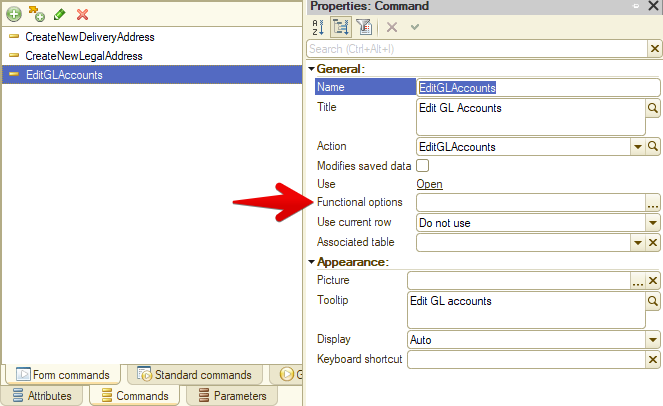
Here’s one way to solve unresolved references left after deleting a functional option. It starts with a configuration check giving me a couple of dozen messages like this:

CommonForm.PersonalSettings.Form Unresolved metadata object references (2)
Catalog.BankAccounts.Form.GLAccountsEditForm.Form Unresolved metadata object references (1)
Catalog.CashRegisters.Form.GLAccountsEditForm.Form Unresolved metadata object references (1)

I export the configuration to files and open Form.xml for one of the affected forms. I pick a form with fewer controls, so there’s less stuff to sift through.

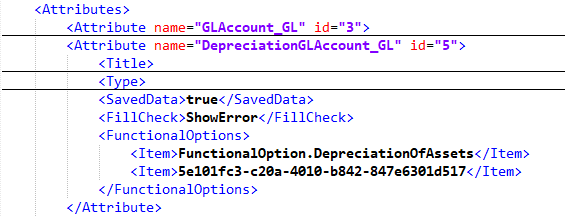
A quick scan for anything unusual doesn’t take long:

The suspect

A normal functional option reference is its name, as with DepreciationOfAssets. If there’s a GUID instead, that functional option is missing from the configuration. The reference is unresolved.

I search the rest of the export for that GUID, and there are almost all the problems the platform complained about. Fixing them is easy: remove the broken reference from the XML and load the file back into the configuration. There’s an even simpler approach: open the form control’s functional options list and immediately save it. That also removes the broken reference.

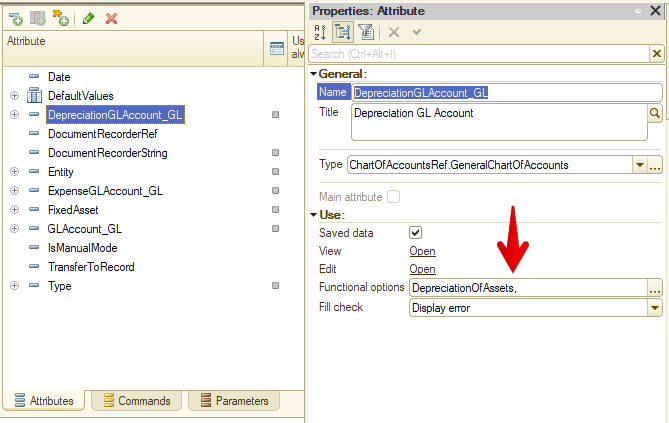
Why is looking for these strays in Designer itself a job for incurable optimists? Because the problem is almost impossible to notice. At best, you’ll see something like this:

Real evidence

Designer knows there are two options in the field, but can’t get a name for the second one. It’s gone. And most often there’s only one functional option! Then it looks like this:

Your Honor, I’m innocent!

A Method with a Surprise
27 Jule 2020 ·

A couple of weeks ago, I encountered an annoying bug. The task couldn’t be simpler: find a document by number. Do it this way, and the document is found:

SELECT Ref FROM Document.Invoice WHERE Number = &Number

But this way? No luck:

Documents.Invoice.FindByNumber(Number)

At first I froze for a moment, then checked the documentation and, of course, found the answer. FindByNumber() has a second parameter, IntervalDate, for finding documents with periodic numbering. It narrows the search to a particular period. If numbering resets annually and you pass May 1, 2020, for example, the search covers January 1 through December 31, 2020. And Invoice does indeed use annual numbering.

So what’s the problem? The vague phrase “the parameter is used for documents with periodic numbering” actually hides an iron rule: you cannot omit the parameter for such documents.

To check, let’s look at the SQL the DBMS actually runs. An ordinary query brings no surprises. P1 is the separator, P2 the document number:

SELECT
    T1._IDRRef 
FROM
    dbo._Document283 T1
WHERE
    ((T1._Fld704 = @P1))
    AND ((T1._Number = @P2))

But calling FindByNumber() adds a third parameter with the value 2001-12-31 23:59:59. Yes, “the end of the first year since the beginning of time”:

SELECT
    T1._IDRRef
FROM
    dbo._Document283 T1
WHERE
    ((T1._Fld704 = @P1))
    AND
    (
        T1._Number = @P2
        AND T1._Date_Time <= @P3
    )

Naturally, this query doesn’t find the required document. It won’t find anything in a real infobase, ever, under any circumstances.

The solution is clear: pass IntervalDate or, if we don’t have a date, use the Standard Subsystems Library’s ObjectAttributeValue() or an equivalent. But honestly, the platform should throw an exception when FindByNumber() is called without IntervalDate on a document with periodic numbering, rather than quietly execute a query guaranteed to be pointless.

One Query to Rule Them All
25 Jule 2020 ·

For posterity, I’ve uploaded one of the inefficient queries I worked on a few months ago to GitHub Gist. It powered a dynamic list on a catalog item form, and whenever the user opened that tab, the platform went off to meditate, even with a relatively small database.

At first glance, it looks straightforward: a bunch of queries against document tables, joined with UNION ALL. Each table is filtered by roughly the same conditions: reference type, date, and whether the reference appears in a subquery’s result.

But there are several potential problems. First, at least 14 tables are involved, one per combined query. That alone raises the risk that the optimizer won’t have time to choose even a reasonably decent plan. Most likely, it will just take a wild guess and hope for the best.

Second, much of that work is probably wasted. Each query has something like this:

WHERE VALUETYPE(AdditionalExpenses.Ref) IN (&DocumentsListSelectedTypes)

The dynamic list receives a list of document types to display. But that filter kicks in after the data has been read: even if the user only wants invoices, the DBMS still reads all 14 tables, then discards 13 of them.

Still, none of that is especially critical. If that were the full list of problems, we might never have investigated. The main issue is the second condition in the WHERE clauses: each query checks whether the document reference appears in a subquery’s result.

Using subqueries in conditions is almost taboo unless temporary tables are involved: the DBMS often can’t work out how much data it’ll get back, or how best to handle it. And the data source makes things even worse here. A filter criterion isn’t a database table you can read, even by scanning; it’s a collection of tables. DocumentsByProject contains thirty!

That sounds bad enough, but there’s more: each of the fourteen combined queries selects documents of a particular type from those thirty tables.

OMG

And… scene :-)