Notes: Blog

My notes about life, work and other fascinating things around me.

Shown: 0 · Page

New Blog's UI
17 January 2026 ·

Over the New Year holidays I randomly got obsessed and rewrote my blog's UI. I only wanted to add search for my notes — there are a lot of them now, and every so often I need to quickly fish something out of the pile (like "here's that link" to a coworker).

The blog runs on GitHub Pages, so the options aren’t exactly infinite: either outsource search to Google, or build a static index and ship it to the user's browser so it can grep through it locally. I went with the second route: faster, more controllable, and, yes, an excuse to write code. The first time you search it has to download the index file, but... It's 200 KB. That's basically one medium-sized sigh in 2026 internet terms.

And then, you know how it goes... Scope creep grabbed me by the hoodie. First I couldn't get Tachyons to play nice with the search input — got annoyed and migrated everything to Tailwind (I'd been meaning to try it anyway, just never had a "good reason", so I invented one). While I was writing the search code, I figured it'd be dumb not to add tags too, because why do the same work twice. Next thing I know I "wake up" and there's a whole tag cloud sitting above my notes. At that point it felt only logical to do the same for the projects page — except there it's not tags, it's tech stacks...

So yeah, it turned into that "Fear and Loathing in Las Vegas" meme. The tendency was to push it as far as I can, kinda.

Now the only thing left is to make myself actually write into the new project log. There's always a ton of work, and it's genuinely interesting — but if I don't write things down... Welp. Everything sinks into coffee.

No More Embedded Tweets
21 Marth 2022 ·

As soon as I removed Google Fonts from my blog, I had to remove embedded tweets as well.

How did it work before? I want to link a tweet — I simply insert the link to it. The build script replaces it with an HTML block, then Twitter founds this block and replaces it with the text of the tweet (and some useful links as well). This commit shows you how it worked.

How does it work now? You're right, it does not! Twitter is blocked in Russia.

Well

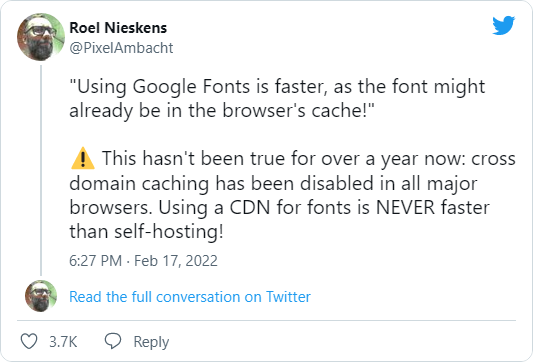
The solution: I had to screen all the tweets that I once referred to and add them to the notes in the form of pictures with links. Whoever needs the original will turn on VPN and go to Twitter, and the rest, at least, can read the text.

A few words about the technical side. I was too lazy to screen each tweet manually, so I was thinking about how to automate the process. At first, I came across only services that were ready to solve the problem for some pathetic ten dollars (thanks guys, maybe, one day…), but then I came across the perfect tool: a console script for Node.js.

Nothing that you don't need. Pure functionality. You give a tweet to it. It gives you a picture back:

npx snap-tweet https://twitter.com/PossumEveryHour/status/1506148678461014016

That's all. I want to donate the author, really.

I thought about attaching snap-tweet to my build script (so that it would be like before: I insert a link to a tweet, and then it generates a picture by itself and puts it where it needs to be). Decided that I'm not gonna do it. Rude violation of KISS, and indeed… There's enough entropy in the world so far. Especially now.

No More Google Fonts
19 February 2022 ·

Tweet

A year ago, damn it. Okay, hello everyone! Johnny Slowpoke is here! Today we will throw out Google Fonts from my blog. I used to load the main font (PT Sans) from this service, but it makes almost no sense without cross-domain caching. Frankly speaking, the only point to do this further is if a server on which the site is running is slow, so it is faster to load fonts from Google.

I host my blog on GitHub servers and have no complaints about performance. So, I'm self-hosting PT Sans now, and you know what? The difference is dramatic. When updating a page before, there was clearly a noticeable delay between loading the page and loading the font. For now, it is barely recognizable. If you have a blog and want to try to self-host fonts — here is a cool service that solves the problem in a few clicks.

Don't forget to put a big, nice star on the repository!

Building The Blog on GitHub
29 September 2021 ·

For the last year this site has been working on a simple platform: statics, GitHub and my domain. All the pages were pre-generated and placed in a GitHub's repository with GitHub Pages enabled.

I collected statics using a script. It was working with a list of text files, pedantically arranged in folders. The script rummaged through them and generated HTML files. Then I manually pushed them to the repository.

This scheme worked well, but the number of clicks annoyed me. Here is the script pull, and there is the script pull, and then you have to tinker with the git. I wanted it to be simpler.

At some point, I figured out that not only the deployment of statics, but also the assembly can be shifted onto the shoulders of GitHub. I put together some thoughts and added two more repositories:

  1. A repository of initial data. Here I put the content of the site: the text files and a bit of metadata (page titles, dates of pages creation, tags for notes, and so on).
  2. A repository of the script for generating statics. In addition to the script itself, I put various assets here (icons, styles, manifests — in general, everything that doesn't need to be generated every time, but you have to “put” it next to the resulting HTML).

Then I wrote an action that wakes up with every push to the repository with the initial data. Shortly, its logic:

  1. Clone the repository with statics and the repository with the generating script;
  2. Update the repository with statics using the generating script;
  3. Push changes of the repository with static to the main branch;
  4. Notify the owner (me) via Telegram.

Voilà! Now, whenever the repository with the original data changes, the GitHub immediately (well, as soon as possible — within a minute) updates the repository with the site and deploys it via GitHub Pages. A bonus is a web interface to manage the site (in fact, the GitHub site). No Code. :-)

While I'm at it, I added links for editing pages directly to the site (the pencil icon in the upper-right corner). This is intended as a convenience for me, but anyone who finds a typo can send a PR. Thank you in advance!