Notes

My notes about life, work and other fascinating things around me.

Shown: 0 · Page

The Year In The Date Literal Exceeds 3999
28 Marth 2026 ·
Work
MS SQL
PostgreSQL

I already wrote about the error mentioned in this post’s title earlier, but here's the refresher: the platform chokes on dates later than the year 3999 (things start blowing up at 3999-12-01, I guess). In theory, dates like that should never make it into the database in the first place. In practice... Well, thanks to bugs in application code — and in the platform itself — they sometimes do.

The usual symptoms are pretty random and annoying: some reports stop working, some documents refuse to post, totals recalculation crashes, and so on. Basically, any code that touches records with those broken dates is now having a bad day.

The fix I outlined in the post linked above does work, but it's relatively slow: you need to configure the tech log, collect the output, and then parse it. The problem is that the platform crashes the moment it touches the first bad date, and there may be lots of them scattered across different tables. So you often end up doing this in multiple passes: run a check, hit an error, fix it, run again, hit the next one, repeat.

Thank You, Mario!

A few years ago, because I wanted a faster way to deal with this, I wrote a PostgreSQL query for it. The idea is simple:

  1. Find all date fields in the database.
  2. Build one giant query against those fields to look for dates beyond 1C's limit.

So yes, this query generates another query. Very normal behavior. Run the generated query, and you get the full picture: a list of tables containing invalid dates. After that, it's just engineering work — inspect the tables and decide what to do. In our case, bad dates sometimes show up in totals and turnovers, so we can just delete those rows and recalculate totals using the standard tools.

Why do this at the DBMS level? Because 1C itself can't really help here — as a reminder, the platform crashes as soon as it touches the bad records. That includes reads, not just writes. Also, in this case, going directly against the database is simply faster and more convenient.

The other day I rewrote the same query for MS SQL. It turned out longer — because, well, MS SQL likes to make you earn it — but the idea is exactly the same.

If you want to use it, keep this in mind:

  • The _Fld626 field in the query text is the Fresh separator. In your database it may have a different name, or it may not exist at all.
  • The query is written for a database that uses a 2000-year offset. If your database does not use that offset, you'll need to adjust the condition accordingly — see DATEADD().
  • I added the XML output trick (FOR XML) to stop SSMS from truncating the generated mega-query. That seemed faster than messing around with type casts. The side effect is that before running the generated query, you need to replace > with >.
With Side Effect
15 Marth 2026 ·
Work

In the latest release of our ERP, we optimized several heavy dynamic lists — orders, invoices, proforma invoices, and so on. Over time they had accumulated a pretty solid pile of technical debt, mostly in the form of mountains of helper tables bolted onto the main queries: contact info, technical attributes, balances, turnovers, you name it.

At some point even in fairly small deployments the DB optimizer started producing complete nonsense instead of query plans, and the resource cost of letting that happen was getting less and less funny.

So, we patched things up using several different approaches. One of them was loading extra row data inside the OnGetDataAtServer() handler (I actually mentioned this mechanism not that long ago). We built a nice little framework around it, rolled it out, tested it, and... Well, now we're all sitting here with those deeply unimpressed engineer faces.

To be fair, performance really did get a lot better. Inside a compact handler, you can tune queries against heavy virtual tables almost perfectly. The problem is somewhere else: field values populated by this handler are not passed into the standard dynamic list mechanisms. Which means search, sorting, and grouping simply do not work for those fields.

So you type a value that is clearly visible in the column — and the row is not found. Or not all matching rows are found. Or rows show up that visibly should not match at all. From the user's point of view, this looks absolutely terrible. A bug is a bug. Those fields don't look any different in the UI, so how exactly are you supposed to explain that this is "just how the platform works™"?

And if you explicitly exclude such a field from the mechanisms that can't handle it, that's somehow even worse. For example, try to sort by it — and boom, giant error message. Explaining why sorting blows up on this "Amount" column while the one right next to it works just fine is... Not exactly a beginner-friendly support conversation.

Honestly, how do you come up with such a great handler concept and then completely fumble the platform-level implementation?

This randomly reminded me of Reddit. Some communities love threads like "invent a superpower, but with a side effect". Like, one person comments: "I can run at the speed of the wind!" and someone replies: "yeah, but you can't stop". That kind of thing. Sometimes it gets pretty funny.

Superpower

That's basically the kind of conversation we're having with the platform developers. You can massively speed up dynamic lists, but the UI will make your users furious. You can automatically send binary data to an S3 bucket, but lose it all with one careless click. You can teleport anywhere, but it takes exactly as long as walking. You can shapeshift, but only into an elderly pug. You have thick, silky, luxurious hair, but on your ass.

Ikigai
9 Marth 2026 ·
Meanwhile

In Japanese, there's a wonderful word: ikigai. It's kind of like your reason for living, but not in some huge existential sense — more in a grounded, everyday way. A source of inner energy, a source of joy. Basically, the thing that makes you want to get out of bed in the morning.

A person can have several of those anchors, and they're different for everyone. Coffee, a cat, a craft you love, taking care of the people close to you, a garden, walks, video games...

Anyway, that's what got me thinking. I stumbled across a channel called "Alyoshkino Svoe". From what I understand, the guy behind it is a lawyer from St. Petersburg who breeds fancy chickens and regularly posts videos about specific breeds, incubation details, feeding, and so on.

I'm not into birds at all, but I caught myself just sitting there for twenty minutes, completely mesmerized, listening without looking away. It almost works like therapy, honestly. And it struck me that this is actually a pretty solid kind of ikigai: something you'll love the way this guy loves his chickens.

Autosummary
8 February 2026 ·
Work
AI

I started recording all my meetings back in 2020 — at least, that’s what my own notes say. Video is always more accurate than memory, and clicking "Start Recording" in OBS is the cheapest way to not lose some random-but-important detail.

The downsides are obvious, though: you can't quickly grasp the gist of a meeting from a video, searching through it is basically impossible, it eats disk space like it's bulking season, and it's painfully easy to accidentally capture something private. To partially compensate, I used to jot down key points in bullet form during the meeting, and later either throw them into a task tracker or write a mini-summary for myself: who I met with, what we discussed, what decisions we landed on. If I forgot something or missed details, I'd double-check the video.

But this method isn't perfect either. Even a rough outline steals focus from the actual meeting. And some "oh right, that detail matters" moments only reveal themselves when it's already too late.

Forgot

So I ended up with a better approach: extract the meeting audio from the video, turn it into text (with a neural net), then turn that transcript into a detailed meeting summary (with another neural net). Yes, it's neural nets all the way down.

The easiest way to rip the audio is with ffmpeg (a command-line utility for working with audio/video). Here's an example (mono, 16 kHz sampling rate + loudness normalization):

ffmpeg.exe -y -i "D:\video.mkv" -vn -ac 1 -ar 16000 -af loudnorm -c:a pcm_s16le "D:\audio.wav"

As for speech-to-text: I experimented with Vosk + recasepunc, but... Yeah, no. Let's just say I'd rather not relive that experience. Meanwhile Boromir Whisper (OpenAI's speech recognition model) installs in the background in about 10 minutes:

py -3.10 -m venv .venv
.\.venv\Scripts\Activate.ps1
pip install setuptools wheel
pip install torch torchvision torchaudio --index-url https://download.pytorch.org/whl/cu118
pip install openai-whisper

Example run:

whisper "D:\audio.wav" --model medium --language Russian --output_format txt

The result is a plain text transcript you can shove into any chatbot and get a fairly coherent summary. Sure, you still need to proofread it — fix mistakes and hallucinations, rephrase a couple things — but it's still way better than trying to write notes live.

And that’s basically the whole method. The only thing left is writing a simple script so you don’t have to run two commands manually every time. If you’re on Windows and you can't be bothered to vibe-code, you can grab my script and tweak it.

The script finds the first .mkv in its folder, runs it through ffmpeg + Whisper, and saves the result back into the same folder. If you use it: note that it runs via CUDA (CPU works too, just much slower), and it stores downloaded Whisper models not in the default cache, but inside the current Python virtual environment folder.

(if you really want, you can wire up an API call or point it at some local model via LM Studio — but for my personal setup I decided: nope, that's already too much engineering for a lazy win)

New Blog's UI
17 January 2026 ·
Blog
Work
Done

Over the New Year holidays I randomly got obsessed and rewrote my blog's UI. I only wanted to add search for my notes — there are a lot of them now, and every so often I need to quickly fish something out of the pile (like "here's that link" to a coworker).

The blog runs on GitHub Pages, so the options aren’t exactly infinite: either outsource search to Google, or build a static index and ship it to the user's browser so it can grep through it locally. I went with the second route: faster, more controllable, and, yes, an excuse to write code. The first time you search it has to download the index file, but... It's 200 KB. That's basically one medium-sized sigh in 2026 internet terms.

And then, you know how it goes... Scope creep grabbed me by the hoodie. First I couldn't get Tachyons to play nice with the search input — got annoyed and migrated everything to Tailwind (I'd been meaning to try it anyway, just never had a "good reason", so I invented one). While I was writing the search code, I figured it'd be dumb not to add tags too, because why do the same work twice. Next thing I know I "wake up" and there's a whole tag cloud sitting above my notes. At that point it felt only logical to do the same for the projects page — except there it's not tags, it's tech stacks...

So yeah, it turned into that "Fear and Loathing in Las Vegas" meme. The tendency was to push it as far as I can, kinda.

Now the only thing left is to make myself actually write into the new project log. There's always a ton of work, and it's genuinely interesting — but if I don't write things down... Welp. Everything sinks into coffee.

Backup Management
6 December 2025 ·
Work
Done

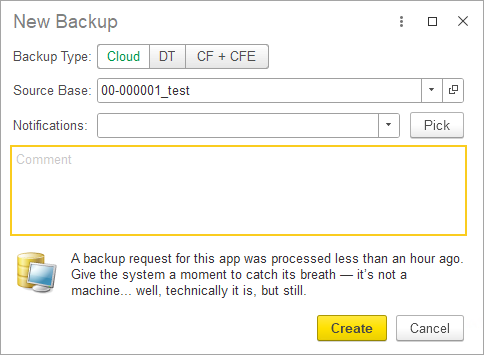
At the end of the year we shipped a big update to our internal tool (I briefly wrote about it before). The goal: give teammates sane, usable access to backups of customer apps. In a SaaS company, everyone needs backups all the time — dev, QA, incident investigations, you name it. Without proper tracking the whole thing turns into a petting zoo: three people, same moment, three requests for almost identical copies of the same database. Sure, it "works", but you end up chewing through 3x the resources for zero extra value.

We did have a solution built on top of the Bitrix UI, but due to, uh... the unique "evolutionary path" of that product, it delivered more pain than gain. So we rethought the workflow and rewrote everything. Frontend is 1C; backend is PostgREST, PostgreSQL, PowerShell, and a bunch of other bits and bobs. The internal logic is fairly gnarly, but for the user it's a clean, friendly UI where you can request a backup in literally two clicks.

You can pick one of three backup types:

  • Cloud backup (a copy of the real app deployed in the cloud and accessible — including via the browser);
  • File backup (a regular .dt file you can download and spin up locally);
  • Configuration + extensions backup (.cf + .cfe).

Also, the new solution detects when someone tries to request a backup for an app that's already being generated right now. And it rate-limits things too: you can't back up the same app more than once per hour.

And yes — we're still sneaking jokes into the UI. Obviously.

But Still!

Coffee First!

Desire Paths
29 November 2025 ·
Work
Optimization

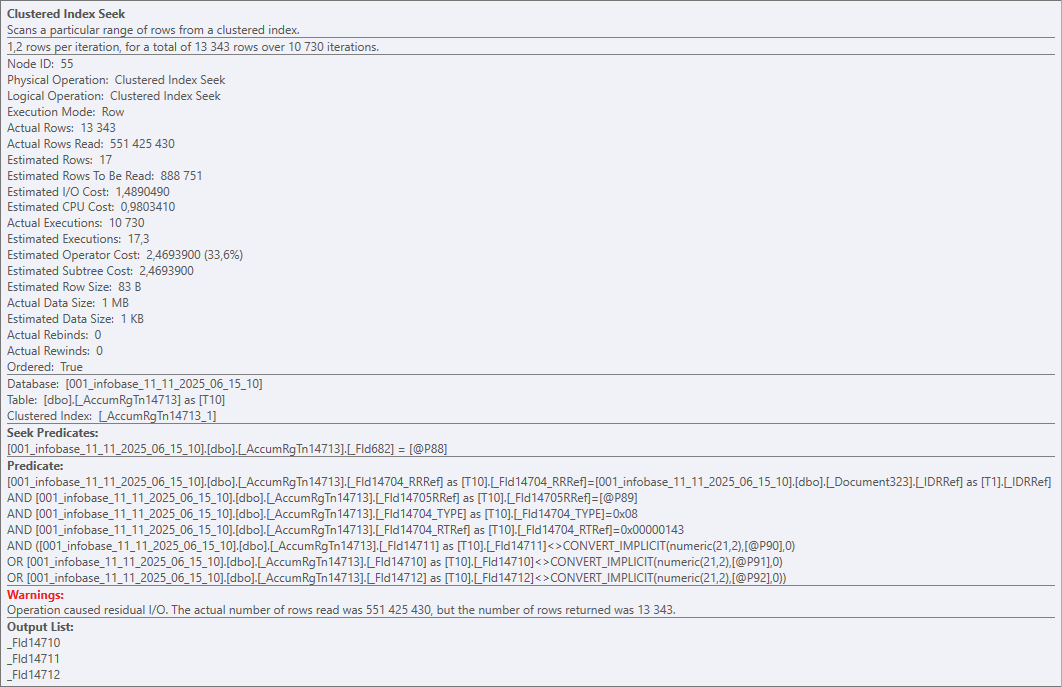
Alright, Jean Fresco's riddle. You've got a table — say, ~50k rows. How do you end up reading half a billion?

Easy-peasy: Nested Loops + Clustered Index Seek:

Half a billion

Clustered Index Seek is a bit of a marketing name here, of course. In reality, on every execution the operator walks the entire table (the whole clustered index) and checks every row against the predicates. And it does that 10 730 times for 51 391 rows. Result: 551 425 430 rows read, 13 343 returned.

Ouch

So yeah — a perfect textbook example of a horrible query plan in a vacuum. Put it in a museum. Nested Loops, if you've forgotten, works roughly like this:

For Each Table1Row In Table1 Do
    For Each Table2Row In Table2 Do
        ...

That's fine for small tables, but the DB can also pick it for bigger ones — for example, if it runs out of time to build a proper plan.

That's exactly what happened here. Zooming out to the platform level: we've got a dynamic list that queries a documents table, and the devs bolted on like a dozen virtual tables from accumulation registers.

Some of those registers were huge on their own, and the virtual tables poured gasoline on the fire (each one turns into 2+ nested queries). The DB honestly tried to come up with an efficient strategy, but at some point it basically decided: "a garbage plan is still better than no plan at all".

And the user? They tried to search a document by number — and the client app just straight-up froze.

So, about virtual tables in dynamic lists. There's a nice English phrase: "desire path" — the trail people naturally carve because it's the easiest way. Slapping a virtual table onto the main one really is often the simplest, fastest, most familiar way to solve the task. But it's not efficient.

There's an alternative, for example the OnGetDataAtServer() handler. It takes longer to implement, but it lets you properly tune the virtual table and avoid the scenario above. Scrolling the list will produce more queries, sure — but they'll be smaller, faster, and way more efficient than one single giant monster query.

Food Diary In Obsidian Bases
23 November 2025 ·
Done
Obsidian

I've rebuilt last year’s plugin with Obsidian Bases — it now tracks calories, protein, fat, and carbs in your food.

The result is way more flexible and customizable than the plugin version: if you suddenly decide you want to count fiber as well or just shuffle some columns in the report, you don't have to rewrite, rebuild, or release anything. You just tweak it to your heart's content.

And it doesn't look half bad either:

UI

All the necessary settings and scripts live in the GitHub repo.

Well, There Are Some
17 November 2025 ·
Meanwhile

I'm out for a walk in the evening, and behind me there's some mom and her little kid — about five years old, I guess. I don't see them, I just hear them talking. The mom is explaining university to the kid: that you have to get in, study, there will be exams and all that.

The boy is quiet for a bit, then says sadly:

— I thought there was only school, but it turns out there are more difficulties too...

Harmless Harm
16 November 2025 ·
PostgreSQL
MS SQL

The other day my colleague and I were debugging an issue, nothing fancy, just another "why is this query behaving weird?" moment.

Simplified, the idea was: we read a table from the database and dump the result into a temp table. If a certain condition is met, we still want the temp table to be created, but it must be empty (regardless of whether the source table has rows or not).

The query looked roughly like this:

SELECT
    Table.Field1 AS Field1
FROM
    Table AS Table
WHERE 
    &Parameter

If we needed to copy rows from the source table into the temp table, we passed TRUE into the parameter; if we wanted the temp table to be empty, we passed FALSE.

Looks simple at first glance, but this trick is a silent performance foot-gun if the table being read is large.

The reason is how DB engines work with parameterized queries. Both MS SQL and PostgreSQL build the execution plan based on the query text, and in this example the parameter value does not affect the decision of whether the table should be read or not.

As a result, when this query runs, both engines will pedantically scan the whole table (or its index), even if the parameter is FALSE. In that case each row is just discarded, so the logic is technically correct, but we're wasting resources on a pointless scan and polluting the buffer cache, slowing down the system overall and diligently contributing to global warming :)

The fix is simple: inline TRUE/FALSE in the query body as a constant instead of using a parameter. Or use TOP so the query text is even simpler:

SELECT TOP 0
    Table.Field1 AS Field1
FROM
    Table AS Table

At the SQL level this turns into something like "SELECT TOP 0 ... FROM Table" for MS SQL and "SELECT ... FROM Table LIMIT 0" for PostgreSQL. The final plan will still contain a read operator, but the executor won't actually request any rows, so there's no real data scan (yay).

P.S. If you don't care about having proper column types in the temp table, you can even do this:

SELECT TOP 0
    UNDEFINED AS Field1

The performance gain, however, is so tiny that it's probably not worth over-optimizing for this. There are better hills to die on.

Voodoo
5 October 2025 ·
Work

Looks like we finally caught our first lab-reproducible case of platform cache corruption. Short synopsis:

  • Spin up a fresh app from the v35 template of our ERP.
  • Run it and wait for initialization to finish.
  • Swap the app configuration to the v36 release (specifically build 28537 from the dev repo) and run it again.

After this super simple sequence, about half the team sees the platform suddenly lose one of the enums. And it's annoyingly selective: hit an enum value on the client — all good; do the same on the server — boom, exception.

Same story with the manager module of one catalog: its methods exist and are exported, but after the update the platform pretends they don't and throw an exception when you call them.

Welcome To Dipshit Central

As always, when the magic blooms — look at the cache. Clear it and symptoms vanish. There are indirect hints too:

  • The enum did exist in v35, but it was renamed in v36.
  • Those manager-module methods didn't exist in v35 (they were added in v36).

So the v35 cache didn't contain either of these in their v36 identities, yet for some reason the platform insists on digging into that old cache.

We still don't have a clean root cause. We traced it to a specific commit after which the bug started showing up, but the only weird thing there its its name (and honestly, there are nearby commits that look even more suspicious from this point of view). The rest were minor changes that regenerate internal metadata IDs in the manifest. Yes, those IDs are tied to cache keys, but they get bumped on any metadata change and have never caused issues before.

If you landed here from Google because you hit the same mess — make a no-op change to the problematic object so the platform refreshes the metadata IDs in the manifest. For example, add an empty method or even just a space in the module. That fixes the configuration so the recipe at the top stops corrupting the cache.

Voodoo, sure — but hey, it works ¯\_(ツ)_/¯

Slow Removal of Fresh Areas
3 August 2025 ·
Work

A colleague noticed that on one of our Fresh instances, deleting data areas had become painfully slow. Dug into the metrics:

DELETE FROM T1
FROM _DataHistoryMetadata T1
WHERE 
    T1._MetadataId = ?
    AND T1._IsActual = 0x00 
    AND NOT (
        T1._MetadataVersionNumber IN (
            SELECT T2._MetadataVersionNumber AS MetadataVersionNumber_
            FROM _DataHistoryVersions T2
            WHERE T2._HistoryDataId IN (
                SELECT DataHistoryLatestVersions1.DataHistoryLatestVersions._HistoryDataId AS HistoryDataId_
                FROM DataHistoryLatestVersions1.DataHistoryLatestVersions T3
                WHERE DataHistoryLatestVersions1.DataHistoryLatestVersions._MetadataId = ?
            )
        )
    )

Each of these queries was reading around 20GB. What's happening is mostly clear: the platform is trying to delete an area's data history, but the janky DB query causes a full scan over the whole history table across all areas instead of using an index. Someone on Dmitrovskaya got lazy again.

Why are you surpised?

So we were losing between 30 seconds and a half an hour per operation. Wanted it faster. Fix:

CREATE NONCLUSTERED INDEX IX_DataHistoryLatestVersions1_MetadataId
  ON dbo._DataHistoryLatestVersions1 (_MetadataId)
  INCLUDE (_HistoryDataId)
  WITH (DROP_EXISTING = OFF, ONLINE = OFF);

CREATE NONCLUSTERED INDEX IX_DataHistoryVersions_MetadataVersionNumber
  ON dbo._DataHistoryVersions (_MetadataVersionNumber)
  WITH (DROP_EXISTING = OFF, ONLINE = OFF);

Deletion cost predictably dropped ~99%.

If you're going to repeat this on your side:

  1. Technically this violates the license agreement, you've been warned and all that.
  2. There's a risk the platform will trip over the new indexes during future restructurings (especially on the "new" schema). Better to have a ready script to drop the index, and then (after restructuring) put it back.
Myth Buster
27 Jule 2025 ·

I stumbled upon a hefty Infostart article all about "debunking myths" around the platform.

Honestly, about half of it reads like a joke. It's like:

Hot off the press! Crime, intrigue, investigations! File‑based infobase is faster than client-server! DCS is slower than a plain request! Calling a server method on the server counts as a brand-new server call! UFO over Red Square!

Still, there are some genuinely interesting nuggets! For instance, I'd never heard the claim that cramming your code into one single line makes it run ten times faster. Too bad you'd get your ass handed to you by the team for trying that kind of desperate swag before you even get to celebrate the speed boost. And let's be real — most enterprise app slowdowns usually come from totally different places.

Or take their speed comparison for dumping data into a table: one test for object presentations and another for their descriptions. The presentation dump was literally tens of times slower! On paper, that sounds weird — both are just strings already pulled from the database at measurement time. My guess is it's down to typing: presentation strings can be unlimited length, unlike descriptions. So you get extra memory allocations, helper structures popping up, and bam — that's where the slowdown creeps in.

P.S. I've jotted down some of these points myself before. Off the top of my head — I remember benchmarking ValueIsFilled() and getting a nasty surprise from the built‑in FindByNumber().

Geometry Deletion
12 June 2025 ·
3D

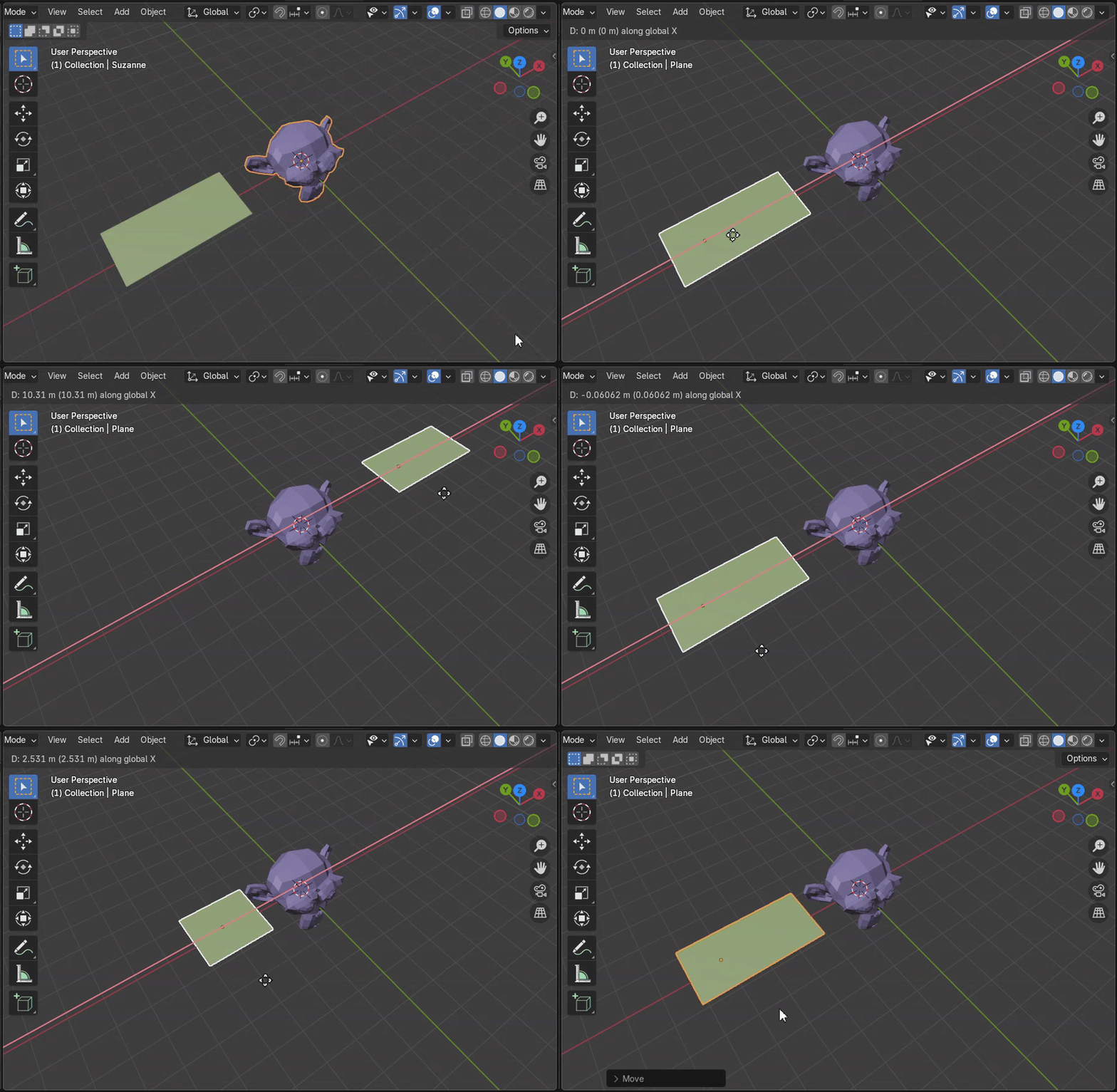
I figured out a cool trick for cutting off parts of an object when it intersects with something else. Like, in this gif, there’s a monkey head model in the center, and as a plane moves through it, the part that intersects just disappears.

Demo

The idea is pretty simple: you shrink the geometry of the "cutter" object down to a cube, get its min and max coordinates along each axis, and then for every point on the object you're trimming, you check whether it falls within that range. If it does — boom, it gets deleted.

There are tons of ways you could use this. For example, I used it to automatically trim parts of decorative music staff lines on a wall so they wouldn't go across a doorway.

Example

Sure, you could do it by hand, without geometry nodes, but that would kill flexibility. If the wall size, door size, or the angle of the lines changes — you'd have to redo everything from scratch.

No
11 June 2025 ·
Work

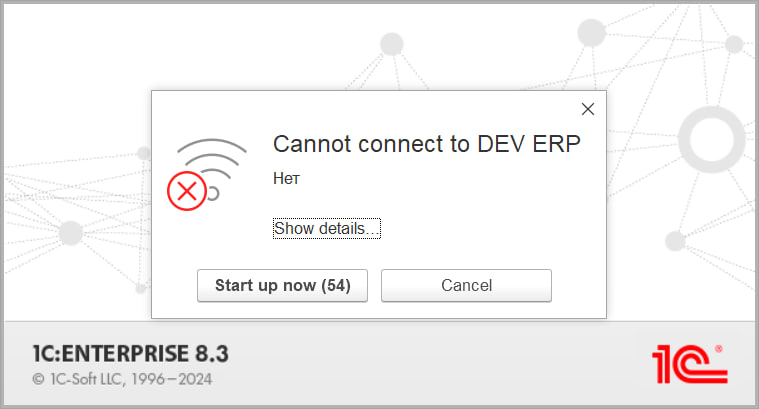
No

This is the message the current platform throws up when you try to connect to an offline server cluster. I do appreciate minimalism in interfaces, of course, but this is definitely over the top.

What's more, the platform is installed with only a single language pack (English) and even launched with a hard override to "Ven VLen", yet somehow the native birches still manage to sprout up. Maybe the C++ library that fires off the message (DataExchangeTcpClientImpl.cpp) is looking at the OS language (Russian) in my case — hard to say.

Anyway, I can't shake the Bugs Bunny vibes every time I see that dialog box.

No

The Genie Problem
12 April 2025 ·
3D

Returning to Volka's room, the old man turned round slyly, snapped the fingers of his left hand, and there appeared on the wall over the aquarium an exact copy of the telephone hanging in the hall.

"Now you can talk to your friends as much as you like without leaving your own room."

"Golly, thanks a lot!" Volka said gratefully. He removed the receiver, pressed it to his ear and listened. There was no dial tone.

"Hello! Hello!" he shouted. He shook the receiver and then blew into it. Still, there was no dial tone.

"The phone's broken," he explained to Hottabych. "Let's unscrew the receiver and see what's wrong."

However, despite all his efforts, he could not unscrew it.

"It's made of the finest black marble," Hottabych boasted.

"Then there's nothing inside?" Volka asked disappointedly.

"Why, is there supposed to be something inside this, too? Just like in a watch?"

"Now I know why it doesn't work. You've only made a model of a telephone, without anything that's supposed to go inside it. But the insides are the most important part."

"The Old Genie Hottabych", Lazar Lagin

When I’m doing 3D modeling, I often feel like that genie. He also tried to mimic the shape of things and jazz them up, but always ended up failing ‘cause he hadn’t got a clue about what was inside.

I’m just the same. For the past month, I’ve been putting the finishing touches on a model of a school music room, and guess what? I’ve learned more about how pianos work than I have in my whole life before. I could even give a quick lecture on heating systems in Russian schools — talking about sectional, panel, cast iron, and aluminum radiators, which types pop up most, the spacing between them, why you shouldn’t hook up three in a row, and so on.

I read about this effect: like when you're drawing, say, samurai armor — you end up inadvertently learning heaps about the properties of leather, the different kinds of metal, and the whole tech stack of the samurai era. I never thought I'd run into that from day one — but hey, I think it's a good thing. It fires up your neural connections, broadens your view of the world, sparks your creativity, and all that jazz.

Plus, it’s way more fun working on a model when you actually know what’s going on under the hood.

Easter Eggs
6 April 2025 ·
Work

Thank you, Mario!

Awaiting Signal

A couple of Easter eggs hidden inside FirstBit ERP. They're tucked away for the developers: in the first case, users see just the form title and notification text, while in the second, they see the standard "waiting for connection" message.

I like to add little things like this from time to time — it helps to keep things fun, even when the task isn’t the most exciting or I’m just feeling tired. If you haven’t checked out Bystronovsky’s "Design Without Stress", you really should — no way I could explain it better myself.

By the way, here’s another Easter egg! Not from our ERP this time, but from a new tool we’re making for automated database updates. We're building it just for ourselves, so we can joke around with the user a bit :)

Nice try, Marty!

ERP Development In English
19 January 2025 ·
Work
English

Our lead developer recently shared some insights about our work — specifically, developing ERP systems on 1C for the UAE and, more recently, Saudi Arabia. The session was hosted by the online English school Across, so the audience was spot-on: Russian-speaking folks interested in building careers and exploring international markets.

Overall, it turned out pretty cool, especially as a language practice. Just a reminder: learning foreign languages is still one of the best ways to give your brain a workout, and it’s also super accessible. There’s no shortage of resources, communities, and interest-based clubs out there — you just need the motivation :)

Mysterious Code
18 January 2025 ·
Georgia
Videogames

Code

Somewhere on the streets of Tbilisi. As a big fan of the Dishonored series, I just couldn’t walk past this. I’m sure there’s a safe nearby that this code unlocks!

Go Away, Negativity!
29 December 2024 ·
Georgia
Meanwhile

Chichilaki

The white things in the background are called chichilaki. It’s a kind of Georgian New Year tree (in practice, it’s finely shaved hazelnut branches). It’s believed to absorb all the accumulated negativity, so after the holidays, it’s supposed to be burned (along with the negativity).

Turns out, that last part is a bit of a challenge. The local police (and especially the fire department) view this good old tradition with suspicion — and understandably so (a chichilaki can be as tall as a person, making it quite the torch). So, we were advised to simply toss the "negativity-charged" chichilaki into the trash to avoid getting fresh troubles. Or donate it to the zoo — apparently, the animals play with them and even use them to clean their teeth.

That last part made me smile. Getting rid of negativity with the help of cats — what a surprise. Big, toothy cats, sure, but still cats!