Notes

My notes about life, work and other fascinating things around me.

Shown: 0 · Page

Reuse Carefully
8 February 2022 ·

I'll tell you about a funny and a little embarrassing case that I took apart in January. The essence in a nutshell: a huge auto-test based on Vanessa, which is intended to check the VAT calculation, falls somewhere near the end.

I start investigating. First, I look at the screenshots in Allure: OK, the reason is obvious – in one of the documents, the conditional appearance for the field with the VAT amount doesn't work. The test expected it to be unavailable if the VAT rate is zero, but it turned out to be available somehow.

It's a mess, it needs to be fixed! I look at the condition in the code: well, it locks the field if the VAT rate is in the list of “zero” rates (list of VAT rates whose rate is equal to zero). Everything appears to be simple and logical. What the hell could possibly go wrong here?

Tweet

Well, I try to reproduce the bug manually. And there, all of a sudden, everything is nice: the conditional appearance works as it should. Floating bug, or what? I run the auto-test again, at the right moment I jump in with the debugger and find some outright garbage: in the list of “zero” rates, besides themselves, there are a bunch of empty links!

Frankly speaking, I was scratching the back of my head. The document receives this list from the common module with this code. An empty ref from here, even theoretically, cannot be obtained. Moreover, the module has the “Reuse Return Values” option ​​enabled, and the function is actually executes once somewhere at the beginning of the test, before all complex data manipulations. So, the test cannot affect it in any way, in theory.

Is it a dead end? Well, experienced colleagues have probably already guessed everything, but I had to dance around the bug and even check the standard, until got the following: return values ​​cache in 1C can be changed. I mean, not by calling RefreshReusableValues​​(), but by changing reusable values directly.

How? Well, if you get some values ​​from a cached common module, and they are not of a primitive type (string, number, etc.), you will not get the value itself, but a pointer to it somewhere in memory. You write this pointer to a variable and try to change it – you change the cache.

It's that simple, yes. This is what happened in my case: the form of another document called the method that generates the list of “zero” rates. Having received a list of values, it added an empty ref to it and used it in its logic. Thus, each time this form opens, the list cache contains more and more empty refs, which eventually broke the document at the other end of the configuration.

Tweet

In a good way, the platform should throw exceptions when developer trying to change the cache, but until this happens, you have to take care yourself. For example, when developing cached modules, return immutable data types from them (FixedStructure instead of Structure, FixedArray instead of Array, and so on). True, this is not a 100% protection: firstly, fixed types are not applicable everywhere, and secondly, even in the latest versions of the SSL, this is far from being done everywhere. Do you know many configurations not based on SSL?

Sonar also know nothing about the problem, as well as less popular software. No silver bullet, in short – check your code, look at the code of your colleagues and try not to forget about another elegant way to bang ourselves in the foot.


Infostart Event 2021
16 November 2021 ·

Last week I visited Moscow for Infostart Event 2021:

  • Listen to numbers of interesting reports — check;
  • Meet a few cool people in real life — check;
  • Chat with friends — check!

As a result, I suddenly felt rested despite the flights, stress, and fuss. I think it's because I'm working remotely, so it was really cool to look at so many colleagues in real life (not as a stream of electrons, I mean).

In order not to get up to fly twice, I passed the first test for PostgreSQL administration in the PostgresPro office. There are three more tests ahead, and the final one does not exist at all yet — but the walking one will master the road, I guess.

Matryoshka
30 October 2021 ·

A few days ago, there was a link to 1Ci certificate in the team chat (a colleague passed their junior course). I go over and see no auth form, no errors — I just get a PDF file. Everything is OK, right? Well, then I open the file:

Error.pdf

Honestly, I am even delighted. We need to implement this UX in our products: you press, for example, the “print” button for a document, and it gives you a PDF! And inside it — a link to another PDF! And inside it — “entity is not filled”, so go fill.

You can sell it as a Russian way of dealing with errors. This is, like, for historical reasons! Blame all the damned matryoshkas, and Koschei with his needle. It is, as you remember, in the egg, and it is in the duck, which is in the rabbit, tucked into the chest, and further along the chain of nesting.

Second Monitor Management via Console
16 October 2021 ·

I have two monitors. I use the second one during meetings in Zoom or when playing together with friends (in both cases it's convenient to bring the people's cameras there). There are more examples when it's useful, but often the device is simply idle. In order not to be distracted, I decided to turn it off.

What is the ambush here: it is inconvenient to enable or disable the second monitor via OS (a few clicks, and you need to scroll, and all the time you get confused where to go — in “Screen settings” or “Personalization”). I would like one command, and the command on a hotkey. And, ideally, from the script to rule all this.

I did not find the script, but I found a ready-made utility — MultiMonitorTool. It's free. Works under the Windows 10 without problems. The commands below turn on / off the 2nd monitor:

MultiMonitorTool.exe / disable 2
MultiMonitorTool.exe / enable 2
MultiMonitorTool.exe / switch 2

For some reason, when you turn on a monitor via enable or switch, it's positioned incorrectly sometimes (for example, before it was turned off, it was on the right, and after turning it on, it was on the left). This is fixable. First, let's save the configuration at the moment when both monitors are on:

MultiMonitorTool.exe / SaveConfig Monitors.cfg

And then, when you need to turn on the monitor, load the saved config:

MultiMonitorTool.exe / LoadConfig Monitors.cfg

The utility can do a lot more (for example, one of the commands flips application windows between monitors). Follow the link above for the description.

Top Salaries
2 October 2021 ·

There is a path to a CSV file. You need to open it, read the header (first line), find the Salary column and display the top 10 salaries.

Link

Threw in my two cents just to complete the picture. If you forget about stability, readability, and performance — you can cut it in half. Here it was obvious from the very beginning that it would be shorter in bash and clearer in Python, so I just wrote it as I was used to.

What was useful: there are a bunch of examples in other languages ​​in the comments to the post. Frankly speaking, I haven’t come across some of them; it was really curious to look at the syntax and try to understand the way to solve the task.

In general, the whole story reminded Eugene Stepanishev's hobby — to write the output of the American “beer song” in all languages ​​in a row. By the way, Tonsky's issue looks as fun for me too — too trivial to seriously compare something on its basis.

What was funny: for a couple of colleagues, the 1C code caused such acute vision problems that they considered it necessary to report it :-) I partly understand the desire to assert itself on the stereotype “1C is bad, mkay?”, but it's the wrong case. The preference in syntax is nothing but a matter of taste, and besides it, the solution in 1C is no different from solutions in any other language without a built-in library for parsing CSV.

Building The Blog on GitHub
29 September 2021 ·

For the last year this site has been working on a simple platform: statics, GitHub and my domain. All the pages were pre-generated and placed in a GitHub's repository with GitHub Pages enabled.

I collected statics using a script. It was working with a list of text files, pedantically arranged in folders. The script rummaged through them and generated HTML files. Then I manually pushed them to the repository.

This scheme worked well, but the number of clicks annoyed me. Here is the script pull, and there is the script pull, and then you have to tinker with the git. I wanted it to be simpler.

At some point, I figured out that not only the deployment of statics, but also the assembly can be shifted onto the shoulders of GitHub. I put together some thoughts and added two more repositories:

  1. A repository of initial data. Here I put the content of the site: the text files and a bit of metadata (page titles, dates of pages creation, tags for notes, and so on).
  2. A repository of the script for generating statics. In addition to the script itself, I put various assets here (icons, styles, manifests — in general, everything that doesn't need to be generated every time, but you have to “put” it next to the resulting HTML).

Then I wrote an action that wakes up with every push to the repository with the initial data. Shortly, its logic:

  1. Clone the repository with statics and the repository with the generating script;
  2. Update the repository with statics using the generating script;
  3. Push changes of the repository with static to the main branch;
  4. Notify the owner (me) via Telegram.

Voilà! Now, whenever the repository with the original data changes, the GitHub immediately (well, as soon as possible — within a minute) updates the repository with the site and deploys it via GitHub Pages. A bonus is a web interface to manage the site (in fact, the GitHub site). No Code. :-)

While I'm at it, I added links for editing pages directly to the site (the pencil icon in the upper-right corner). This is intended as a convenience for me, but anyone who finds a typo can send a PR. Thank you in advance!

Diablo
22 September 2021 ·

The nice episode of the “We Are Doomed” IT podcast about developer burnout. No insights, but you can hear something useful for yourself. I liked the analogy with video games, somewhere close to the middle:

There was such a game — Diablo. RPG, all sorts of spells, you know. A character has mana and health, and when you have no mana to cast… Ha, I sound like a nerd! Well, nevermind. Briefly speaking, when you have no mana to cast, it's taken from your health.

— Doctor Cat

Hammer & Nails
15 September 2021 ·

I was developing payment documents in our configuration last week and came across an incredibly redundant solution to a primitive problem. Sorry, I can't keep to myself.

Just imagine: you have a document, which contains several tabular sections. Each of them has a comment field. You make a print form for this document; if at least one row of any TS contains a comment — you need to use one template 1, if there are no comments — template 2.

The task is pretty primitive, isn't it? All of us have done something like this a million times. Just read the selection, use IsBlankString() on the comment field and load the appropriate template. Coffee time!

However, instead of a short cycle, I saw this:

There is a chain of queries, in the lowest of which we scan all the TS (which, I remind you, we just raked out for printing). We are looking for comments in them, then we group the result several times and return it to the script.

Well, I'm not even talking about the load on the DBMS (I would venture to guess that this trick doesn't give a noticeable effect — after all, the selection is going to be small). It's just… Well… Checking a selection of rows is, like, five lines of code. Clear, simple, short, Sonar has no room to swear. How could you give birth to this? Because of great love for queries?

You know what? I bet that it's the correct answer. I can almost see this programmer, who has just mastered the query language more or less tolerably. He is in the absolute delight of new opportunities, so… If all you have is a hammer, everything around looks like nails.

No Comment
8 September 2021 ·

I did not notice when I gave up the habit of pedantically commenting on every method with which I have to work. This practice has some clever name for sure, but I don't care, to be honest. I mean the style when a description is added to every meaningful block of code, like this:

The meaning here is simple: when you dig in some dense legacy and run back and forth between chaotically scattered, big procedures — it is rather difficult to keep the logic of each of them in your head. The next cup of coffee will wash everything away. Therefore, such notes greatly speed up orientation on the ground, and the more time passes between approaches to the code, the more noticeable the effect.

However, at some point it became clear that this know-how is just a crutch supporting the frankly crappy code design. If you have a long procedure or function - take a breath, sit down and cut the fatty one into smaller methods. You will save both time and nerves, and you will figure out the code faster, and you will delight SonarCube.

A Slow Notification
18 August 2021 ·

Tweet

This tweet reminded me of a job I once worked on. A client gets in touch: 1C is slow, do something. We ask a few questions. Okay, not all of 1C, just one operation.

They’re running a heavily rewritten Trade Management configuration, and the slow bit is custom code. Inside, it’s queries nested all over the place, a lot of messing about with value tables, some dubious calculations, and a bunch of server procedures seven hundred lines long each. We can’t copy the infobase, the technological log is unavailable, and DBMS and performance counter access are blocked. Debugging on the 1C server is off, and enabling it isn’t an option.

A mess. How can we find where it bogs down? Well, we can change the configuration; that’s something. I time the operation: yes, it thinks about something for a couple of minutes. Excellent! Rubbing my hands, I narrow the search by adding a whole pile of measurements to the most suspicious sections.

And here’s the funny part: nothing’s slow! The code doesn’t exactly fly, but we’re nowhere near minutes. For something this complicated, the timings look fine. Could it be serialization between client and server? I go through the server procedure carefully. Nope, nothing’s being passed back. Everything on the server stays there.

I move to the client code. What could possibly be slow here? Simplified, it looked something like this:

I stared at that code like an idiot for about ten minutes. Eventually, I asked a colleague, who told me something surprising: Notify() doesn’t just send notifications to every open form, it waits for their notification handlers to finish.

That blew my mind. I went digging and eventually found a form that caught the operation-completed event and immediately refreshed its dynamic lists. A query in one of those lists caused the delay: a subquery inside a subquery inside a subquery, plus a pile of joins “through a dot.” Nothing interesting after that.

Well, there you have it :-) Notify with care!

Pavel Chistov Has Passed Away
1 August 2021 ·

Pavel Chistov died of heart failure on Friday evening. If you don’t know who he was, here is an obituary. Though if you read this blog, you probably do.

Nikita Gryzlov, Ilya Leontyev, and Sergey Gorshenin are raising money to support Pavel’s family. His widow’s card number is also listed at the end of the obituary linked above.

Please take care of yourselves.

Finding Long Queries with Python
18 Jule 2021 ·

I’ve published a Python script for finding long-running queries in the 1C technological log. I wrote it in a fit of despair: I couldn’t understand why my trusty Bash script reported an average execution time higher than the maximum for one query.

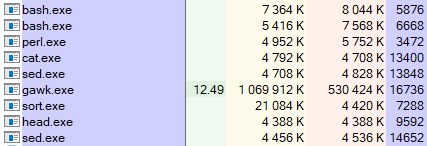
The problem turned out to be gawk. With some log events, it couldn’t work out the duration: it tried to convert a string to a number, failed, and… Oh, no! Of course it didn’t throw an exception! It simply treated those strings as zero and calmly carried on.

The fix was even sillier than the problem: I simply added an explicit string-to-number conversion, and everything worked. How the hell is an explicit conversion different from an implicit one in gawk-land? And, more importantly, why?

Well, that was a circus. At least I got a new script out of it, and it goes easier on memory and CPU too. In the Bash version, I used three collections to calculate execution count, total execution time, and maximum execution time, each keyed by query text and context. All three had to be updated and kept in memory.

That works until you get into hundreds of thousands of entries. Then the collections start eating gigabytes of RAM, and searching them burns through CPU time. The new script is more straightforward: one collection stores all the data for each query.

Why Not Bash?
3 Jule 2021 ·

In my previous note, I discussed tasks where Bash is the perfect tool: minimal constraints and simple requirements. I also mentioned that sometimes it can’t cope at all.

Here’s one I actually ran into. Suppose we have around seventy gigabytes of 1C technological logs and need to rank exception descriptions from most to least frequent.

Easy, right? Extract EXCP, get Descr, count repetitions. I’d even written the necessary script before. I run it and patiently wait…

Know how long it took? Neither do I: after a day, I stopped it and investigated. Something was getting stuck inside gawk: it was hammering the CPU, with cat occasionally chipping in to read more data.

Processes

Well, crap. I thought about it and rewrote the script in Python. The new version finished in fifteen minutes and gave me:

  1. A ranking of exception descriptions;
  2. A script I can read six months later without Google;
  3. Confidence that I can add two or three conditions without accidentally summoning Satan through a combination of operators and flags.

Of course, I could have optimized the Bash version. The array lookups are probably what’s slow: the more descriptions you’ve collected, the longer each search takes, growing linearly with the array size. I could change the collection approach, using gawk only to extract descriptions and passing the results to sort and uniq.

But that starts to resemble the meme about a loaf of bread: you can build a trolleybus out of it, sure, but why? Come on, I just need to solve the problem. Python already did that with flying colors, saving me a lot of time and nerves.

That’s my point. We know Bash has its quirks, and often we can live with them. We know what it’s good at too. But sometimes the question becomes: is getting a solution specifically in Bash worth spending two hours wrestling with utilities, parameters, manuals, and Stack Overflow posts?

Tweet

That’s why not Bash.

UPDATE: A good post by Ivan Grishaev on the same subject.

Why Bash?
23 June 2021 ·

I occasionally see colleagues asking: is 1C still messing around with Bash? Why not Python? Or PowerShell, at least? Weirdos!

Yes, Bash isn’t native to Windows, which is native territory for 1C, and getting it onto Windows is a job in itself. Yes, as a task grows more complicated, script readability drops exponentially. Yes, Bash simply can’t handle some tasks.

But its main advantage is that, for many 1C technological log analysis tasks, it is the simplest and fastest solution. Like an old screwdriver your grandfather used: always at hand, scratched, nicked, and a little awkward, but still working perfectly.

An example? Suppose we need to extract exceptions from the log. Let’s keep it simple and say we only need the first line of each event. We get something like this in Python.

You’ll say it can easily be cut in half, or even to a third. After all, it’s just a one-off job. Why fuss about readability and predictability?

Agreed! But let’s first solve the same task in Bash:

grep -r --include "*.log" ',EXCP,' > result.txt

That’s why Bash.

Metadata Not Found
8 June 2021 ·

Metadata not found

I doubt many people have run into this one. First, you need to use the platform’s built-in data history, which isn’t especially popular. Some people are tied to the Standard Subsystems Library, which still uses familiar versioning through information registers; others don’t like how it’s implemented, and to be fair, the performance does have some rough edges.

Second, you need to disable data history for a metadata object and delete its accumulated object versions before new changes move from the buffer into the main table.

Here’s how data history works. It’s off by default. If you have the right permissions, you can turn it on for the objects you need: constants, catalogs, documents, and so on. The platform then records exactly what changes in those objects. It does this in two stages: first, a relatively fast write to an intermediate buffer, _DataHistoryQueue0; then, when UpdateHistory() is called, the data moves to the main version table, _DataHistoryVersions, and shows up in the app.

History can be updated immediately on writing, but to shorten the transaction, that step is usually moved into a scheduled job. So the data moves out of the buffer every so often, say once every five minutes. If, between an object’s data change and the history update, you disable its history and delete its versions, UpdateHistory() throws an exception: it tries to move changes from the buffer to the main table, but can’t match them up with the data already there.

Here’s some code that reproduces the problem with the Items catalog on platform 8.3.17.1989. Swap in any other object that supports data history; the result is the same.

How do you avoid the error? Obviously, call UpdateHistory() immediately before disabling history for the object. Ideally, do this when users aren’t working in the system: someone’s transaction could slip in between updating and disabling history and cause the same problem. Exclusive mode can guarantee that won’t happen.

An exclusive lock on the object’s table also comes to mind, but the documentation advises against calling UpdateHistory() inside transactions, so I’m not sure about that.

How do you fix the error? Enable data history for the affected object, update history, and disable it again. Back out, then try again properly, so to speak.

A Script to Sync With NAS
7 June 2021 ·

I posted on GitHub a Python script which I use to sync files between my PC and a NAS. I have a Synology DS220j; a lot of software comes with it, including a backup utility. However, it seems to have been made for show only: the program began to fail even at the setup stage, so I lost confidence in it pretty fast.

I suffered with the problem for some time and eventually returned to the good old rclone, which has only two problems for me. Firstly, I can't normally connect to an SMB share: yes, the login and password can be saved in Windows and rclone will use them, but OS will forget it as soon as possible. I got out of the situation by connecting my NAS as an external drive.

Secondly, I had many files and folders to sync: a directory here, a directory there, a config from there, a profile from here… In order not to produce spaghetti code, I wrote a simple script that takes sources and receivers from a config file, and then executes rclone for each pair.

Preparing for the 1C:Expert Exam
25 May 2021 ·

In mid-May, I passed the 1C Expert exam on the technical side of large implementations. I’d spent almost two years preparing, so I’m damn glad I finally got through it.

There’s tons of material online about the exam and everything around it, from Viktor Bogachev’s course to, say, a Telegram chat on the subject. So there’s no shortage of answers to the question in the title. But there are a couple of ways this can mess with your head that people rarely talk about. It helps to know about them beforehand.

Not Enough Dopamine

This exam is hard. Preparing can take a long time, and so can passing it: there’s a good chance you’ll need several attempts. I passed on my second try, but it varies. Some people I know passed on their third, fifth, or even eighth attempt.

You can end up putting in a huge effort again and again with nothing to show for it. Eventually, your brain decides this is something to avoid: it never works out, it feels pointless, and it makes you miserable. You can guess what that does to your chances of passing.

That’s why it’s better to treat preparation as a long, risky project: break it up with small tasks you can actually finish and feel good about. Your brain doesn’t draw much distinction between big and small successes, and getting back to the main project will be easier.

For example, as a distraction I wrote home automation scripts: the static site generator for this website, an organizer based on text files, tools for my home NAS, and other things I’d never got around to. Any tasks will do, including ones that have nothing to do with IT. Unclog the bathroom drain? Excellent idea!

Not Enough Memory

Unless you deal with 1C performance problems every day, this exam eats up a lot of mental RAM. You have to keep all sorts of things in your head that you’d normally just look up: Microsoft SQL Server trace flags and dynamic view names, PostgreSQL settings and recommended values, the platform’s standard indexes, and so on and so forth. A hu-u-uge pile of information! (gestures to show how huge)

Give your brain enough data, and it starts acting suspiciously like a DBMS with an overflowing buffer cache. In other words, anything you don’t need right now will be evicted from memory. Be prepared to forget the most unexpected things: your apartment number, the neighbor’s dog’s name, your wife’s birthday, and those aren’t even the strangest consequences. While preparing, I could really relate to Johnny Mnemonic, the guy from an ancient cyberpunk film who loaded so much data into his brain that he nearly died :-)

Don’t do this

I see two ways out, both fairly obvious.

First, get some practice in. Complicated technical details are a hundred times easier to remember when they bring up a picture of the app where you tried them out.

Second, find something to associate the really tricky bits with. Take Bash! The utility name sed is easier to remember if you know it stands for Stream EDitor. The name cat comes from concatenate, not the animal, but if the animal helps you remember it, use that. Why not?

Or take the byte order mark: \xef\xbb\xbf, yes. I got it to stick with, don’t laugh, the completely unrelated phrase “Elf Friend BB Best Fight.” I have no idea why my brain needs such ass-backwards such roundabout ways of getting things in, but I’m not complaining. Whatever works!

An Updated Script for Finding Long Queries
26 April 2021 ·

I’ve updated the script for finding long queries in the platform’s technological log. The old version had a pretty big bug: it happily grouped DBMSSQL events by Sql and Content, but ignored cases where Sql was missing. That isn’t exactly normal for DBMSSQL, but it happens.

While I was at it, I tidied the code: added formatting and comments, and moved some gawk logic out of the main body into functions. Yes, the script now looks longer than it actually is, but it’s much easier to read.

Honestly, I don’t understand why Bash veterans cram all their logic into two or three lines. The language isn’t exactly a shining example of readability to begin with; Nikita Prokopov’s Telegram channel has an excellent piece about that. A page of pipelines without a single line break makes me want to quietly climb out of the window.

A Bunch of Scripts
24 April 2021 ·

I’ve put a few more scripts on GitHub that I wrote recently to dig through the platform’s technological log:

  • Frequent Events. Groups events by name, counts occurrences, and lists them in descending order, from most to least frequent. Not sure this one is much use in practice; I just wanted to note down which cluster process writes which events.
  • Exception Descriptions. Groups EXCP events by the Name field; for each name, it lists the Description values found in exceptions with that name. This script gives you a rough picture of which exceptions are real problems and which are just background noise you can ignore and, for example, filter out in Kibana.
  • Locks by Connection ID and Region. Useful for finding the culprit behind a managed lock timeout: it extracts all TLOCK events for a particular region and connection from the technological log, then puts them in chronological order.
The SKUUUID in My Own Eye
22 February 2021 ·

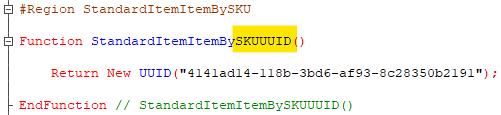
A couple of weeks ago, Alexander Kuntashov posted an amusing screenshot on his channel of an enumeration from the Electronic Documents Library. Whoever wrote it really had a thing for long abbreviations. I had a great time joking about the family resemblance between ИППДОИПУПДУКД and Moscow’s ГНУВНИВИПФИТ, then spotted this beauty in my own code:

SKUUUID

Not quite the master’s touch yet, of course, but definitely heading in the same direction. It reminded me of the parable about the speck in someone else’s eye and the great big log in your own :-)