Notes: Done

My notes about life, work and other fascinating things around me.

Shown: 0 · Page

Obsidian Property Organizer
9 August 2026 ·

One thing AI has genuinely made better for developers: tiny side projects actually get finished now.

I'm talking about all those little tools, MVPs, and random ideas that used to go straight into the "maybe someday" pile. You want to build them, sure, but spending three evenings on yet another tiny utility is a pretty hard sell.

Last week, for example, I vibe-coded an Obsidian plugin for keeping note properties tidy. The idea is simple: for each folder, you can define which properties notes are supposed to have and what order they should appear in. The plugin adds missing ones, removes unwanted ones, and puts everything back where it belongs — instead of preserving whatever mess I hastily threw together months ago and never bothered to fix.

There's a more detailed explanation in the GitHub repo if you're curious.

It's a tiny thing, obviously. Mostly just me feeding my inner perfectionist. But I do like things neat, and apparently I'm not alone: seventy people downloaded the plugin in its first three days.

Greetings, fellow people who derive unreasonable satisfaction from tidy metadata :)

New Blog's UI
17 January 2026 ·

Over the New Year holidays I randomly got obsessed and rewrote my blog's UI. I only wanted to add search for my notes — there are a lot of them now, and every so often I need to quickly fish something out of the pile (like "here's that link" to a coworker).

The blog runs on GitHub Pages, so the options aren’t exactly infinite: either outsource search to Google, or build a static index and ship it to the user's browser so it can grep through it locally. I went with the second route: faster, more controllable, and, yes, an excuse to write code. The first time you search it has to download the index file, but... It's 200 KB. That's basically one medium-sized sigh in 2026 internet terms.

And then, you know how it goes... Scope creep grabbed me by the hoodie. First I couldn't get Tachyons to play nice with the search input — got annoyed and migrated everything to Tailwind (I'd been meaning to try it anyway, just never had a "good reason", so I invented one). While I was writing the search code, I figured it'd be dumb not to add tags too, because why do the same work twice. Next thing I know I "wake up" and there's a whole tag cloud sitting above my notes. At that point it felt only logical to do the same for the projects page — except there it's not tags, it's tech stacks...

So yeah, it turned into that "Fear and Loathing in Las Vegas" meme. The tendency was to push it as far as I can, kinda.

Now the only thing left is to make myself actually write into the new project log. There's always a ton of work, and it's genuinely interesting — but if I don't write things down... Welp. Everything sinks into coffee.

Backup Management
6 December 2025 ·

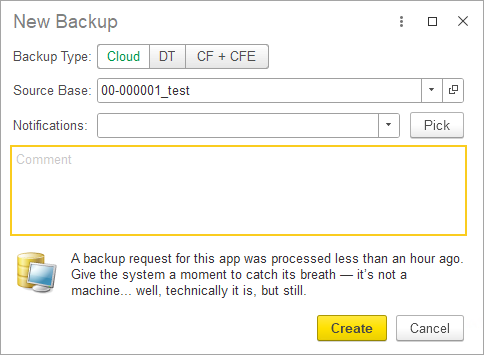
At the end of the year we shipped a big update to our internal tool (I briefly wrote about it before). The goal: give teammates sane, usable access to backups of customer apps. In a SaaS company, everyone needs backups all the time — dev, QA, incident investigations, you name it. Without proper tracking the whole thing turns into a petting zoo: three people, same moment, three requests for almost identical copies of the same database. Sure, it "works", but you end up chewing through 3x the resources for zero extra value.

We did have a solution built on top of the Bitrix UI, but due to, uh... the unique "evolutionary path" of that product, it delivered more pain than gain. So we rethought the workflow and rewrote everything. Frontend is 1C; backend is PostgREST, PostgreSQL, PowerShell, and a bunch of other bits and bobs. The internal logic is fairly gnarly, but for the user it's a clean, friendly UI where you can request a backup in literally two clicks.

You can pick one of three backup types:

  • Cloud backup (a copy of the real app deployed in the cloud and accessible — including via the browser);
  • File backup (a regular .dt file you can download and spin up locally);
  • Configuration + extensions backup (.cf + .cfe).

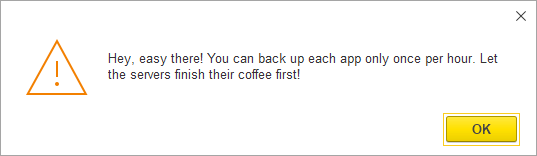
Also, the new solution detects when someone tries to request a backup for an app that's already being generated right now. And it rate-limits things too: you can't back up the same app more than once per hour.

And yes — we're still sneaking jokes into the UI. Obviously.

But Still!

Coffee First!

Food Diary In Obsidian Bases
23 November 2025 ·

I've rebuilt last year’s plugin with Obsidian Bases — it now tracks calories, protein, fat, and carbs in your food.

The result is way more flexible and customizable than the plugin version: if you suddenly decide you want to count fiber as well or just shuffle some columns in the report, you don't have to rewrite, rebuild, or release anything. You just tweak it to your heart's content.

And it doesn't look half bad either:

UI

All the necessary settings and scripts live in the GitHub repo.

Creepy Graveyard
26 November 2024 ·

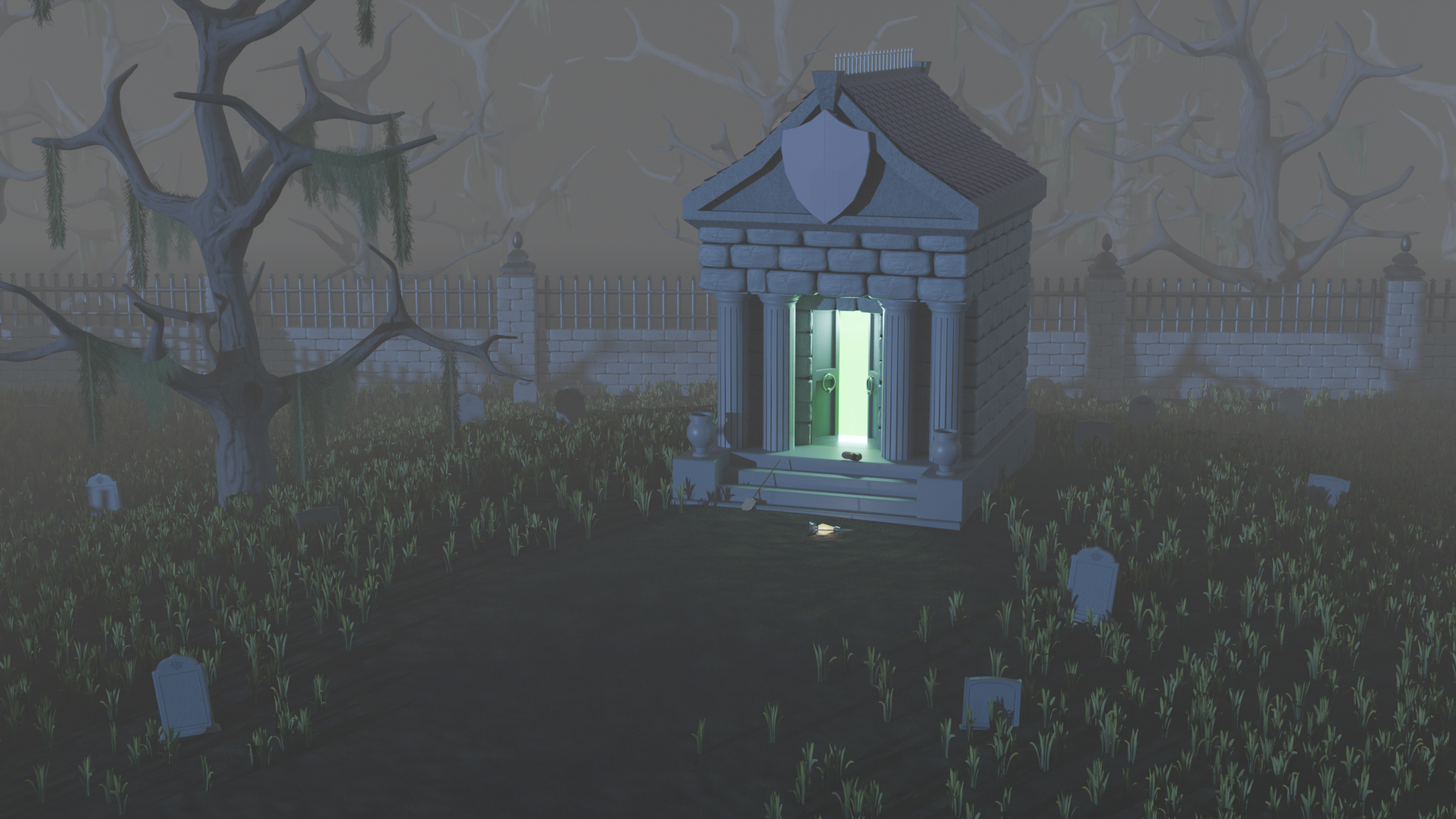
Still learning 3D in my free time. Here's my first somewhat independent project after finishing a course recently.

Creepy Graveyard

Of course, there are plenty of issues: the models, the colors, the composition... Honestly, pretty much everything. Good thing the scene is set at night with fog, so it's easy to hide the worst spots. I wouldn't be surprised if the course creators picked this setting on purpose to keep beginners from getting too discouraged :)

That said, I'm happy with the result. At this stage, perfectionism feels more like an enemy than a friend. And hey, it’s definitely better than my last attempt! Back then, I was totally green in Blender and scared to deviate even slightly from the instructor: ten minutes of watching, ten minutes of copying.

That approach works at the very beginning, but it doesn't help you learn how to solve problems. This time, I watched a few lessons back-to-back for about an hour or two, then tried to figure things out on my own. I only went back to the videos when I was completely stuck. Feels like I’m actually retaining a lot more this way.

Long story short, the thing is done. On to the next one!

UPD: One of the founders of FlippedNormals recorded a video with the same thoughts about training.

Summary to Slack
10 November 2024 ·

I found a script that I wrote a couple of years ago for our work GitLab. In short, we run our development repository through a barrage of tests on Vanessa daily, resulting in a nice report showing how many tests passed, which ones failed, the reasons for failures, and so on.

The report needs to be analyzed regularly, at least at a glance. Of course, we haven’t seen fully "green" tests in a long time, and that’s expected: for example, in the case of interdependent development, commits can break the checked functionality, and the tests still need adjustments. However, keeping a pulse on it is still essential.

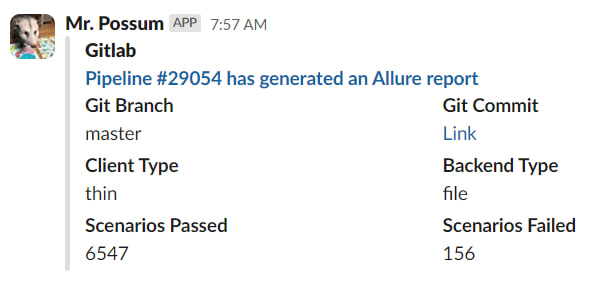
To simplify this routine, I expanded the pipeline code a bit: after generating the report, GitLab first creates a brief summary (client type, database type, test statistics) and sends it to Slack.

Report

As a bonus, it’s now easier to answer the philosophical question, "who broke everything". Most often, it’s the author of the first commit on which the Scenarios Failed metric in the screenshot above hit the ceiling :)

System Analysis
25 August 2024 ·

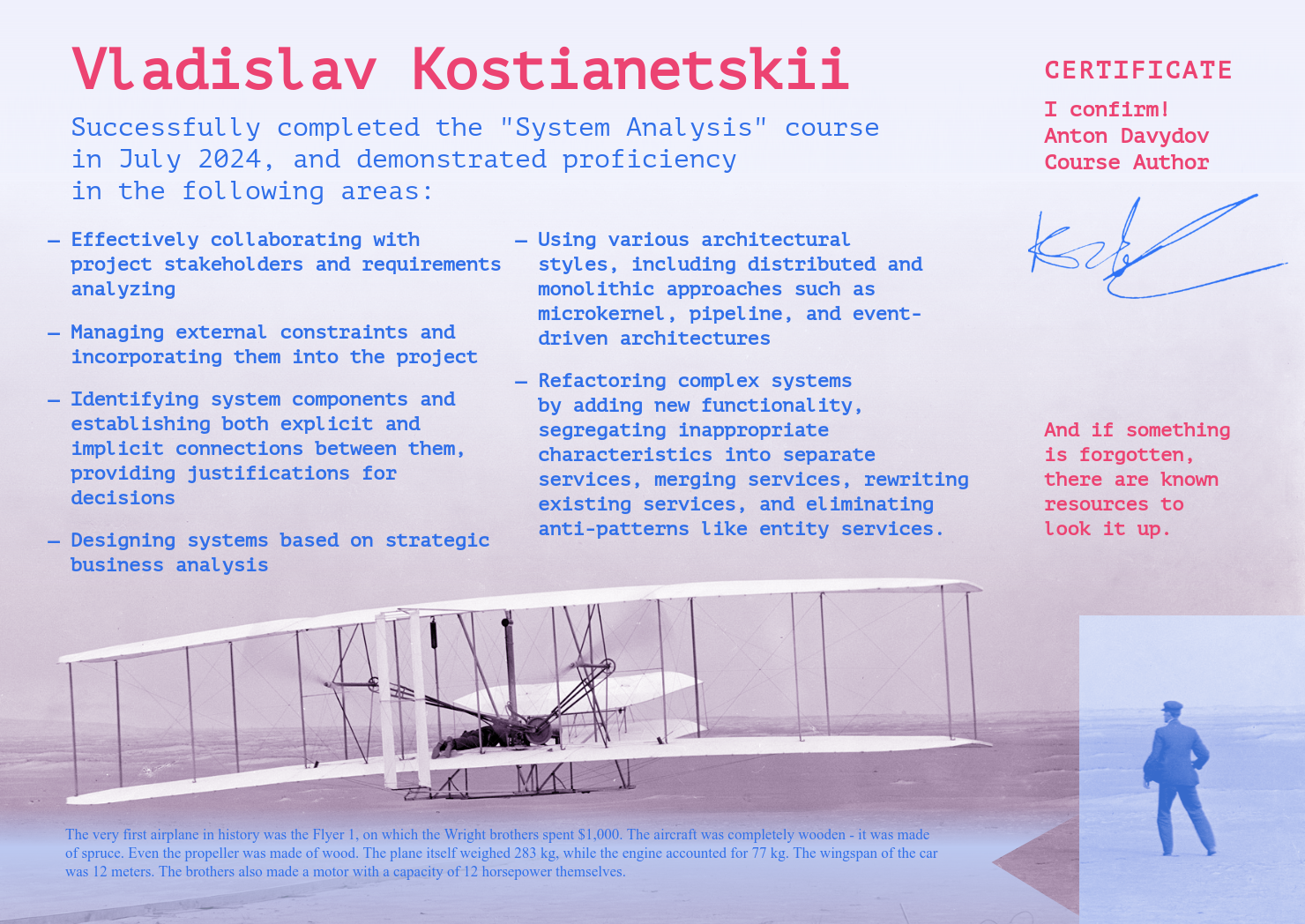
Amidst all these pet projects and the August whirlwind, I forgot to mention that I completed a course on system analysis, which I recently wrote about.

Certificate

The course was structured so that throughout the sessions, we worked on the same system, identifying problems and gradually solving them. Before the first lesson, we were asked to design the initial version of the system so that we could compare it with the final version at the end of the course and assess our progress. Well, I’m happy with the comparison — I mean, it’s really hard to look at that first version without laughing (or crying) :)

There wasn’t much time for reflection during the course, so I plan to continue working on the materials and turning the lessons into personal notes. It’s not that simple, given that our company deals heavily with solutions based on 1C:Enterprise, and much of my work involves various integrations of 1C instances with solutions outside the 1C stack.

However, 1C instances can be considered as monoliths with a specific set of characteristics (depending on the tasks being solved within them), and in most other respects, communication with them doesn’t differ much from traditional solutions: the same events (like RabbitMQ), the same incoming/outgoing HTTP calls, the same instability metric, and so on.

At this point, I’m definitely adopting (or have already adopted):

  1. Breaking down the technical specifications into numbered items (US-XXX) and storing them in one place with tags like "updated at," "canceled at," etc. This format seems quite effective.
  2. Maintaining an ADR (Architecture Decision Record). I’ve already implemented this, actually. However, it’s a bit concerning that some items occasionally get stored there that aren’t strictly architectural (e.g., logging principles for certain sections). Still, such things seem crucial for decision-making.
  3. Event Storming as a way to visualize business processes. I can’t say it’s a huge improvement over the patchwork we used before, but the result looks nice, and having a standard is better than having none.
  4. Application service diagrams with stickers indicating each service's characteristics. This is quite functional when you need to look at the project from a high level, and it’s not as dry as endless tables. That way, if the bus factor kicks in, the next person is more likely to notice these details.
  5. I want to work on BPMN and Activity Diagrams. I like the format, but so far, my attempts haven’t been satisfactory. I’ll keep trying.
  6. The concept of separating functionality to reduce dependencies unexpectedly resonated with me. It used to seem simpler to combine similar functionalities to reduce code volume, but now it seems this approach increases complexity and internal cohesion, potentially causing more harm than good.

Overall, I’m very satisfied with the course. It seems like the best investment of effort over the past year. If you’re thinking of taking it but are unsure — go for it :)

Timesheet for Obsidian
12 May 2024 ·

I made another Obsidian plugin, this time for daily notes. Draws a nice report: what tasks I worked on, what I did, and how much time I spent. I tried to describe how it works in the repository; will be glad if it is useful to someone else!

Funny thing: for the examples in the README, I used issue numbers FBI-1, FBI-2, and so on. This isn't a reference to the X-Files or Twin Peaks — it's just the first thing that came to mind. The fact is that our internal project for the development of FirstBit ERP is called First Bit Internal, abbreviated as FBI. The main pool of tasks we work on lives in it.

We’re already used to it, but our colleagues outside the company always find our screenshots from JIRA or SonarQube amusing. Did you imagine that you were Agent Cooper? Well, I almost don’t even need to :)

Foodiary for Obsidian
14 April 2024 ·

Following my first plugin for Obsidian, I released the second one a couple of weeks ago. Counts calories, proteins, fats, and carbohydrates in food. It helps not to overeat out of nowhere — it’s rather difficult to judge by eye how much you’ve eaten today and whether you can afford that donut.

In short, a useful thing if you:

  1. Fatty (like me)
  2. Want to stop being fatty (like me)
  3. You take notes in Obsidian (like me) 🙂

In fact, there is a lot of software for this task. I tried some of them but was dissatisfied: it either has terrible design, is bugged, or is constantly trying to sell me a monthly subscription. In short, it's more annoying than helpful. I wanted something native, built into the usual routine; so, if routine settles in Obsidian, then the solution seems to suggest itself.

You can install the plugin directly from the program — the developers have already approved it. Otherwise, everything is simple: you write in a daily note what you ate and how much it weighed, and you receive a simple table sorted by calories with numbers by proteins, fats, and carbohydrates.

There are examples in the repository at the link above.

Fastimer for Obsidian
13 February 2024 ·

The Obsidian developers recently approved one of my TypeScript pet plugins — Fastimer. It is an intermittent fasting tracker that adds a new code block to your vault: you enter the start date of the fasting interval and get the date of its finish, the time until this moment, and a list of the zones to be passed.

The block shows an up-to-date picture every time Obsidian renders it, which means you can monitor your progress in real time. When a fasting window ends, you can enter the end date, and the code block will show the result: whether you managed to achieve the goal, how much time you fasted beyond the plan, and so on.

I'm thinking of improving the visual part a bit (currently, everything is displayed as plain text without any design). In addition, I want to add functions for calculating statistics so that you can draw cute graphs like Charts and show achievements. I already made the same in implementing the same application in Python, but I’m unlikely to return to it — it’s easier to solve the task in the Obsidian vault than to roll out an additional utility.

In short, check out the plugin! :) You can find it by name (Fastimer) in the Obsidian library, or install it manually from the repository.

New Fastimer
23 August 2023 ·

Released a new version of my console timer for intermittent fasting. I wrote this app about a year ago, when I was once again upset by the Zero application for Android: some very primitive functions (like viewing a specific interval) did not work. Oh my gosh, guys, you had one job!

The main difference between 1.3.1 and 1.2.3 is that the console menu has been cut to hell in favor of the good old arguments and options. The menu concept looks convenient only if an application has few features. However, as soon as you take a step forward, the need to answer a list of questions each time you need something starts to irritate you.

Slow down, I'm recording
5 Marth 2023 ·

Usually the idea of developing is simple: the faster it works, the better. For example, the more requests an application manages to execute per unit of time, the faster the task for which these requests are needed will be solved.

However, it also happens the other way around: you need to reduce the number of operations that a program is able to perform. Let's imagine we exchange data with an external service and it bans if we hit it with requests too often. For example: the cloud version of Bitrix24 requires sending requests to it no more than two per second.

Here is an implementation of such a slowdown, which I wrote last week. There is no queue support; the main solved problem is to execute as many requests as possible without going beyond the limit (taking into account the fact that requests can be made from different sessions).

The problem is solved through a constant that stores the date for the current second and the number of requests that have already been sent. Clients who run into a limitation are waiting. This approach is not suitable for high-loaded systems, but otherwise it can come in handy.

Infostart Event 2021
16 November 2021 ·

Last week I visited Moscow for Infostart Event 2021:

  • Listen to numbers of interesting reports — check;
  • Meet a few cool people in real life — check;
  • Chat with friends — check!

As a result, I suddenly felt rested despite the flights, stress, and fuss. I think it's because I'm working remotely, so it was really cool to look at so many colleagues in real life (not as a stream of electrons, I mean).

In order not to get up to fly twice, I passed the first test for PostgreSQL administration in the PostgresPro office. There are three more tests ahead, and the final one does not exist at all yet — but the walking one will master the road, I guess.

Building The Blog on GitHub
29 September 2021 ·

For the last year this site has been working on a simple platform: statics, GitHub and my domain. All the pages were pre-generated and placed in a GitHub's repository with GitHub Pages enabled.

I collected statics using a script. It was working with a list of text files, pedantically arranged in folders. The script rummaged through them and generated HTML files. Then I manually pushed them to the repository.

This scheme worked well, but the number of clicks annoyed me. Here is the script pull, and there is the script pull, and then you have to tinker with the git. I wanted it to be simpler.

At some point, I figured out that not only the deployment of statics, but also the assembly can be shifted onto the shoulders of GitHub. I put together some thoughts and added two more repositories:

  1. A repository of initial data. Here I put the content of the site: the text files and a bit of metadata (page titles, dates of pages creation, tags for notes, and so on).
  2. A repository of the script for generating statics. In addition to the script itself, I put various assets here (icons, styles, manifests — in general, everything that doesn't need to be generated every time, but you have to “put” it next to the resulting HTML).

Then I wrote an action that wakes up with every push to the repository with the initial data. Shortly, its logic:

  1. Clone the repository with statics and the repository with the generating script;
  2. Update the repository with statics using the generating script;
  3. Push changes of the repository with static to the main branch;
  4. Notify the owner (me) via Telegram.

Voilà! Now, whenever the repository with the original data changes, the GitHub immediately (well, as soon as possible — within a minute) updates the repository with the site and deploys it via GitHub Pages. A bonus is a web interface to manage the site (in fact, the GitHub site). No Code. :-)

While I'm at it, I added links for editing pages directly to the site (the pencil icon in the upper-right corner). This is intended as a convenience for me, but anyone who finds a typo can send a PR. Thank you in advance!

A Script to Sync With NAS
7 June 2021 ·

I posted on GitHub a Python script which I use to sync files between my PC and a NAS. I have a Synology DS220j; a lot of software comes with it, including a backup utility. However, it seems to have been made for show only: the program began to fail even at the setup stage, so I lost confidence in it pretty fast.

I suffered with the problem for some time and eventually returned to the good old rclone, which has only two problems for me. Firstly, I can't normally connect to an SMB share: yes, the login and password can be saved in Windows and rclone will use them, but OS will forget it as soon as possible. I got out of the situation by connecting my NAS as an external drive.

Secondly, I had many files and folders to sync: a directory here, a directory there, a config from there, a profile from here… In order not to produce spaghetti code, I wrote a simple script that takes sources and receivers from a config file, and then executes rclone for each pair.