Notes: Done

My notes about life, work and other fascinating things around me.

Shown: 0 · Page

Queries and Lock Waits
19 October 2020 ·

I’ve put together two more technological log analysis scripts: the first ranks heavy MS SQL queries, and the second ranks long lock waits.

I pick out heavy queries by how long their DBMSSQL events lasted. The longer a query takes, the more likely it is to have eaten a lot of resources. That usually holds up, though you’d need a trace to diagnose it properly.

Lock waits are also measured by duration. The script also checks that the TLOCK event has something in WaitConnections. That tells us the platform really was waiting to get a lock, rather than just taking a while to set one.

An Updated Top Exceptions Script
17 October 2020 ·

I rewrote the Bash script that ranks exceptions in a collected technological log: I wanted a simpler way to do it.

Out went all the fiddling with replacing event beginnings with a gawk record separator: you can just give gawk a regex for that. I also moved more of the logic into gawk itself. It’s easier to follow, especially if I want to add to it later.

It’s clearly better than before, or at least the logic is easier to understand. Originally, though, I wanted to make the script smaller and get something like this:

grep -hoP ",EXCP,.*\KDescr=.*" */*.log | uniq -c | sort -rn

Filter only lines with EXCP events, cut everything before the error description, and group with uniq. Very elegant, I think.

Except EXCP descriptions can run over several lines. So sometimes we’d lose information we need to figure out what happened: everything after the first line break. I haven’t yet worked out how to solve that without tripling the script’s size :-)

Vulnerabilities in 1C Configurations
13 October 2020 ·

Last month, I attended an Infostart meetup about security in 1C-based solutions. I learned a lot! Among other things, Oleg Tymko talked about things we do in code that can leave a product vulnerable: hard-coded IP addresses, links, email addresses, passwords, that sort of thing.

Yesterday, I put together a simple Bash script that searches a configuration export for such issues. Essentially, it just runs regular expressions over the configuration. I didn’t put too much thought into it, just tried a couple of approaches for the fun of it.

My takeaway? If you’re going to keep developing this seriously, start with something like SonarQube. Brute-force approaches produce too many false positives; you need filters, exceptions, history, and supporting infrastructure.

For a quick look, though, this does the job: no infrastructure, no fussing with configuration or hardware. Export the configuration, kick Bash into action, and that’s it: results in a few seconds.

1C:Professional in Technological Issues
5 September 2020 ·

At the end of August, I passed the 1C Professional test on technological issues in large implementations. It’s basically your ticket to the main exam, a way to thin the crowd and get people to brush up on the theory.

The test has fourteen questions randomly chosen from around five hundred possibilities. You need at least twelve correct answers. You get half an hour, though five to ten minutes is enough in practice: you can work out most answers or just memorize them. There are inaccuracies and vague wording, but not many. Decent questions, in short.

The selection of topics felt like quite a jumble, a little bit of everything. Still, covering all that ground is probably a good thing: you look at another unfamiliar question, answer it, get it wrong, get over being annoyed, and go find out why. You become a little smarter, though no guarantees.

One Query to Rule Them All
25 Jule 2020 ·

For posterity, I’ve uploaded one of the inefficient queries I worked on a few months ago to GitHub Gist. It powered a dynamic list on a catalog item form, and whenever the user opened that tab, the platform went off to meditate, even with a relatively small database.

At first glance, it looks straightforward: a bunch of queries against document tables, joined with UNION ALL. Each table is filtered by roughly the same conditions: reference type, date, and whether the reference appears in a subquery’s result.

But there are several potential problems. First, at least 14 tables are involved, one per combined query. That alone raises the risk that the optimizer won’t have time to choose even a reasonably decent plan. Most likely, it will just take a wild guess and hope for the best.

Second, much of that work is probably wasted. Each query has something like this:

WHERE VALUETYPE(AdditionalExpenses.Ref) IN (&DocumentsListSelectedTypes)

The dynamic list receives a list of document types to display. But that filter kicks in after the data has been read: even if the user only wants invoices, the DBMS still reads all 14 tables, then discards 13 of them.

Still, none of that is especially critical. If that were the full list of problems, we might never have investigated. The main issue is the second condition in the WHERE clauses: each query checks whether the document reference appears in a subquery’s result.

Using subqueries in conditions is almost taboo unless temporary tables are involved: the DBMS often can’t work out how much data it’ll get back, or how best to handle it. And the data source makes things even worse here. A filter criterion isn’t a database table you can read, even by scanning; it’s a collection of tables. DocumentsByProject contains thirty!

That sounds bad enough, but there’s more: each of the fourteen combined queries selects documents of a particular type from those thirty tables.

OMG

And… scene :-)

Service Launcher Update
22 Jule 2020 ·

I’ve improved Service Launcher. If you run the script without parameters, specifying neither -start nor -stop, it now decides for itself whether to start or stop the services.

It checks the status of the first service in the list. If it’s running, the script stops everything on the list. If it’s stopped, the script tries to start them all.

Why? If, like me, you run the script from a programmable keyboard, you now need only one key. Previously, you needed two: one to start the services and another to stop them.

A Blog in Vue.js
21 Jule 2020 ·

In the middle of last year, I got excited about rewriting this website with something more modern than PHP, chose Vue.js as the framework, and got to work. I barely knew JavaScript at the time, so I stumbled over plenty of things like “the date formatting method crashes in Safari.” Eventually, though, I had a working app.

Well, sort of. On one hand, I achieved my main goal: a client-side web application that only asks the server for data and builds the entire interface itself. On the other, I had to bolt an army of workarounds hooks onto the framework even for basic things, like highlighting menu items or returning the correct HTTP codes. Some things I couldn’t get working at all on the first go, such as serving HTML versions of pages to Yandex, whose crawlers in 2020 can’t index JavaScript websites.

I learned a lot, but the end result was such a mixed bag that I eventually gave up on the idea and published the resulting Frankenstein on GitHub. Perhaps it will save someone time on tasks like “display arbitrary HTML through Vue.js” or “make VueI18n work with Russian.”

There’s no documentation, though. I initially wanted to explain how everything worked, but quickly realized it would take a lot of time for little obvious benefit. I’ll probably return to the subject when the mood strikes. For now, let’s call it an MVP :-)

Service Launcher
13 Jule 2020 ·

Some time ago, I wrote about PowerShell cmdlets for starting and stopping services. I’ve now turned those sketches into a proper script: it reads the list of services to start or stop from a separate file, and checks whether it has admin rights, asking for them if it doesn’t.

You can see the result on GitHub. No big deal: I wanted to practice the language and simplify my daily routine. My system has about fifteen resource-hungry services needed for work but useless at other times. Stopping and starting that whole zoo by hand is a pain. Doing it with one command? Much better!

The Size of Data in a 1C Database
11 Jule 2020 ·

Last week, while browsing the 8.3.15 release notes, I came across GetDatabaseDataSize(). I got curious about how it works and how its numbers compare with what you get from, say, Management Studio.

I ended up writing a sort of console to pass various metadata objects to the method, and started watching the platform’s database queries.

Basically, the platform works out the data size with something like this:

CAST(
    SUM(
        CAST(
            DATALENGTH(T1._Fld40) AS NUMERIC(12, 0)
        )
    ) AS NUMERIC(18, 0)
)

It does this for every field in the object, including standard attributes. If there are tabular sections, it counts those too, then sums the results.

Conclusions?

First, now I understand the method’s awkward name. It doesn’t calculate table size, as I initially thought, but data size specifically. The estimate excludes schema overhead, index overhead, and extent allocation. It counts only the size of the data stored directly in the object.

So a product catalog, say, will actually take up more space than this method reports. Possibly a lot more. You wouldn’t use it for precise analysis, but it’s fine for a quick look at where the data is piling up.

Second, the method doesn’t count the data history overhead for the objects being analyzed, which the docs are quite clear about. In theory, you could calculate it manually starting from _DataHistoryMetadata, but let’s wait a release or two: perhaps the developers will add it.

Third, the DBMS reads all the data in the tables it needs, then works out how big that data is. That probably means a whole bunch of scans, which can flush the buffer cache pretty quickly. In 1cFresh, the queries respect data separators, but that’s cold comfort to me.

Use it with care on a live production system.

Viewing a Value Table
16 May 2020 ·

I’ve uploaded a short function to GitHub that converts any value table into a spreadsheet document.

Why? So you can see what’s in it. You can’t pass the value table itself to the client, but you can pass a spreadsheet document based on it. A spreadsheet document also has a client-side Show() method that displays it in a separate window.

That way, you can poke around in utility tables right in Enterprise mode, without building an interface for each one. Feed a table to the function above, get a spreadsheet document back, send it to the client, and show it.

IsEmpty() or ValueIsFilled()?
11 April 2020 ·

A few days ago, a colleague and I discussed the best way to check whether a reference is filled. I remembered an instructor telling us, very confidently, to be careful with ValueIsFilled(). Supposedly, it compares the variable with every possible empty value in the configuration, and the whole thing is a huge, slow mess. As an alternative, the instructor recommended the reference’s IsEmpty() method and checking composite attributes roughly like this:

СсылкаЗаполнена = Ссылка <> Неопределено И Не Ссылка.Пустая();

My colleague argued that ValueIsFilled() is faster because it’s a built-in function and doesn’t spend time looking up a method on an object, a relatively slow operation in scripting languages.

I can’t recall either method ever being a bottleneck, but I got curious and wrote a test that checks a reference variable for an empty value both ways and measures the time taken.

The average result looks roughly like this. There are four steps: the first two assume the reference is defined, while the third and fourth add a check for that. The table’s last column shows the execution context, client or server.

The result is pretty clear: ValueIsFilled() doesn’t slow things down at all. It’s actually faster than IsEmpty(), especially once we start checking the variable for Undefined. The difference isn’t enormous, of course, but it could save a couple of seconds in some lengthy scheduled operations.

Besides, one check that works for everything is easier than trying to guess every value the variable might have.

Filtering Standard Attributes
9 Marth 2020 ·

A short code fragment from the data history settings processor I just wrote about. It checks whether Attribute is MetadataObject’s standard attribute named StandardAttributeName. When is that useful? Suppose you’re iterating over an object’s standard attributes and want to skip one for some reason.

At first glance, the solution looks absurdly convoluted. Why not simply compare the attribute being checked with the one we want to exclude?

If Attribute = MetadataObject.StandardAttributes.Order Then

Because that code doesn’t work: comparing two standard attributes of a metadata object in the 1C platform always returns False.

All right, you might say, why complicate things? How about this?

If Attribute.Name = "Order" Then

That won’t work either if your code runs in a Russian configuration: the standard attribute we’re looking for is then named “Порядок.”

But you can look up the standard attribute in the collection by either its Russian or English name. Then you get its actual name and compare that with the name of the attribute you’re checking.

Of course, we could simply compare the name with both “Order” and “Порядок.” But first, that’s ugly; second, our coding standards don’t allow Russian in the code. I wanted a more general solution.

The Try/Catch is there in case the configuration has no standard attribute with that name at all. Trying to look it up would throw an error.

Data History Settings
9 Marth 2020 ·

I’ve put a data processor on GitHub for setting up the data history feature that arrived in the platform not long ago. Here’s what it does:

  1. Builds a tree of objects that support data history;
  2. Shows which objects currently have data history enabled;
  3. Lets you enable or disable data history for objects and their attributes.

It supports batch operations: for example, you can enable history for several documents and all catalogs at once. Or wipe all your changes and go back to the defaults the configuration developer set.

I think it turned out well. I mostly wrote it for myself, to give my brain a workout in the evenings, but we might even include it in our configuration! Right now, SSLi handles our data versioning, and it’s not exactly efficient: it’s slow and makes the database balloon. Hopefully, the platform will do better when we test it.

You can find similar tools on Infostart and ITS, but they’re either buggy, work only with Russian configurations (no English interface and dependencies on the Russian Standard Subsystems Library), or are just out of date, with no support for constants, for example.

Top Exceptions in the Technological Log
16 February 2020 ·

I’ve published a Bash script on GitHub that identifies the most frequent exceptions in a collected 1C technological log.

It analyzes EXCP events. These are the main source of error information, though certainly not the only one: EXCPCNTX, for example, describes an event that had started but hadn’t finished when an error occurred. Also, if an exception occurs during a server call, the CALL event’s RetExcp field contains the error text returned to the client.

Most of the time, though, EXCP and the occasional EXCPCNTX will do. People often collect them by default: it doesn’t put any real load on the system and lets you run the logs through an analysis tool, such as the script above, to keep a finger on the pulse.

Fifty Times Faster
5 December 2019 ·

Here’s the brief: a client’s month-end closing document takes just under an hour to post. The database isn’t especially big, but an hour is still way too long. Sure, you don’t close the month very often, and you could do it at night. Still.

I dig into the code, profile it, and see that the platform spends almost all that time in a single procedure, executing a query batch. I look at the first query and think: classic, accessing data through a dot on a composite type. The DBMS must be attaching a wagonload of joins to huge document tables, and the optimizer can’t come up with a decent plan in time.

I test the theory. But SalesDocument includes only eight document types. That should be manageable: the usual rule of thumb is that the optimizer can find a decent plan with up to eight joins.

I check the document tables: they aren’t particularly big. I run the query separately from the batch. It isn’t instantaneous, reading around 350,000 records and selecting about 200,000, but it certainly doesn’t take an hour.

All right, the batch’s first query is heavy, but it’s not the problem. I look at the second and realize that we’ve just read the entire Inventory register and selected most of its records, and now we’re reading it again and joining both result sets on a pile of conditions. The register’s record table has no suitable index: only the standard recorder index, which naturally doesn’t help.

I check: this is exactly where the platform spends most of its time waiting for the DBMS.

I couldn’t find a way around reading the whole register table twice. Every alternative I tried meant changing how the data was stored, and that wasn’t an option. So I went with a compromise: in the second query, I replaced the join to the actual register record table with a join to a temporary table created in advance and indexed on the join fields.

This was a case where 1C’s general recommendation worked perfectly: posting time fell from 50 minutes to three, and after further code optimization, to one minute. Fifty times faster than where I started.

A minute for month-end closing is usually fine, so I called it a day.

Finding Methods with a Parameter
18 November 2019 ·

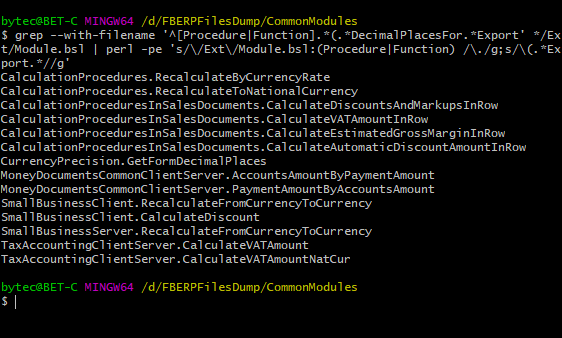
The task: find methods in a configuration’s common modules that have a specific parameter, DecimalPlacesFor in this example.

A normal search through the configuration code produces many false positives, such as every reference to a parameter with that name inside method bodies. The platform doesn’t support regular expression searches yet, so the easy way is to export the configuration to files and run a Bash script on the common modules directory.

The bit before the pipe does the searching. The rest trims the output down to module names and the methods found in them. For example:

Console screenshot

Profit? Profit!

Multiple Languages in Vue.js
25 June 2019 ·

I write this website in Russian, but it also has an English mirror where I gradually translate my posts. I don’t want to maintain two sets of scripts, so both domains point to the same server, which checks which domain received the request and replies in the right language.

Sounds simple, but it creates a bunch of other headaches. Getting the interface into the right language is one of them. At first, out of habit, I created two client-side arrays of phrases in different languages. I soon ditched that homegrown solution and plugged in Vue I18n.

Underneath, it’s still just two arrays of phrases that you pass in at startup. But that’s not the useful part. The plugin handles two other bits of the interface for you:

  1. Pluralization. Needed to display “page” correctly in tag statistics: in Russian, one post, two posts, and five posts require different noun forms.
  2. Date formatting, such as the date below this note.

Sure, I could have done both on the server in PHP, but that felt messy. The server should return data; the client should build the interface. No need to mix them.

A Duplicate Key
1 Marth 2019 ·

Infostart published an interesting article about the DBMS error “cannot insert duplicate key.” One possible cause is using an object’s unique identifier to match it during exchanges with other infobases, without a dedicated register mapping local objects to identifiers in the external database.

I haven’t yet encountered anything as wild as unique identifiers colliding across different infobases for the same table. But I abandoned the “single identifier” approach for good after building an exchange between FirstBIT ERP and GROTEM / Agent.

The first version worked like this: data from FirstBIT ERP was first exported to an intermediary 1C infobase written by GROTEM’s developers, and then to the mobile application server’s main database.

Matching was very simple: object identifiers. The same document in both databases had the same identifier, for example. But some mappings were more complicated: a FirstBIT ERP counterparty became three objects on GROTEM’s side: a counterparty, a retail outlet, and a settlement document.

WAIT WHAT

Yes, a settlement document. All three objects had the same identifier, that of the FirstBIT ERP counterparty. It wasn’t particularly elegant, but the platform handles this arrangement perfectly well, and we decided there shouldn’t be any problems.

The exchange refused to work, though.

A quick look showed that the data made it to the intermediate infobase just fine and passed every integrity and completeness check. Only the last step was failing: sending it to the mobile application server’s database.

Eventually, it turned out that:

  1. This database has a table storing all the objects we care about: documents, catalog items, and so forth.
  2. That table has a unique index on the object GUID.

Well, mystery solved. Of course, the very first exported counterparty created three entities with the same GUID. They lived happily in their separate tables on the 1C side, but couldn’t be written into one shared table in the application database.

I will not use GUIDs to map objects!

An Unsuccessful Hunt
21 February 2019 ·

After upgrading the platform to 8.13.12.1790, we encountered an intermittent bug when switching a control’s current page on the server. It works on the server itself, but as soon as control returns to the client, the current page reverts to the previous one. The current-page-change event also fires, as though the user had changed it manually.

Unpleasant, but nothing terrible: we worked around the bug, documented it, and reported it to 1C. They’re still thinking about it. But weirdly, I’m a little disappointed. When you dig into these things, there’s always a bit of mystery. It feels like you’re about to uncover something interesting, some new quirk of the platform, maybe.

Then you finally look at the problem from the right angle, and it’s just an ordinary bug. Maybe striped or spotted, but a perfectly ordinary bug, sitting there twitching its antennae. And you think: damn, is that all I caught? :-)

DCS and View Rights
28 August 2018 ·

The Data Composition System goes by the rule “if the user can’t view it, it might as well not exist.” Sometimes that leads to some pretty weird behavior. For a nice simple textbook report, it works fine: if the user lacks view rights for a catalog, for example, that catalog won’t appear in the report. Real examples can be more complicated, though.

A couple of weeks ago, I was debugging a report that produced a seemingly clear error when generated:

Your settings are wrong, comrade!

The report is enormous: a query of a good thousand lines, complex settings, a huge template, and tangled composition code. We first suspected a settings error, but the investigation quickly led from a currency reference in the dataset to a constant holding that currency at the report’s lowest level. The user had no view rights for that constant.

I couldn’t tell you exactly what threw the platform off and made the error so unhelpful. Maybe it was what we did with the temporary table holding the constant. Maybe it was reading it inside a CASE expression. Or maybe it was that we had all the rights we needed for the currency catalog itself. I didn’t dig around to find the exact trigger. I think it’s simply an implementation detail of the DCS engine that may change between versions. Just keep view rights in mind, and you can avoid the problem.

If you encounter the error, try generating the problematic report with full rights. If that works, list the tables from which it reads data and check that both read and view rights are granted for all of them.

Tedious, but it can save a lot of time.